Answer

The changes missing in Exported Customization

  • May 8, 2025
  • 10 replies
  • 143 views

Forum|alt.badge.img

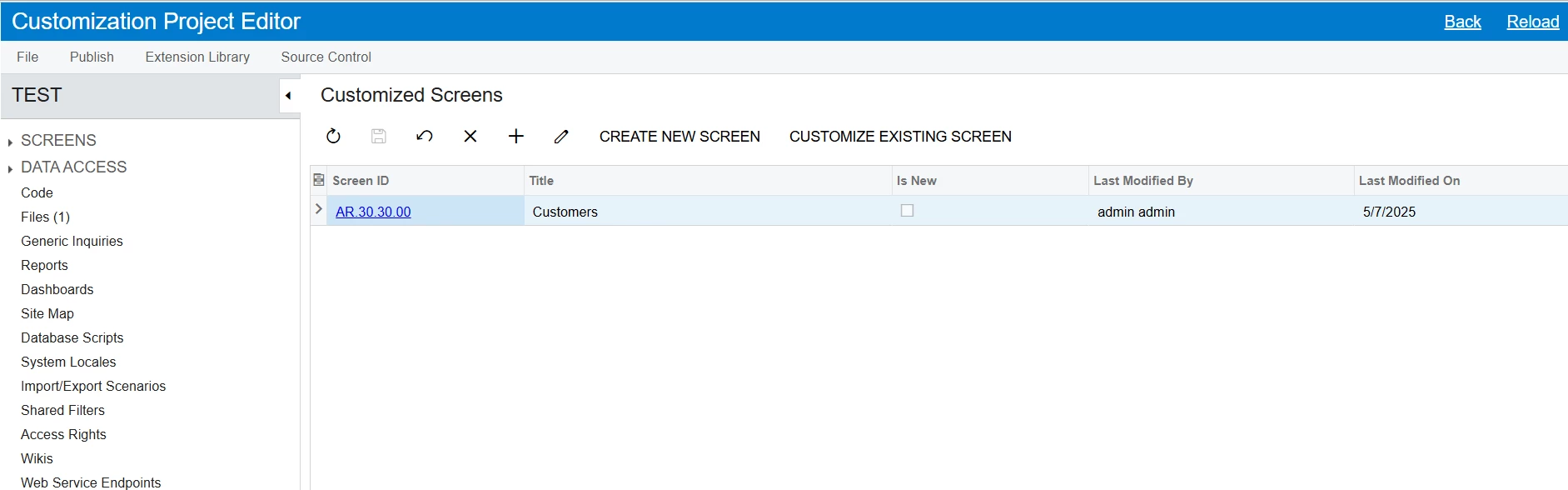
In Customized Screens , I started Customize existing screen AR303000 .

I selected EDIT ASPX button And added the below code to Tabs after Compliance Tab .

<px:PXTabItem Text="MyNewTab">
  <Template>
    <px:PXButton runat="server" ID="btnGetResult" Text="GetResult"><AutoCallBack Command="GetResult" Target="ds" ></AutoCallBack></px:PXButton>
    <px:PXGrid ID="grid" runat="server" >
      <Levels>
        <px:PXGridLevel DataMember="CurrentCustomer">
          <Columns>
            <px:PXGridColumn Width="200px" DataField="UsrNoOfHits" ></px:PXGridColumn>
            <px:PXGridColumn Width="250px" DataField="UsrBookMarkRating" ></px:PXGridColumn>
            <px:PXGridColumn Width="350px" DataField="UsrNotes" ></px:PXGridColumn>
            <px:PXGridColumn Width="350px" DataField="UsrSanctionsCheckMessage" ></px:PXGridColumn>
          </Columns>
          <Mode AllowAddNew="False" AllowDelete="False" AllowUpdate="False" ></Mode>
        </px:PXGridLevel>
      </Levels>
    </px:PXGrid>
  </Template>
  </px:PXTabItem>

After publishing this works fine in the current instance . But when I Export the customisation package and
Import and publish in another instance these codes are missing . I am new to Acumatica , Is there anything missing or am I do anything wrong ?

Any help would be appreciated. Thank you

Best answer by PraveenBeo

@Chris Hackett . Yes . I noted down all the customizations I made to screen AR303000. Then, I deleted the screen from the Customization Editor. After that, I added it again and reapplied all the customizations. This time, the changes were included in the customization package (ZIP file). Thank you

10 replies

Forum|alt.badge.img+1
  • Semi-Pro III
  • May 8, 2025

Hi ​@PraveenBeo 

It looks like your changes might have been made at runtime and not saved in the customization project. Can you confirm if:

  • You added the code using the Customization Project Editor or DLL?

  • The ASPX file is included in the exported package?

  • You've added required DAC fields and rebuilt the DLL?

If any of these are missing, the changes won't carry over to another instance.


Forum|alt.badge.img
  • Author
  • Jr Varsity II
  • May 8, 2025

@Saikrishna V 

  1. You added the code using the Customization Project Editor or DLL?

Yes , In Customization Project Editor → Screens → Edit Existing → AR303000 → EDIT ASPX

      2. The ASPX file is included in the exported package?

No . The file is missing in the Pages Folder . Don't know why .

     3.  You've added required DAC fields and rebuilt the DLL?

No . I added the custom fields also using Customization Project Editor 


Thank you for your time 


Forum|alt.badge.img+1
  • Jr Varsity II
  • May 8, 2025

HI ​@PraveenBeo ,

Please verify the following in the exported package:

  • After making edits, ensure that you clicked on "Generate Customization Script" via:
      Edit ASPX → Generate Customization Script

  • Confirm that the screen was added correctly in the editor.

 Verify by opening above screen that custom fields are available

Hope above helps!!


Forum|alt.badge.img
  • Author
  • Jr Varsity II
  • May 12, 2025

hi ​@Rakshanda  . I have tried it . But still The file is missing in the Pages Folder after export the customisation project. Shall we put the file manually in The pages folder (Pages / AR /AR303000.aspx) ? Thank you


Forum|alt.badge.img+1
  • Semi-Pro III
  • May 12, 2025

Hi @PraveenBeo,

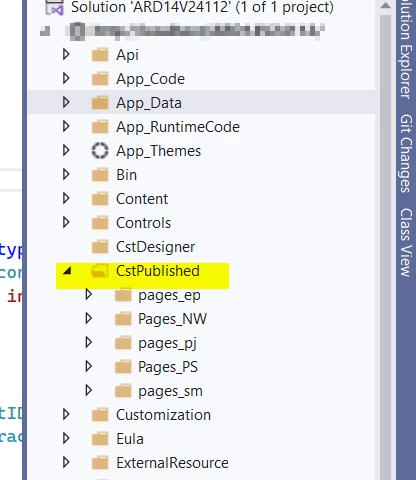
I'm a bit unclear about the issue you're experiencing with your package. If you have made changes to the ASPX files using the Project Editor, then clicked "Generate Customization Script" and published the package, the modified files should appear in the CstPublished folder in Visual Studio.

However, if you're directly modifying files under Pages/AR/AR303000.aspx, those changes will not be included in the customization package.

Could you please share some screenshots and the steps you followed? That will help us understand the issue better and provide more accurate support.


Thanks


Forum|alt.badge.img
  • Author
  • Jr Varsity II
  • May 12, 2025

hi ​@Saikrishna V 

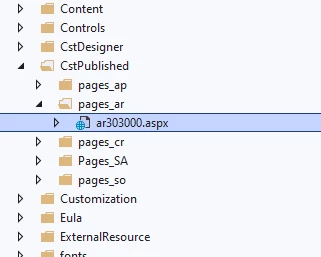
Yes , The file Comes in the CstPublished folder as shown in the screenshot. But after export customisation project. In the zip file No AR folder and ar303000.aspx file . But all other pages are there except this one . Can Directly put this file there ?   Thank you for your support 


Forum|alt.badge.img+1
  • Semi-Pro III
  • May 12, 2025

Thanks for the update ​@PraveenBeo 

If you are directly modifying files under the Pages folder (like Pages/AR/AR303000.aspx) instead of using the Project Editor, those changes won't be included in the customization package (ZIP file).


Forum|alt.badge.img
  • Author
  • Jr Varsity II
  • May 14, 2025

@Saikrishna V  . What I did is , 

  1. Opened customization Project Editor 
  2. In Customized Screens → Customize Existing Screen → Added AR303000 And Opened It for Editing .
  3. In Screen Editor: AR303000 (Customers) → EDIT ASPX → Here I put the aspx code for new tab (The code is given in the question) → Then clicked Generate customization button → After that published the project 
  4. Tested the instance and found the new tab I added came in Customers screen and Works well .
  5. Then I Exported the customization Project to zip File . But when I Opened the Zip file , AR303000.aspx is missing . All Other Screens I Edited came there inside pages folder but the folder AR and file is missing.
  6. When I tried drag and drop new tab in Screen Editor: AR303000 (Customers) , Then the file comes in Exported Zip file .

Drag and drop tab control help me to solve the issue at the moment . But as I am new to acumatica development , Did I do anything wrong in my steps edit aspx ?   I Think I had the same issue described in this question 

Thank you All for your time and effort .


Chris Hackett
Community Manager
Forum|alt.badge.img
  • Acumatica Community Manager
  • July 3, 2025

Hi ​@PraveenBeo were you able to find a solution? Thank you!


Forum|alt.badge.img
  • Author
  • Jr Varsity II
  • Answer
  • July 4, 2025

@Chris Hackett . Yes . I noted down all the customizations I made to screen AR303000. Then, I deleted the screen from the Customization Editor. After that, I added it again and reapplied all the customizations. This time, the changes were included in the customization package (ZIP file). Thank you