



Answer

Symbols are loaded for debugging source code, but Breakpoints don't recognize them

  • September 10, 2025
  • 3 replies
  • 73 views

MichaelShirk
Captain II
Forum|alt.badge.img+5

I’ve read everything I can find on debugging Acumatica source code, and I can’t figure this out. 

I’m trying to debug the PXNoteAttribute.AttachFile() method in the PX.Data.dll. For some reason it’s renaming files with a GUID, when we programmatically attach them to an email. 

I’ve done all the things like unchecking the “Just my Code” option in the Visual Studio debugging options, specified the correct location for the pdb files, and ensured that the dll and pdb file are from the same version. 

As the screenshot shows, the modules window looks like it’s gonna work, and tells me the symbols are loaded, but the breakpoint shows the warning, and says they can’t be loaded. 

What might I be missing?
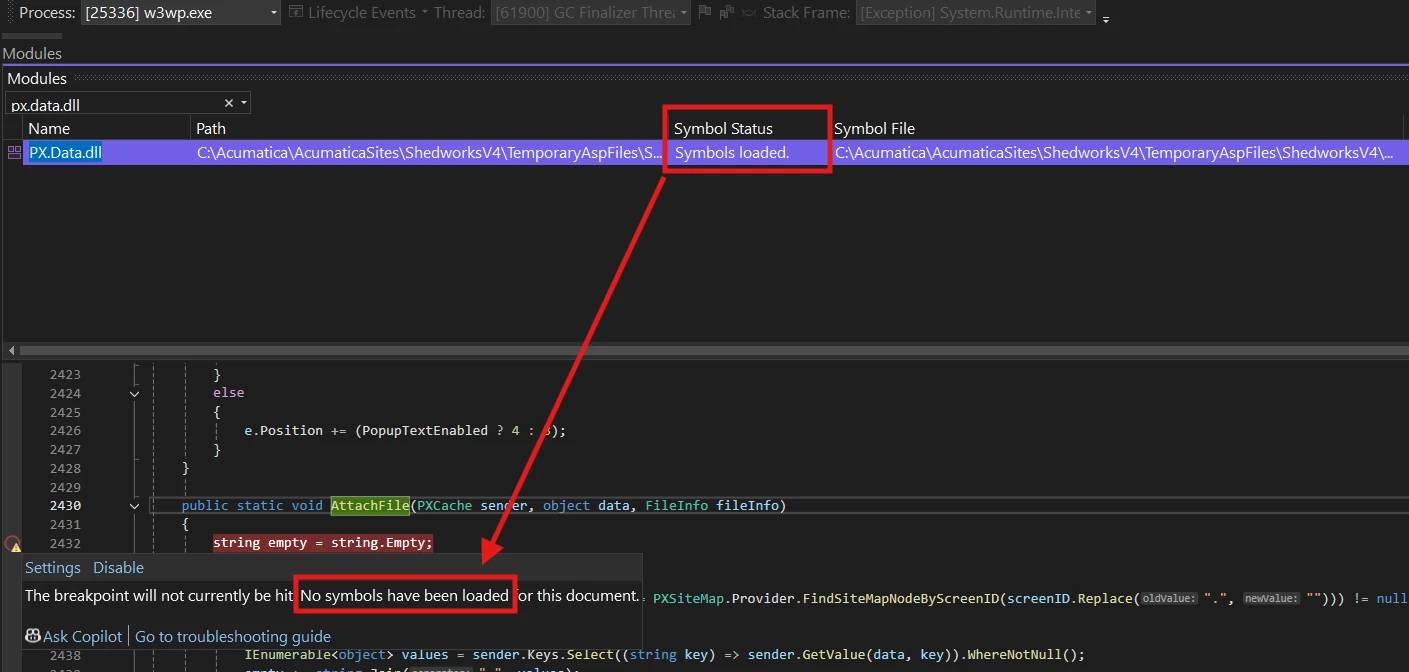


Best answer by RohitRattan88

@MichaelShirk , have you tried adding a breakpoint on some graph code/line to see if that is being triggered? I would test that first before trying to debug attribute logic.

I found that (for PX.Objects)I have to decompile dlls exclusively, not sure if that is the case for PX.Data:

Expand External Sources in Solution Explorer > expand  Modules Without Sources:

Find PX.Objects.dll > right click > Decompile Source:


After Decompile is complete, Expand PX.Objects.dll from External Sources and select desired module and code to set your breakpoint (SOOrderEntry > SOLine_OrderQty_FieldUpdated in this case)


Open your ERP and perform the desired business operation you are willing to debug(SOLine_OrderQty_FieldUpdatedin this case) and your breakpoint is triggered:


See if this works for you.

3 replies

Forum|alt.badge.img+8
  • Captain II
  • September 15, 2025

@MichaelShirk 


I have encountered this a few times, and it just seems to be a loading delay from what I have experienced.


Have you let it sit and ponder for a few minutes?


RohitRattan88
Acumatica Moderator
Forum|alt.badge.img+4
  • Acumatica Moderator
  • Answer
  • September 15, 2025

@MichaelShirk , have you tried adding a breakpoint on some graph code/line to see if that is being triggered? I would test that first before trying to debug attribute logic.

I found that (for PX.Objects)I have to decompile dlls exclusively, not sure if that is the case for PX.Data:

Expand External Sources in Solution Explorer > expand  Modules Without Sources:

Find PX.Objects.dll > right click > Decompile Source:


After Decompile is complete, Expand PX.Objects.dll from External Sources and select desired module and code to set your breakpoint (SOOrderEntry > SOLine_OrderQty_FieldUpdated in this case)


Open your ERP and perform the desired business operation you are willing to debug(SOLine_OrderQty_FieldUpdatedin this case) and your breakpoint is triggered:


See if this works for you.


MichaelShirk
Captain II
Forum|alt.badge.img+5
  • Author
  • Captain II
  • September 15, 2025

Thanks ​@RohitRattan88 ! 
This worked to debug the attribute. 

One additional note for anyone else who might come across this. 
I had to start debugging before the “External Sources” node showed up in the solution explorer.

