Question

Stock Item Decimal Field Error

  • December 5, 2025
  • 5 replies
  • 49 views

Hello!

I’m looking for some help resolving an error I am seeing with a customization project I created that adds new fields to the Stock Item screen > Packages tab.

The error I am getting is: An error occurred during processing of the field Freight Included: Specified cast is not valid..

Here is what the Trace specifies:

Error: An error occurred during processing of the field UsrFreightIncluded: Unable to cast object of type 'System.Decimal' to type 'System.String'..

Below is part of the code giving me the issue. 

public class InventoryItemExt : PXCacheExtension<InventoryItem>

{

    #region UsrFreightIncluded
    [PXDBDecimal(2)]
    [PXDefault(TypeCode.Decimal,"0.00")]
    [PXUIField(DisplayName = "Freight Included")]
    public virtual string UsrFreightIncluded { get; set; }
    public abstract class usrFreightIncluded : PX.Data.BQL.BqlDecimal.Field<usrFreightIncluded> { }
    #endregion
}


Thanks in advance!
5 replies

Forum|alt.badge.img+7
  • Captain II
  • December 5, 2025

The issue is in your declaration:

  public virtual string UsrFreightIncluded { get; set; }

You’ll want that to be:

  public virtual Decimal? UsrFreightIncluded { get; set; }


Thanks for that! However this gave me a new error:

Error: The entry form (ID: IN202500, title: Stock Items) cannot be automated. An error occurred during processing of the field Freight Included: Specified cast is not valid..

Any thoughts on this one?


jinin
Pro I
Forum|alt.badge.img+11
  • Pro I
  • December 6, 2025

Hi ​@FreddyDelRio96 

Please verify that the field was created as a Decimal in the database. It appears that the field may have been created as a string, which is causing the error.

The DAC field should be defined as follows:

#region UsrFreightIncluded
[PXDBDecimal(2)]
[PXDefault(TypeCode.Decimal, "0.00")]
[PXUIField(DisplayName = "Freight Included")]
public virtual decimal? UsrFreightIncluded { get; set; }
public abstract class usrFreightIncluded : PX.Data.BQL.BqlDecimal.Field<usrFreightIncluded> { }
#endregion


I’m still getting a ‘Specified cast is not valid..’ error so have reverted to having all 4 of my custom fields as Strings instead of Decimals. I’ve attached my customization package here., Would appreciate if someone could take a look at this and let me know if I’m doing something wrong. I tagged the 2 fields I wanted to be Decimals under a comment of:

// Fields converted to String for Stability (No Numeric Mask/Formatting)

Thanks in advance! 


jinin
Pro I
Forum|alt.badge.img+11
  • Pro I
  • December 11, 2025

Hi ​@FreddyDelRio96 ,

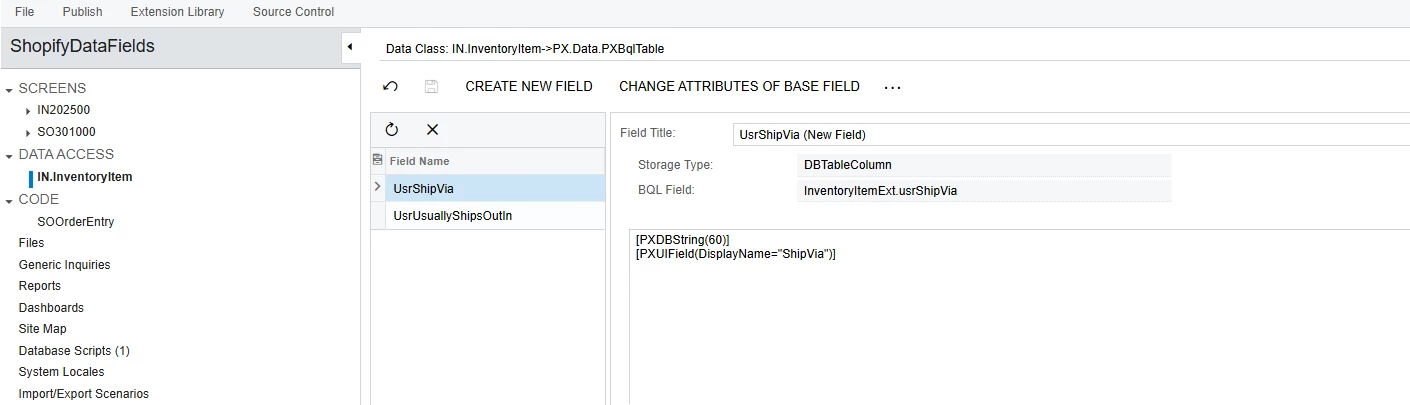
You have not added the fields correctly. In the SalesOrderEntry code, four fields were added to the DAC, but only two fields are visible under Data Access.


Please remove all the fields added manually in both the Data Access and the code.

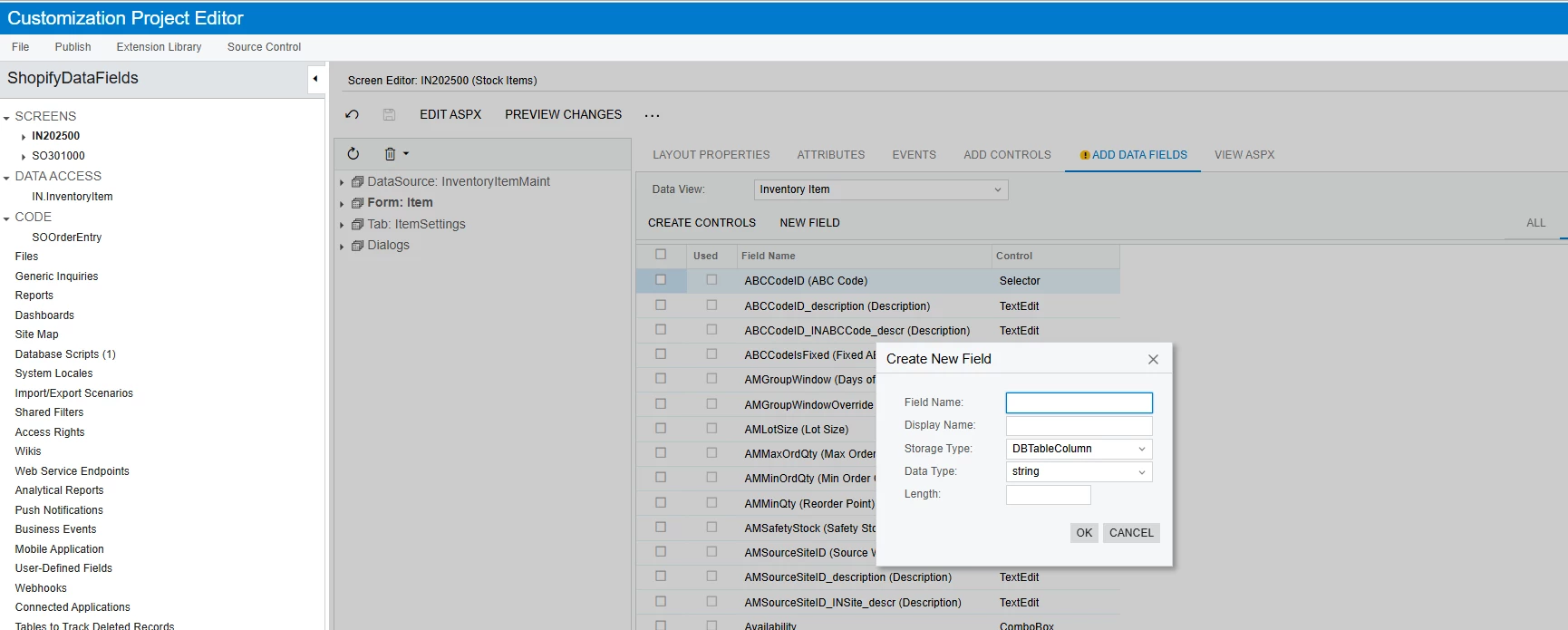
Then, create the fields directly from the ASPX page as shown in the screenshot and publish the package.

This will automatically generate the DAC fields and the corresponding database fields correctly.