Solved

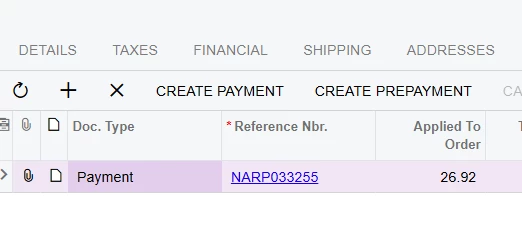
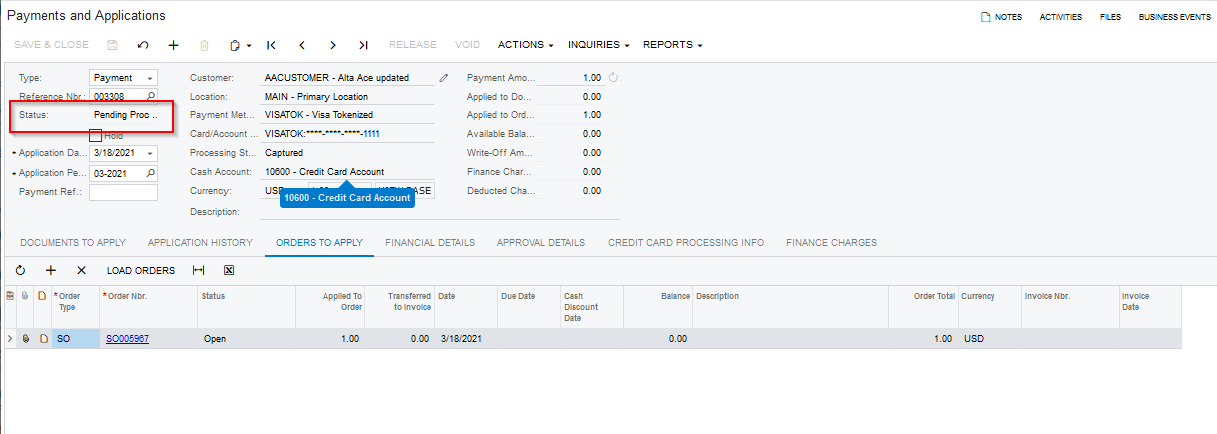
Status of the payment record showing pending processing

  • March 31, 2021
  • 9 replies
  • 994 views

praveenpo
Semi-Pro III
Forum|alt.badge.img+3

​Hi,

I’m creating the payment programmatically but payment status is showing Pending Processing.Even tried setting the status to balanced and it didn't worked.

Payment is captured in the External system so we are filling the ExtranalTrsnaction table and below is the code that we used create the payment.

 ARPaymentEntry docgraph = PXGraph.CreateInstance<ARPaymentEntry>();
                ARPayment objPayment = new ARPayment();
                objPayment.DocType = ARDocType.Payment;
                objPayment.Status = ARDocStatus.Balanced;
                objPayment.CustomerID = order.CustomerID;
                objPayment.PaymentMethodID = filter?.PaymentMethod;
               // objPayment.CuryID = order.CuryID;
                objPayment.ExtRefNbr = filter?.PaymentRefNbr;
                objPayment.CuryOrigDocAmt = filter?.PaymentTotal;
                docgraph.Document.Cache.Insert(objPayment);

                SOAdjust adjnew = new SOAdjust();
                adjnew.AdjdOrderNbr = order.OrderNbr;
                adjnew.AdjdOrderType = order.OrderType;
                adjnew.CuryAdjgAmt = filter?.PaymentTotal;
                docgraph.SOAdjustments.Insert(adjnew);

                docgraph.Actions.PressSave();

                CCProcessingCenter objProcessingCenter = PXSelectJoin<CCProcessingCenter,
                                                        InnerJoin<CCProcessingCenterPmntMethod, On<CCProcessingCenter.processingCenterID, Equal<CCProcessingCenterPmntMethod.processingCenterID>>,
                                                        InnerJoin<PaymentMethod, On<PaymentMethod.paymentMethodID, Equal<CCProcessingCenterPmntMethod.paymentMethodID>>>>,
                                                        Where<CCProcessingCenterPmntMethod.paymentMethodID, Equal<Required<SOOrder.paymentMethodID>>,
                                                        And<PaymentMethod.paymentType, Equal<PaymentMethodType.creditCard>,
                                                        And<CCProcessingCenter.isActive, Equal<True>>>>>.Select(this, filter.PaymentMethod);
                if (objProcessingCenter != null)
                {
                    InsertRecords(docgraph);
                    docgraph.Document.Current.CCActualExternalTransactionID = docgraph.ExternalTran.Current?.TransactionID;
                    docgraph.Document.Current.IsCCCaptured = true;
                    docgraph.Document.Cache.Update(docgraph.Document.Current);
                    docgraph.Actions.PressSave();
                }

    private void InsertRecords(ARPaymentEntry docgraph)
        {          
            CCProcTran tran = PXSelectReadonly<CCProcTran, Where<CCProcTran.origRefNbr, Equal<Required<SOOrder.orderNbr>>, And<CCProcTran.origDocType, Equal<Required<SOOrder.orderType>>,
                             And<CCProcTran.refNbr, Equal<Required<ARPayment.refNbr>>,And< CCProcTran.pCTranNumber ,Equal<Required<CCProcTran.pCTranNumber>>>>>>>.Select(this, docgraph.SOAdjustments.Current?.AdjdOrderNbr, docgraph.SOAdjustments.Current?.AdjdOrderType, docgraph.Document.Current.RefNbr, docgraph.Document.Current.ExtRefNbr);

            if (tran == null)
            {
                ExternalTransaction objExternalTransaction = new ExternalTransaction();
                objExternalTransaction.ProcessingCenterID  = docgraph.Document.Current.ProcessingCenterID;
                objExternalTransaction.PMInstanceID = docgraph.Document.Current.PMInstanceID;
                objExternalTransaction.ProcStatus = "CAS";
                objExternalTransaction.DocType = ARDocType.Payment;
                objExternalTransaction.RefNbr = docgraph.Document.Current.RefNbr;
                //objExternalTransaction.OrigDocType = docgraph.SOAdjustments.Current?.AdjdOrderType;
                //objExternalTransaction.OrigRefNbr = docgraph.SOAdjustments.Current?.AdjdOrderNbr;
                objExternalTransaction.TranNumber = docgraph.Document.Current.ExtRefNbr;
                objExternalTransaction.Completed = true;
                objExternalTransaction.Amount = docgraph.SOAdjustments.Current?.CuryAdjdAmt;
                objExternalTransaction.Active = true;
                objExternalTransaction.Direction = "D";
                docgraph.ExternalTran.Insert(objExternalTransaction);

                //Record Inserting in CCProcTran table to refund
                CCProcTran objCCProcTran = new CCProcTran();
                objCCProcTran.PMInstanceID = docgraph.Document.Current.PMInstanceID;
                objCCProcTran.ProcessingCenterID = docgraph.Document.Current.ProcessingCenterID;
                objCCProcTran.DocType = ARDocType.Payment;
                objCCProcTran.RefNbr = docgraph.Document.Current.RefNbr;
                //objCCProcTran.OrigDocType = docgraph.SOAdjustments.Current?.AdjdOrderType;
                //objCCProcTran.OrigRefNbr = docgraph.SOAdjustments.Current?.AdjdOrderNbr;
                objCCProcTran.TranType = CCTranTypeCode.PriorAuthorizedCapture;
                objCCProcTran.ProcStatus = CCProcStatus.Finalized;
                objCCProcTran.CuryID = docgraph.Document.Current.CuryID;
                objCCProcTran.TranStatus = CCTranStatusCode.Approved;
                objCCProcTran.Amount = docgraph.SOAdjustments.Current?.CuryAdjdAmt;
                objCCProcTran.PCTranNumber = docgraph.Document.Current.ExtRefNbr;
                objCCProcTran.StartTime = docgraph.Accessinfo.BusinessDate;
                objCCProcTran.PCResponseCode = Convert.ToString(1);
                objCCProcTran.PCResponseReasonText = KNMCMessages.TransactionApproved;
                docgraph.ccProcTran.Insert(objCCProcTran);

                docgraph.Actions.PressSave();
            }
        }



Best answer by alexandermakarov89

Hi, praveenpo

You can use the following example to update the ARPayment.PendingProcessing field for ARPayment to see the correct doc status (Balanced):

ARPaymentEntry docgraph = PXGraph.CreateInstance<ARPaymentEntry>();
ARPayment payment = new ARPayment();
payment.DocType = ARPaymentType.Payment;
payment = paymentGraph.Document.Insert(payment);
payment.CustomerID = ...
payment.CustomerLocationID = ...
payment.PaymentMethodID = ...
payment.CashAccountID = ...
payment.PMInstanceID = ...
payment.CuryOrigDocAmt = ...
payment.DocDesc = ...

payment = paymentGraph.Document.Update(payment);
payment.PendingProcessing = false;
payment = paymentGraph.Document.Update(payment);
paymentGraph.Save.Press();


The better way to add ExternalTransaction, CCProcTran and update ARPayment flags (PendingProcessing, IsCCCaptured) automaticly is to use the following code.

using PX.Objects.AR;
using PX.Objects.Extensions.PaymentTransaction;
using PX.Objects.AR.CCPaymentProcessing;
using PX.Objects.AR.CCPaymentProcessing.Common

CCPaymentEntry entry = new CCPaymentEntry(paymentGraph);
paymentEntry.AfterProcessingManager = new ARPaymentAfterProcessingManager()
{ Graph = paymentGraph };


TranRecordData tranRecord = new TranRecordData();
tranRecord.ExternalTranId = ...
tranRecord.AuthCode = ...
tranRecord.TransactionDate = ...
tranRecord.ProcessingCenterId = ...
tranRecord.TranStatus = ...
tranRecord.Imported = ...

ICCPayment doc = paymentGraph.Document.Current;
entry.RecordPriorAuthCapture(doc, tranRecord);


9 replies

Naveen Boga
Captain II
Forum|alt.badge.img+20
  • Captain II
  • April 2, 2021

Hi @praveenpo,

For the Credit card payment method the default status will be “Pending Process” and the “Balanced” status will be “Cash/Check” type.

And, code looks clean to me, and observed there is no code for releasing of newly created payment.

After adding the RELEASE action code, can you please also verify with the “CASH” payment method and check.


Nayan Vadher
Community Manager
Forum|alt.badge.img+2
  • Acumatica Developer Support
  • April 2, 2021

​Hi,

I’m creating the payment programmatically but payment status is showing Pending Processing.Even tried setting the status to balanced and it didn't worked.


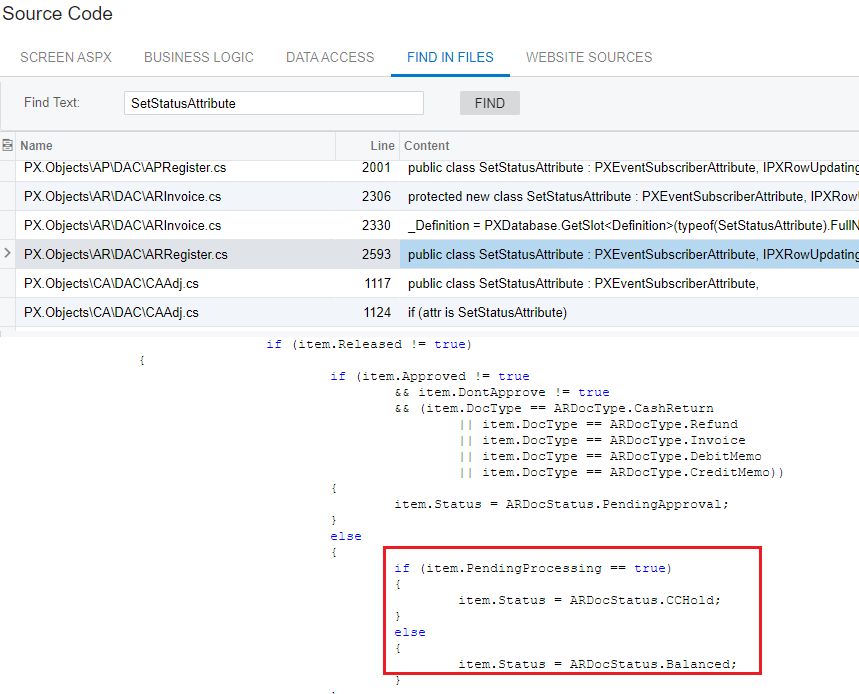
The reason is because Status field is driven using SetStatus attribute. Look at its field ARRegister.Status definition in the Source Code screen.  This attribute looks for PrendingProcessing field to detemine the status. See screenshot below:

I dont see this field being set in your code. 


Hi, praveenpo

You can use the following example to update the ARPayment.PendingProcessing field for ARPayment to see the correct doc status (Balanced):

ARPaymentEntry docgraph = PXGraph.CreateInstance<ARPaymentEntry>();
ARPayment payment = new ARPayment();
payment.DocType = ARPaymentType.Payment;
payment = paymentGraph.Document.Insert(payment);
payment.CustomerID = ...
payment.CustomerLocationID = ...
payment.PaymentMethodID = ...
payment.CashAccountID = ...
payment.PMInstanceID = ...
payment.CuryOrigDocAmt = ...
payment.DocDesc = ...

payment = paymentGraph.Document.Update(payment);
payment.PendingProcessing = false;
payment = paymentGraph.Document.Update(payment);
paymentGraph.Save.Press();


The better way to add ExternalTransaction, CCProcTran and update ARPayment flags (PendingProcessing, IsCCCaptured) automaticly is to use the following code.

using PX.Objects.AR;
using PX.Objects.Extensions.PaymentTransaction;
using PX.Objects.AR.CCPaymentProcessing;
using PX.Objects.AR.CCPaymentProcessing.Common

CCPaymentEntry entry = new CCPaymentEntry(paymentGraph);
paymentEntry.AfterProcessingManager = new ARPaymentAfterProcessingManager()
{ Graph = paymentGraph };


TranRecordData tranRecord = new TranRecordData();
tranRecord.ExternalTranId = ...
tranRecord.AuthCode = ...
tranRecord.TransactionDate = ...
tranRecord.ProcessingCenterId = ...
tranRecord.TranStatus = ...
tranRecord.Imported = ...

ICCPayment doc = paymentGraph.Document.Current;
entry.RecordPriorAuthCapture(doc, tranRecord);


  • Freshman I
  • November 11, 2024

I have found a couple ways to fix this issue.


  1.  As long as its the same day, you can validate the payment and it should show as balanced.  
  2. If you wait until next day you can validate the payment, then record payment (copy and paste the transaction ID  from ebiz portal).  

  • Freshman I
  • February 10, 2026

I am struggling with this exact issue!  The charge happened on 01/22/2025 (we are working on cleaning up our AR and the payment was partially applied to the customer account).  I can validate the card but I don’t want to charge their card for a second time.  I can’t get this record to open up so I can delete it out of Acumatica.  The payment did get completely applied a few days later but I can’t get this record to a balanced or open status so I can delete it.  The status in Acumatica is Pending Processing.  Help please!!  


  • Freshman I
  • February 10, 2026

Is this for a sales order or appointment/service order?  


I’m assuming the payment has went through on Ebiz but still showing pending processing on Acumatica?


  • Freshman I
  • February 10, 2026

Is this for a sales order or appointment/service order?  


I’m assuming the payment has went through on Ebiz but still showing pending processing on Acumatica?

Sales order.  It went through Authorize.net. The payment did go through eventually and that got recorded correctly in Acumatica separately. But this one I guess because it was already locked, they couldn’t enter the payment.  Now I can’t void or delete the one in pending processing.  


  • Freshman I
  • February 10, 2026

On the sales order itself you might have to X the payment then fix it.  I’ve run into that a couple times 


Forum|alt.badge.img
  • Jr Varsity II
  • February 12, 2026

the current logic looks fine overall, but I noticed there’s no step included to release the payment after it’s created. You may want to add that and then test once using a different payment method as well, just to confirm the flow behaves as expected.