Question

State of customization is wierdly different to what is expected - site corruption issue?

  • July 18, 2025
  • 6 replies
  • 124 views

Forum|alt.badge.img+1

Hi,


Just wondering if anyone has seen the type of issue described below (which I’m currently at a loss to explain or know what to do next)?


Symptoms started last night when we attempted to republish a customisation.  We needed to slightly change a SQL view (with a DAC on top of it).  Couldn’t get this very simple change to work. SQL statement was just skipped no matter what I tried.
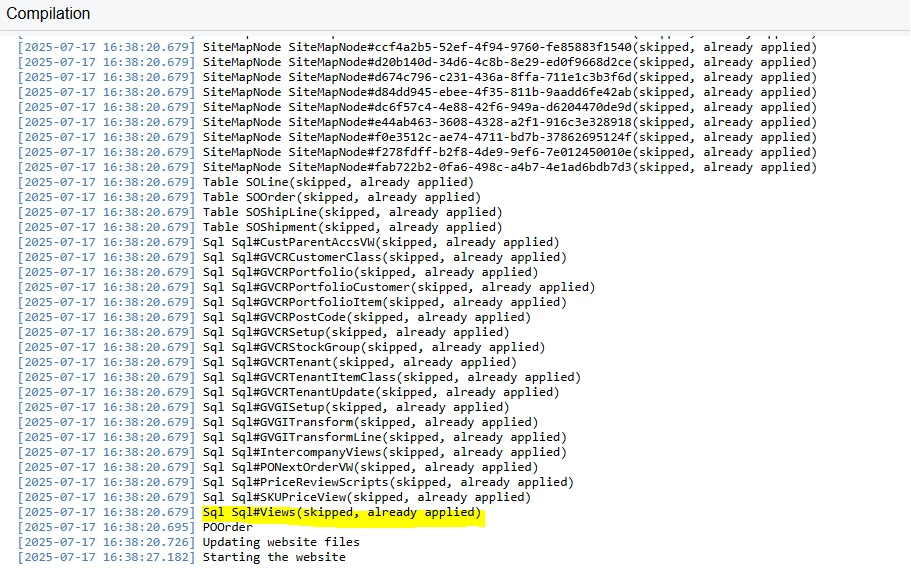
 

What I found is that the only way to get the publish step to attempt to rerun the SQL statement was to deliberately make the SQL statement malformed.  In this scenario the publish step attempted to apply the SQL statement and errored out as it should.  However, as soon as the SQL statement was valid, it always got skipped even if radically different to the previous publish.  Spent a few hours trying all the usual tricks to try and get a valid SQL statement to publish, tried all the different tick box options, priority settings, etc.

Then today we have the weird scenario described below:


We have custom fields in our customisation that the UI says aren’t in use, but they are visible on the form:
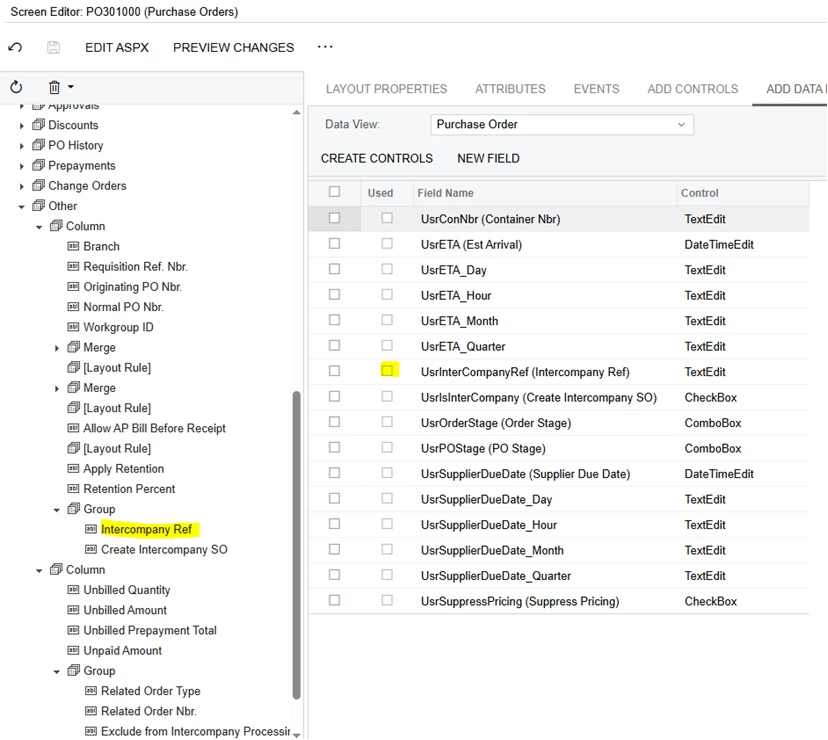
and in the UI:
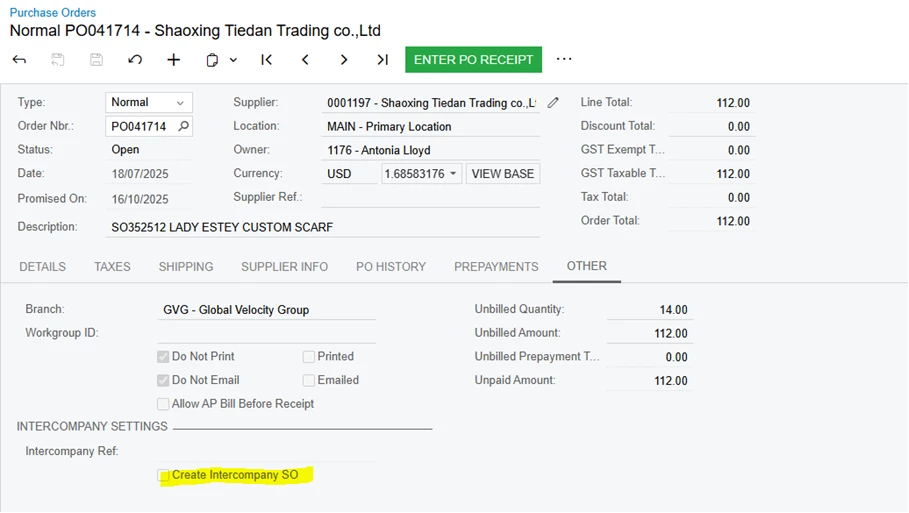
Also, the ASPX is inconsistent with the UI.  The below says that the Commit changes box should be ticked:

 

 But the UI says otherwise:
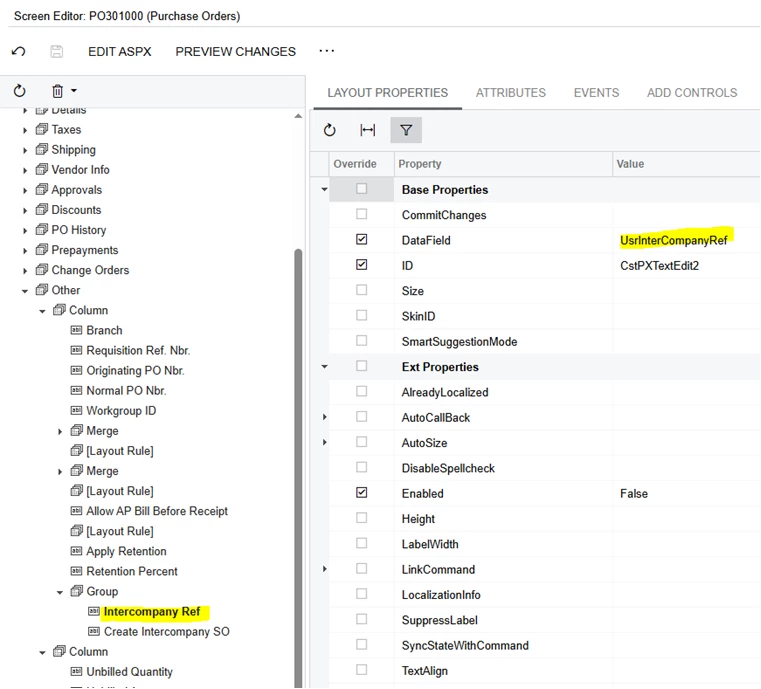
 

This isn’t the only example of this unusual behaviour.  We have custom fields that were there before but not anymore and we don’t think we removed them, other inconsistencies, etc.

We have unpublished everything, republished, multiple times to try and fix this.  We did this when we couldn’t get the view to update before we discovered lots more things we can’t currently explain.  The example above relates to PO301000.  Have checked that the screen is only modified in one place:
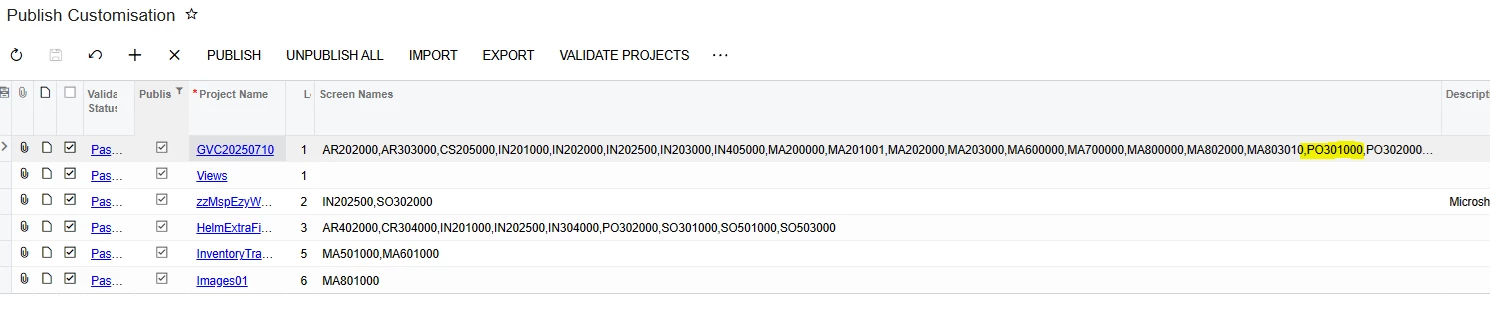
As far as I know, you can have forms customised in more than one customization so that shouldn’t matter.  We understand that you can’t have the same graph and DAC customised in more than one customization.

The site is multi tenanted with 6 tenants.  We have checked that the customisations are all in one tenant and published to multiple tenants.  We follow the advice in the link below and have found it to be very good advice

https://www.augforums.com/publishing-an-acumatica-customization-project/

One thought we have is maybe unpublishing everything, exporting the customisations out, physically deleting them from Acumatica, reimporting and republishing might help.  We’re a bit nervous about touching anything on the live site though until we have some clues about why this is happening.

Thanks in advance for any help/suggestions offered.

John.

 

6 replies

MichaelShirk
Captain II
Forum|alt.badge.img+5
  • Captain II
  • July 18, 2025

Hey ​@JWS539 perhaps you’re already doing this, but I don’t see it mentioned. 

Have you tried checking the “Execute all database scripts including previously executed” box in the “Publish to all tenants” dialogue box? 

Here is the sequence I follow on the Customization Projects screen to make sure everything is “fresh”. 

  1. Unpublish all customizations
  2. Export the package that I’ll be publishing a new version of. (Not necessary, but I do it just in case I need to revert to that version if something goes wrong with the new package.)
  3. Delete the package that I’m publishing the new version for. 
  4. Import the new package.
  5. Select all applicable customization packages.
  6. Click “Publish to Multiple Tenants”. 
  7. Select the tenants to publish to, in the “Publish to all tenants” dialogue box.
  8. Click the “Execute all database scripts including previously executed” box. 
  9. Click OK.


Additionally, and I don’t know if this is necessary, but our SQL view scripts in the customization are structured so that if they exist in the database already, they’re deleted and recreated. 
 

IF EXISTS
(
    SELECT * FROM sys.views
    WHERE name = 'SomeCustomView' AND schema_id = SCHEMA_ID('dbo')
)
DROP VIEW [dbo].[SomeCustomView]
GO

CREATE VIEW [dbo].[SomeCustomView] AS 
SELECT

-- Rest of the View

Forum|alt.badge.img+1
  • Author
  • Varsity II
  • July 18, 2025

Hi Michael,


Thanks for taking the time to review this topic.  Have been ticking the  “Execute all database scripts including previously executed” box.  Our views setups are the same as you describe also ie. drop if exists.

Our thinking is the same as yours and we will go through all of the steps you have suggested.  So far we’ve been skipping step 2, 3 & 4.  Will execute the below removing the goto step 5 piece in brackets

  1. Unpublish all customizations (goto step 5 ie. skip 2,3 & 4)
  2. Export the package that I’ll be publishing a new version of. (Not necessary, but I do it just in case I need to revert to that version if something goes wrong with the new package.)
  3. Delete the package that I’m publishing the new version for. 
  4. Import the new package.
  5. Select all applicable customization packages.
  6. Click “Publish to Multiple Tenants”. 
  7. Select the tenants to publish to, in the “Publish to all tenants” dialogue box.
  8. Click the “Execute all database scripts including previously executed” box. 
  9. Click OK.

Be interesting to see if that resolves the issue.  Am still a bit mystified how we managed to get the site in it’s current state, especially the differences we’re seeing in the ASPX and the UI.  These have always been 100% aligned, until now.

Will let you know how we go.

Thanks,

John.


Forum|alt.badge.img+1
  • Author
  • Varsity II
  • July 19, 2025

HI,  

Just an update on the above.  Went through the steps above and this solved some of the problem eg. the ASPX being inconsistent with what was seen on the UI, etc.  However, I still couldn't get Acumatica to update the SQL for a view for love nor money.  Finally figured out a process that worked.  Seems for the build# of Acumatica we are on, the only way I can get a view to update is with the settings below:


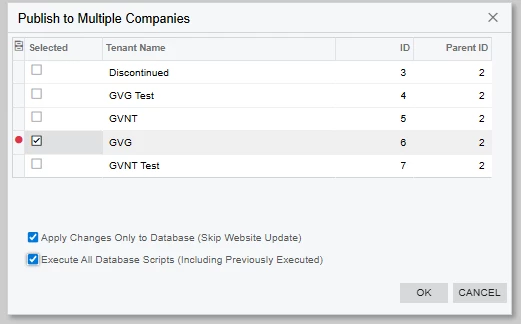
Just publish to only one view (because that’s all you need to do given that the same database structure and views run across all tenants), with the Apply Changes only to database, and the Execute All Database scripts tick boxes ticked.  It seems that the Apply Changes Only to database is the thing that triggers the views to be updated.  I’m sure that we have never had to have both boxes ticked on other builds.

This makes publishing a two step process, which is fine:  First pass to update the views and database structure with the options as shown above, second parse to update the website.

Thanks,

John.


MichaelShirk
Captain II
Forum|alt.badge.img+5
  • Captain II
  • July 21, 2025

@JWS539  very weird! Which build and hosting model are you on?


Forum|alt.badge.img+1
  • Author
  • Varsity II
  • July 25, 2025

Hi Michael,


Build# is  2023.117.400.7506 [23.117.0021]  hosted by MYOB which is a cloud instance over mySQL DB


Chris Hackett
Community Manager
Forum|alt.badge.img
  • Acumatica Community Manager
  • September 24, 2025

Hi ​@JWS539 were you able to find a solution? Thank you!