




I added a smartpanel to the Sales Order screen. It functions exactly the way I want it to. The problem is that it only opens 1 time. If I refresh the page, it works again, but only once.
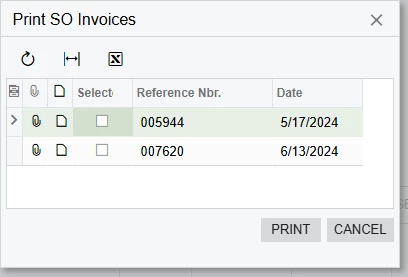
This is my aspx code:
<px:PXSmartPanel runat="server" ID="icsPrintSOInvoices" Caption="Print SO Invoices" CaptionVisible="True" Height="220px" AutoRepaint="True" LoadOnDemand="True" Width="400px" ShowAfterLoad="True" Key="SOInvoicesVw" AutoCallBack-Target="icsSOInvoiceList" AutoCallBack-Command="Refresh">
    <px:PXGrid runat="server" ID="icsSOInvoiceList" SkinID="Details" Width="100%" DataSourceID="ds" KeepPosition="False" AllowPaging="True" Height="100px">
      <Levels>
        <px:PXGridLevel DataMember="SOInvoicesVw">
          <Columns>
            <px:PXGridColumn DataField="Selected" Width="60" Type="CheckBox" TextAlign="Center" CommitChanges="True" />
            <px:PXGridColumn DataField="RefNbr" Width="140" />
            <px:PXGridColumn DataField="DocDate" Width="90" /></Columns>
          <Mode AllowAddNew="false" AllowDelete="false" /></px:PXGridLevel></Levels>
      <ActionBar Position="Top">
        <CustomItems />
        <Actions>
          <AddNew Enabled="False" />
          <Delete Enabled="False" /></Actions></ActionBar>
      <AutoSize MinHeight="350" /></px:PXGrid>
    <px:PXPanel runat="server" ID="PanelPrintSOInvoice_pnlButtons" SkinID="Buttons">
      <px:PXButton runat="server" Text="Print" DialogResult="OK" ID="PanelPrintSOInvoice_btnPrint" />
      <px:PXButton runat="server" ID="PanelPrintSOInvoice_btnCancel" Text="Cancel" DialogResult="Cancel" /></px:PXPanel></px:PXSmartPanel>
This is the View:
public SelectFrom<SOInvoice>
    .InnerJoin<ARRegister>.On<ARRegister.refNbr.IsEqual<SOInvoice.refNbr>.And<ARRegister.docType.IsEqual<SOInvoice.docType>>>
        .Where<SOInvoice.sOOrderNbr.IsEqual<SOOrder.orderNbr.FromCurrent>
            .And<SOInvoice.docType.IsEqual<ARDocType.invoice>>>.View SOInvoicesVw;
This is the Action:
public PXAction<SOOrder> PrintSOInvoice;
[PXUIField(DisplayName = "Print SO Invoice", Enabled = true, Visible = true)]
[PXButton(CommitChanges = true, DisplayOnMainToolbar = false, Category = "Printing and Emailing")]
protected void printSOInvoice()
{
    SOOrder sO = Base.Document.Current;
    if (sO == null) return;

    //SOInvoicesVw.AskExt();

	if (SOInvoicesVw.AskExt() == WebDialogResult.OK)
    {
		foreach (SOInvoice soInvoice in SOInvoicesVw.Select())
		{
			if (soInvoice.Selected == true)
			{
				Dictionary<string, string> parametersDictionary = new Dictionary<string, string>();
				parametersDictionary["RefNbr"] = soInvoice.RefNbr;
				parametersDictionary["DocType"] = soInvoice.DocType;
				throw new PXReportRequiredException(parametersDictionary, "SO643000", PXBaseRedirectException.WindowMode.New, "SOInvoice");
			}
		}
	}
}
In Debug, the action fires every time I click the button from the main menu. But nothing shows after the first run at it.
What am I missing?
Thanks in advance to the group for all your support!!