

Answer

Show UDF from Bills and Adjustments (AP301000) to Supplier Details (AP402000)

  • January 15, 2025
  • 2 replies
  • 47 views

Forum|alt.badge.img+2

Hi I have a UDF (APRegisterExt.usrMAINMAINAPKynectionRefNo) which I need to this field’s value under the Supplier Details UDF (APDocumentResultExt.usrMAAPSDKynectionRefNo)
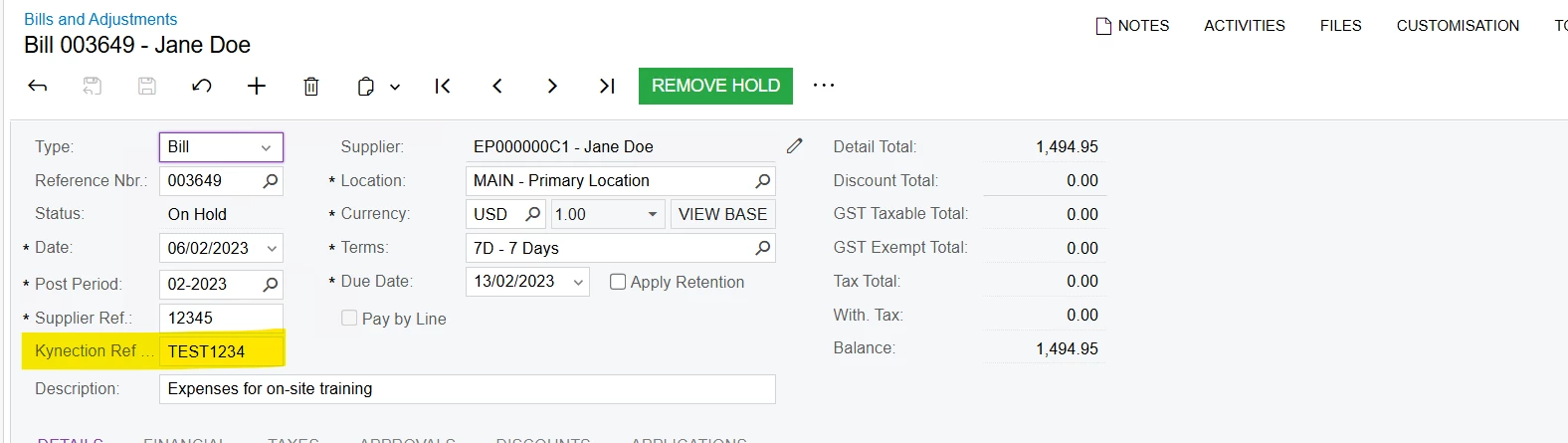
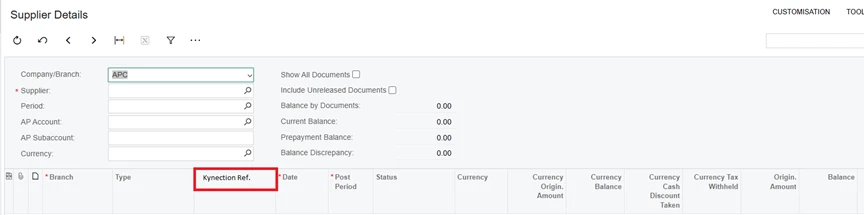


I have added the logic below but receive the following error:

\App_Code\Caches\APDocumentEnq.cs(31): error CS0246: The type or namespace name 'APDocumentResult' could not be found (are you missing a using directive or an assembly reference?)
 public class APDocumentEnq_Extension : PXGraphExtension<PX.Objects.AP.APDocumentEnq>
{
#region Event Handlers
protected void APDocumentResult_RowSelected(PXCache cache, PXRowSelectedEventArgs e)
{
var row = (APDocumentResult)e.Row;
if (row == null) return;

var docResultExt = cache.GetExtension<APDocumentResultExt>(row);


var apDoc = PXSelect<APRegister,
Where<APRegister.refNbr, Equal<Required<APRegister.refNbr>>,
And<APRegister.docType, Equal<Required<APRegister.docType>>>>>
.Select(Base, row.RefNbr, row.DocType)
.RowCast<APRegister>()
.FirstOrDefault();

if (apDoc != null)
{
var apRegisterExt = PXCache<APRegister>.GetExtension<APRegisterExt>(apDoc);
docResultExt.UsrMAAPSDKynectionRefNo = apRegisterExt.UsrMAINMAINAPKynectionRefNo;
}
}


#endregion
}
}

Please let me know if using this event handler or field selecting is the best approach. Any insight would be appreciated, thank you!

Best answer by TharidhiP

Hi All,

I reviewed this and found out that when referencing APDocumentResult we need to add APDocumentEnq.APDocumentResult which bypasses the error. Additionally I used a FieldSelecting event handler to enable the copy logic of the field.

 protected void APDocumentResult_UsrMAAPSDKynectionRefNo_FieldSelecting(PXCache cache, PXFieldSelectingEventArgs e)
{
if (e.Row == null)
return;

var row = (APDocumentEnq.APDocumentResult)e.Row;

// Retrieve the associated APRegister record
var apRegister = PXSelect<APRegister,
Where<APRegister.docType, Equal<Required<APDocumentEnq.APDocumentResult.docType>>,
And<APRegister.refNbr, Equal<Required<APDocumentEnq.APDocumentResult.refNbr>>>>>
.Select(Base, row.DocType, row.RefNbr);

Hope this helps!

2 replies

Forum|alt.badge.img+2
  • Author
  • Pro III
  • Answer
  • January 16, 2025

Hi All,

I reviewed this and found out that when referencing APDocumentResult we need to add APDocumentEnq.APDocumentResult which bypasses the error. Additionally I used a FieldSelecting event handler to enable the copy logic of the field.

 protected void APDocumentResult_UsrMAAPSDKynectionRefNo_FieldSelecting(PXCache cache, PXFieldSelectingEventArgs e)
{
if (e.Row == null)
return;

var row = (APDocumentEnq.APDocumentResult)e.Row;

// Retrieve the associated APRegister record
var apRegister = PXSelect<APRegister,
Where<APRegister.docType, Equal<Required<APDocumentEnq.APDocumentResult.docType>>,
And<APRegister.refNbr, Equal<Required<APDocumentEnq.APDocumentResult.refNbr>>>>>
.Select(Base, row.DocType, row.RefNbr);

Hope this helps!


Chris Hackett
Community Manager
Forum|alt.badge.img
  • Acumatica Community Manager
  • January 18, 2025

Thank you for sharing your solution with the community ​@TharidhiP!