Answer

Set role Employee for Admin

  • May 29, 2023
  • 4 replies
  • 126 views

Forum|alt.badge.img

Hi everyone.

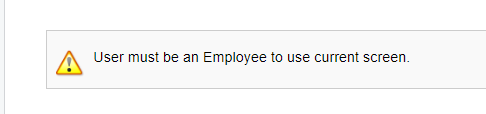
I login as admin. I go to Employee Time Card EP305000 screen and it’s show error. How to set role Employee for admin user? Thank everyone.

Best answer by Manikanta Dhulipudi

Hi @thanhaim 

if you are an admin user, you still need an employee creation in the system to use the employee time card screen.

Please create an employee and tag your user role.

Thanks

4 replies

Manikanta Dhulipudi
Captain II
Forum|alt.badge.img+15

Hi @thanhaim 

if you are an admin user, you still need an employee creation in the system to use the employee time card screen.

Please create an employee and tag your user role.

Thanks


Laura03
Captain II
Forum|alt.badge.img+19
  • Captain II
  • May 29, 2023

Hello @thanhaim ,

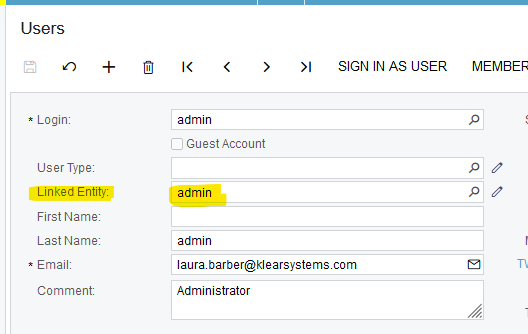
Here is a little more detail, a screen shot to show how to connect your employee “Admin” to your user “Admin”:


Kandy Beatty
Captain II
Forum|alt.badge.img+17

HI @thanhaim 

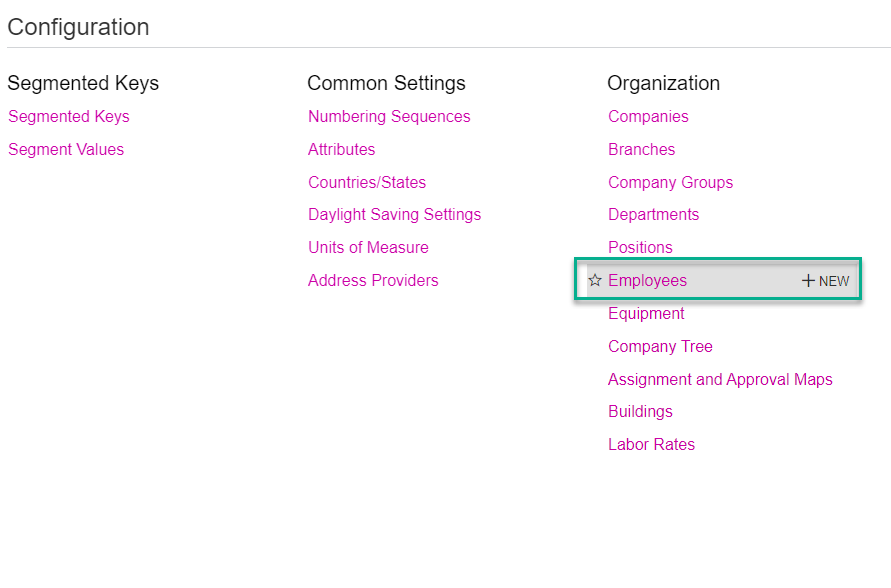
Ensure that the Employee is created in the system under the Employees under Configuration.

In previous versions, you had to have Delegates to enter time cards for Employees. In 2023R1, that is not the case. 

What version are you using?


Forum|alt.badge.img
  • Author
  • Freshman II
  • May 29, 2023

Dear @kandybeatty49 @Laura02 @manikantad18 . I created an employee and tag role employee by admin. That's so great. Thank you very much and have a good day.😍