



In Expense and Receipt screen (ScreenId=EP301020) “Project/Contract” field present.
User can select Projects.
In this selector popup we need to add customer name and service order nbr field.
I can add customer name but not service order nbr. (No error - No column)
Code for customization:
[PXDBInt]
        [PXUIField(DisplayName = "Project/Contract")]
        [PXDimensionSelector(ContractAttribute.DimensionName,
        typeof(Search2<Contract.contractID,
          LeftJoin<EPEmployeeContract, On<EPEmployeeContract.contractID, Equal<Contract.contractID>, And<EPEmployeeContract.employeeID, Equal<Current2<PX.Objects.EP.EPExpenseClaimDetails.employeeID>>>>,
                  LeftJoin<PMProject, On<PMProject.contractID, Equal<Contract.contractID>>,
              LeftJoin<PX.Objects.FS.FSServiceOrder, On<PX.Objects.FS.FSServiceOrder.projectID, Equal<Contract.contractID>>>>>,
           Where<Contract.isActive, Equal<True>,
         And<Contract.isCompleted, Equal<False>,
         And<Where<Contract.nonProject, Equal<True>,
           Or2<Where<Contract.baseType, Equal<CTPRType.contract>,
           And<FeatureInstalled<FeaturesSet.contractManagement>>>,
           Or<Contract.baseType, Equal<CTPRType.project>,
            And2<Where<Contract.visibleInEA, Equal<True>>,
           And2<FeatureInstalled<FeaturesSet.projectModule>,
           And2<Match<Current<AccessInfo.userName>>,
           And<Where<Contract.restrictToEmployeeList, Equal<False>,
           Or<EPEmployeeContract.employeeID, IsNotNull>>>>>>>>>>>>,
           OrderBy<Desc<Contract.contractCD>>>),
         typeof(Contract.contractCD),
         typeof(Contract.contractCD),
         typeof(Contract.description),
         typeof(Contract.customerID),
         typeof(PMProject.customerID_Customer_acctName),
         typeof(PX.Objects.FS.FSServiceOrder.refNbr),
         typeof(Contract.status),
         Filterable = true,
         ValidComboRequired = true,
         CacheGlobal = false,
        DescriptionField = typeof(Contract.description))]
        [ProjectDefault(BatchModule.EA, AccountType = typeof(EPExpenseClaimDetails.expenseAccountID))]
Outpout:
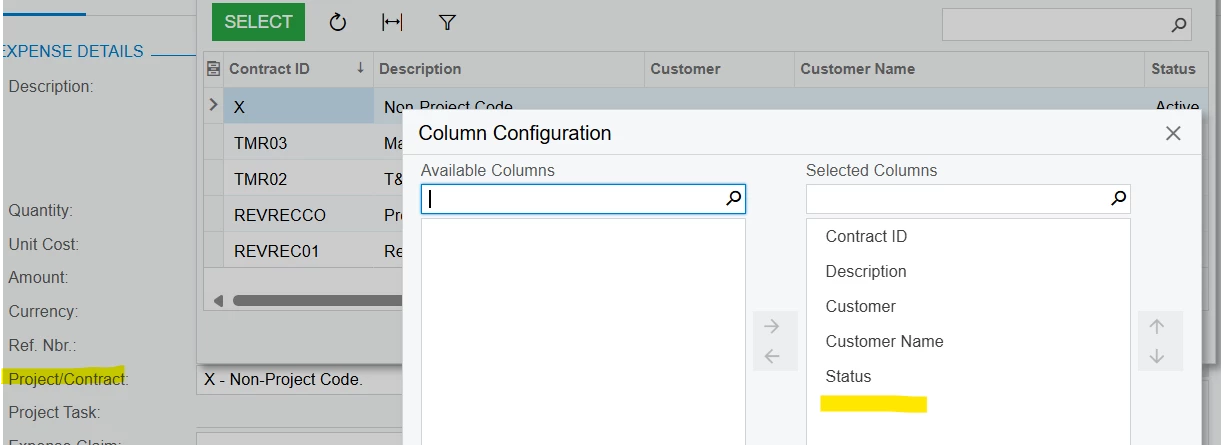
We can see that no column for refNbr.
