Answer

Selector User Field on Customer Screen, Data from EPEmployee (AcctCD) Not Loading

  • September 11, 2025
  • 7 replies
  • 70 views

Bravo94
Freshman I
Forum|alt.badge.img

Hello everyone,

I have created a custom field named `UsrPMV1` that should allow me to select an employee. This field has been added to the `BAccount` table and configured as a dropdown (`PXSelector`). It is supposed to fetch data from the `EPEmployee` class and display values from its `AcctCD` field.

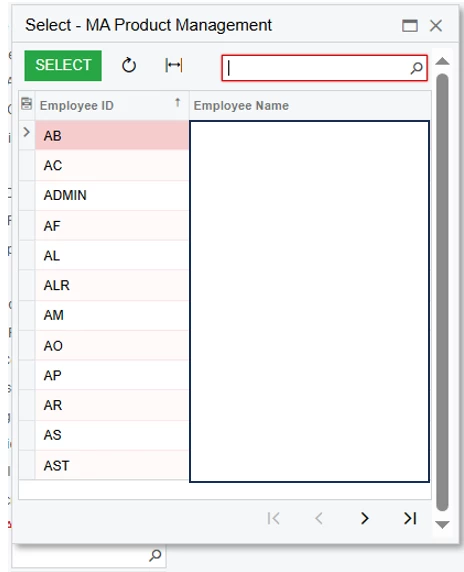
However, when I test it on the form, the dropdown remains empty.

Here is my current code:

namespace PX.Objects.CR
{
    public class BAccountCustomExt : PXCacheExtension<PX.Objects.CR.BAccount>
    {
        #region UsrPMV1
        [PXDBString(200)]
        [PXUIField(DisplayName = "MA Product Management")]
        [PXSelector(
            typeof(Search<EPEmployee.acctCD>),
            typeof(EPEmployee.acctCD),      
            typeof(EPEmployee.bAccountID),   
            SubstituteKey = typeof(EPEmployee.acctCD), 
            DescriptionField = typeof(EPEmployee.acctName) 
        )]
        public virtual string UsrPMV1 { get; set; }
        
        public abstract class usrPMV1 : PX.Data.BQL.BqlString.Field<usrPMV1> { }
        #endregion
    }
}


Does anyone know why my selector field remains empty? Did I miss something or forget any configuration?

My goal is for this field to allow assigning one employee (from EPEmployee) per customer. Additionally, when I'm in the Sales Order screen and select a customer, I want this custom userfield (UsrPMV1) to show which employee created that customer record.

Any help would be greatly appreciated!


Best answer by Abhishek Niikam

@Bravo94 I just noticed that you have to add PXSelector in ASPX to UsrPMV1 
Option 1 : You can edit in ASPX page
Option 2 : First remove field from Customization editor (just from layout like formView) & rebuild source code & then you can add field again from editor(it already selector when build without adding on screen)

and publish it.
I hope it helps!

7 replies

Forum|alt.badge.img+2

Hello ​@Bravo94
I think change your field from string to int?, and point the selector at EPEmployee.bAccountID.
Like following: 
#region UsrPMV1
        [PXDBInt] // Store EmployeeID (bAccountID)
        [PXUIField(DisplayName = "MA Product Management")]
        [PXSelector(
            typeof(Search<EPEmployee.bAccountID>),   // primary key search
            typeof(EPEmployee.acctCD),               // will display in dropdown
            typeof(EPEmployee.acctName),             // description
            SubstituteKey = typeof(EPEmployee.acctCD),
            DescriptionField = typeof(EPEmployee.acctName)
        )]
        public virtual int? UsrPMV1 { get; set; }

        public abstract class usrPMV1 : PX.Data.BQL.BqlInt.Field<usrPMV1> { }
        #endregion

and don’t forgot to change datatype of field in Database!

I hope it helps!


Bravo94
Freshman I
Forum|alt.badge.img
  • Author
  • Freshman I
  • September 11, 2025

Hi,


i deleted the user field and created it as int just to be sure.


but its not working


Forum|alt.badge.img+2

Hello ​@Bravo94 I tried in my instance & it shows like this:
 

Make sure you using proper reference
using PX.Objects.EP;

I hope it helps!


Forum|alt.badge.img+2
  • Jr Varsity II
  • Answer
  • September 11, 2025

@Bravo94 I just noticed that you have to add PXSelector in ASPX to UsrPMV1 
Option 1 : You can edit in ASPX page
Option 2 : First remove field from Customization editor (just from layout like formView) & rebuild source code & then you can add field again from editor(it already selector when build without adding on screen)

and publish it.
I hope it helps!


Bravo94
Freshman I
Forum|alt.badge.img
  • Author
  • Freshman I
  • September 11, 2025

.


Bravo94
Freshman I
Forum|alt.badge.img
  • Author
  • Freshman I
  • September 11, 2025

@Bravo94 I just noticed that you have to add PXSelector in ASPX to UsrPMV1 
Option 1 : You can edit in ASPX page
Option 2 : First remove field from Customization editor (just from layout like formView) & rebuild source code & then you can add field again from editor(it already selector when build without adding on screen)

and publish it.
I hope it helps!

it works with ASPX,


Thank u


PorchlightZach
Varsity III
Forum|alt.badge.img

I recently had to add something similar to our SOOrder dac so we could select employees in SOOrderEntry. 

My code looks pretty similar to yours, with the exception that I am using FBQL in the first param to only load employees that are Active. I don’t know how much this would change your chances of success but filtering with vStatus = CustomerStatus.active  is probably something you want if your company has ever had people leave.  

[PXDBInt]
[PXUIField(DisplayName = "Sales Person")]
[PXSelector(typeof(SearchFor<EPEmployee.bAccountID>.In<SelectFrom<EPEmployee>.Where<EPEmployee.vStatus.IsEqual<CustomerStatus.active>>>)
, typeof(EPEmployee.acctCD)
, typeof(EPEmployee.acctName)
, SubstituteKey = typeof(EPEmployee.acctName))]
public virtual int? UsrPBCSalesPersonID { get; set; }
public abstract class usrPBCSalesPersonID : PX.Data.BQL.BqlInt.Field<usrPBCSalesPersonID> { }


Given that you have a selector visible in the customized screen editor and it isn’t showing up when you view the actual screen, I wonder if there is some stale temporary code hanging around in the customization build folders? 

This has happened to me a few times in the past.  I’d make changes and they just wouldn’t show up and it was very confusing and made no sense.  If I removed the temporary customization files for the site it would sometimes fix the issue. 

It might be worth clearing those files out just to rule that out.  I do this by restarting IIS on my dev machine and then delete the folders in C:\Program Files\Acumatica ERP\Customization\<SITENAME>\. I usually keep the SITENAME directory in place and delete the two subdirectories inside. Your folder structure might be a little different but hopefully you know where to look. 

If I get any errors about files still in use, I restart IIS again and keep trying.  Of course, this only works when there is some kind of weird caching issue going on with building projects and there isn’t some other code related issue causing it.  Good luck!