


I'm experiencing an issue when updating a custom field (usrDebitAccount) on the Transfers screen (IN304000) within the Transfer Details grid, specifically in a Released document.
In the INTran_RowSelected event, I’ve enabled the custom field usrDebitAccount when the row is released, like this. I have also enabled the field from workflow as well.
protected void INTran_RowSelected(PXCache cache, PXRowSelectedEventArgs e, PXRowSelected InvokeBaseHandler)
{
    InvokeBaseHandler?.Invoke(cache, e);
    var row = (INTran)e.Row;
    if (row == null)
    {
        return;
    }

    if (row.Released == true)
    {
        Base.transfer.Cache.AllowUpdate = true;
        Base.transactions.Cache.AllowUpdate = true;

        PXUIFieldAttribute.SetEnabled<INTranExt.usrDebitAccount>(cache, row, true);

    }
}
The issue is:
-
When I change the value of
usrDebitAccounton a single row and try to save, the Save button appears enabled but it shows the below error message
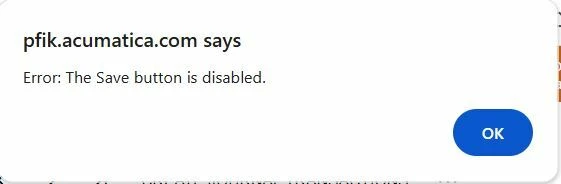
-
If I click ok button of above pop up error message and attempt to save a second time, the value gets saved correctly.
-
When I update the
usrDebitAccountfield across multiple rows, the Save button appears disabled and I can’t save at all.
Does anyone have a workaround or a recommended way to ensure the Save button is properly enabled after editing custom fields in a released document.?
Thanks




