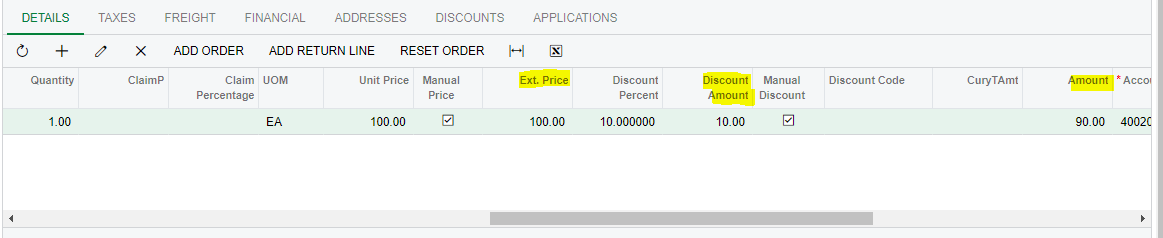
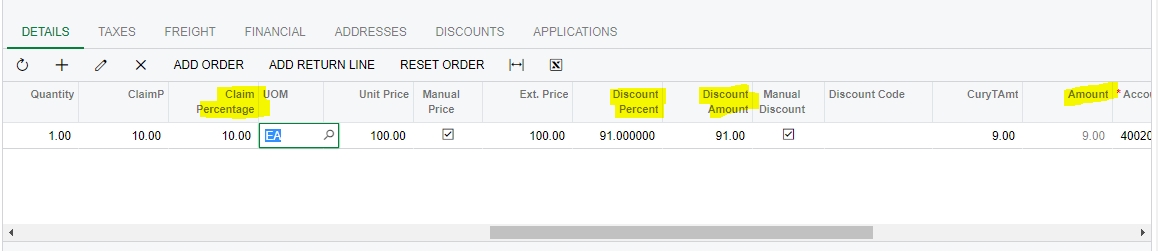
I had to add new field into SO303000 screen Detail Grid.
Field name - Claim Percentage
When the above filed is updated or entered amount need to be calculated like below formula.
Amount = Amount*(Claim Percentage/100)
When add the claim percentage without discount amount, It's calculations are okey.
In my case,After I have add the quantity,unit price and discount amount , the Amount shows below like that.
Then,I added the claim percentage.
When I add the claim percentage, Discount Amount,Discount percentage and Amount all the fields are changed.Why this is happened and how I resolve this?
Below I have attached my claim p field updated event.
The CuryTranAmt field in the ARTran DAC has multiple downstream effects because it's intrinsically linked to many calculations, especially when it comes to discounts.
When you modify CuryTranAmt, Acumatica recalculates other related fields, such as the discount amount, the discount percentage, etc., based on its in-built business logic. This is why changing the value of CuryTranAmt causes other fields to change unexpectedly.
Here's how you can approach this:
Explicitly Recalculate: After updating the CuryTranAmt, you may need to manually update the fields like discount amount, etc., based on your custom logic to ensure consistency.
Use Custom Fields: Instead of directly updating CuryTranAmt, consider storing the calculated value in a custom field. This way, you can show the updated value to the user without affecting other fields. This would be more of a "for display" field.
Review Calculations: Ensure that the way you calculate the CuryTranAmt is consistent with how Acumatica calculates other related fields. If the built-in calculations conflict with your custom logic, it can cause unexpected values.
Looking at your FieldUpdated event, I notice you're manipulating the CuryTranAmt directly. Instead, you should consider recalculating other fields as needed after your changes or, as mentioned, use a separate field for display.
Lastly, always ensure your custom logic doesn't contradict the standard Acumatica business logic. If it does, you might need to override or extend other events to ensure consistent behavior across your customizations.
the first line can be combined with the second and third to be this, because it’s all multiplication and division, which doesn’t matter in which order you do it
The CuryTranAmt field in the ARTran DAC has multiple downstream effects because it's intrinsically linked to many calculations, especially when it comes to discounts.
When you modify CuryTranAmt, Acumatica recalculates other related fields, such as the discount amount, the discount percentage, etc., based on its in-built business logic. This is why changing the value of CuryTranAmt causes other fields to change unexpectedly.
Here's how you can approach this:
Explicitly Recalculate: After updating the CuryTranAmt, you may need to manually update the fields like discount amount, etc., based on your custom logic to ensure consistency.
Use Custom Fields: Instead of directly updating CuryTranAmt, consider storing the calculated value in a custom field. This way, you can show the updated value to the user without affecting other fields. This would be more of a "for display" field.
Review Calculations: Ensure that the way you calculate the CuryTranAmt is consistent with how Acumatica calculates other related fields. If the built-in calculations conflict with your custom logic, it can cause unexpected values.
Looking at your FieldUpdated event, I notice you're manipulating the CuryTranAmt directly. Instead, you should consider recalculating other fields as needed after your changes or, as mentioned, use a separate field for display.
Lastly, always ensure your custom logic doesn't contradict the standard Acumatica business logic. If it does, you might need to override or extend other events to ensure consistent behavior across your customizations.