



Answer

Row data disappears after processing

  • September 22, 2022
  • 4 replies
  • 118 views

darylbowman
Captain II
Forum|alt.badge.img+15

I created a custom processing screen with the following data view:

public SelectFrom<INLocationStatus>.
InnerJoin<InventoryItem>.
On<InventoryItem.inventoryID.IsEqual<INLocationStatus.inventoryID>>.
Where<
Brackets<INLocationStatus.siteID.IsEqual<PrintLabelsFilter.siteID.FromCurrent>.
Or<PrintLabelsFilter.siteID.FromCurrent.IsNull>>.
And<Brackets<INLocationStatus.locationID.IsEqual<PrintLabelsFilter.locationID.FromCurrent>.
Or<PrintLabelsFilter.locationID.FromCurrent.IsNull>>>.
And<Brackets<InventoryItem.itemClassID.IsEqual<PrintLabelsFilter.itemClassID.FromCurrent>.
Or<PrintLabelsFilter.itemClassID.FromCurrent.IsNull>>>>.
ProcessingView.FilteredBy<PrintLabelsFilter> Items;

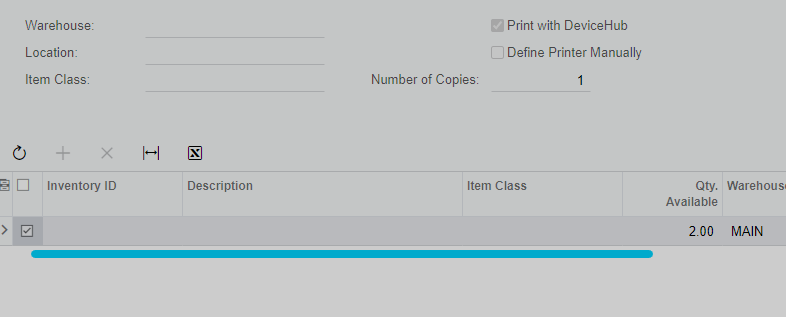
The view displays great and it processing like expected. However, when the processing has finished, the rows that were processed display, but there is data missing from the joined tables.

Does anyone know why this happens?
 

Best answer by jinin

Hi @darylbowman 

We can use projection View and DAC. That is a good approach. Please try with Projection.

4 replies

jinin
Pro I
Forum|alt.badge.img+11
  • Pro I
  • September 22, 2022

Hi @darylbowman 

If we use the Join, the data disappears after the process. Better you can create an Unbound DAC and add all the required fields and insert the record into the DAC. Load the data in the grid using the Unbound DAC. So all the data will load and not vanish after the process also.


darylbowman
Captain II
Forum|alt.badge.img+15
  • Author
  • September 22, 2022

I’m curious if this is just a known workaround or an accepted practice? It feels like a bug.


jinin
Pro I
Forum|alt.badge.img+11
  • Pro I
  • September 22, 2022

Hi @darylbowman 

May be its a bug. I did this workaround to resolve the problem. 😉


jinin
Pro I
Forum|alt.badge.img+11
  • Pro I
  • Answer
  • September 23, 2022

Hi @darylbowman 

We can use projection View and DAC. That is a good approach. Please try with Projection.
