

Answer

Replacement of StateColumn property of PXToolBarButton in Modern UI

  • April 28, 2025
  • 8 replies
  • 122 views

Forum|alt.badge.img

StateColumn property of PXToolBarButton,


it disable the custom action button on grid header based on assign field value true/false, in Modern UI is there any substitute code or solution


Best answer by aiwan

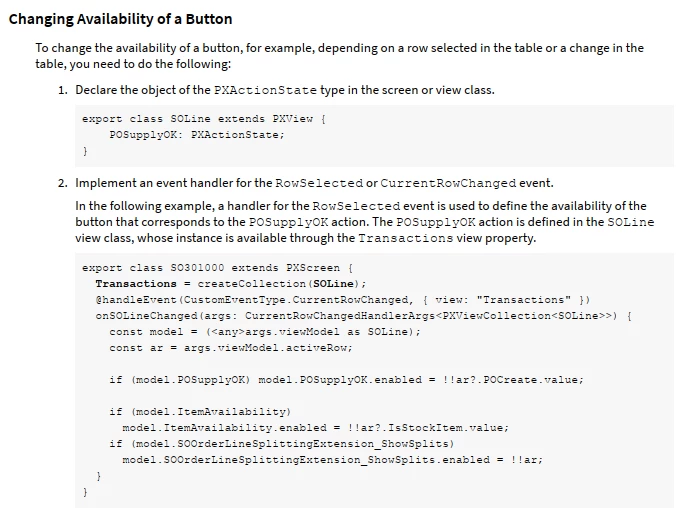
This should help, from the T290 training course 
 

8 replies

Forum|alt.badge.img+8
  • Captain II
  • April 28, 2025

@ashrivastava42 


Have you tried to control this visibility from the graph?


Forum|alt.badge.img
  • Author
  • Freshman I
  • April 28, 2025

No idea, can you share any code snippet or online article or example for this, 


Forum|alt.badge.img+8
  • Captain II
  • April 28, 2025

You can use a RowSelected event handler to handle the visibility.

Something like this:

 protected virtual void _(Events.RowSelected<CRQuote> e, PXRowSelected b)
{
CRQuote row = e.Row;//Get current record
if(row == null) return;

b?.Invoke(e.Cache, e.Args);// Invoke base handler

UpdateCosts.SetEnabled(row.Status == "D");//Set enabled for the action based on a boolean expression
}


Forum|alt.badge.img
  • Author
  • Freshman I
  • April 28, 2025

Thanks for your reply, yes I have used and its working in aspx (classic UI) but I am locking for Acumatica Modern UI (html or typescript) there is not working after converting into modern ui screen


Forum|alt.badge.img+8
  • Captain II
  • April 29, 2025

It should work identically for the modern ui.


Can you share your .ts and .html?


Forum|alt.badge.img
  • Author
  • Freshman I
  • April 29, 2025

CreateVendorShipment  is a method(buttom) which need to enable/disable on OutsideProcess field value, it is true/false

----------ts file---------------------

export class EWPMBatchProcessStep2 extends PXView  {


    CreateVendorShipment : PXActionState;

    CreatePurchaseOrder : PXActionState;


    @columnConfig({width: 70})  BatchProcessStepCD : PXFieldState<PXFieldOptions.CommitChanges>;

    @columnConfig({textAlign: TextAlign.Center, type: GridColumnType.CheckBox}) OutsideProcess : PXFieldState<PXFieldOptions.CommitChanges>;

    @columnConfig({textAlign: TextAlign.Center, type: GridColumnType.CheckBox}) DropShippedToVendor : PXFieldState;

    @columnConfig({hideViewLink: true, textAlign: TextAlign.Left})  VendorID : PXFieldState;

    @columnConfig({hideViewLink: true, textAlign: TextAlign.Left})  VendorLocationID : PXFieldState;

    @columnConfig({textAlign: TextAlign.Right}) AMProdOper__QtytoProd : PXFieldState;

    @columnConfig({textAlign: TextAlign.Right}) AMProdMatl__QtyReq : PXFieldState;

    @columnConfig({textAlign: TextAlign.Right}) AMProdOper__ShippedQuantity : PXFieldState;

    @columnConfig({textAlign: TextAlign.Right}) AMProdOper__ShipRemainingQty : PXFieldState;

    @columnConfig({textAlign: TextAlign.Right}) AMProdOper__AtVendorQuantity : PXFieldState;

    @columnConfig({textAlign: TextAlign.Right}) AMProdOper__QtyComplete : PXFieldState;

    @columnConfig({hideViewLink: true, textAlign: TextAlign.Right}) AMProdOper__POOrderNbr : PXFieldState;

    @columnConfig({textAlign: TextAlign.Right}) AMProdOper__POLineNbr : PXFieldState;

}

--------------------------------Html---------------------------

<qp-tab id="PXTab1_9" caption="Outside Process">

         <qp-grid id="OutsideProcessSteps_gridOutsideProcess" wg-container="OutsideProcessSteps_gridOutsideProcess" view.bind="OutsideProcessSteps"></qp-grid>

    </qp-tab>


Forum|alt.badge.img+8
  • Captain II
  • Answer
  • April 29, 2025

This should help, from the T290 training course 


Forum|alt.badge.img
  • Author
  • Freshman I
  • April 29, 2025

Thanks, this works for me
