

Answer

Question about adding Fields to Mobile App

  • November 5, 2024
  • 3 replies
  • 95 views

Forum|alt.badge.img+1

Very simple Request, adding the GL Account and Subaccount to the Details Section for the Bills and Adjustments when accessing through Approvals.
Here is my attempt to add both ID and Description:
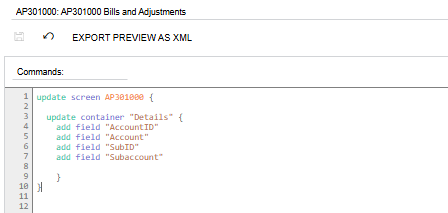
 

“Account” and “Subaccount” are the only ones added and it is the Description that’s displayed rather than the ID. 
Tried a few different things without success. I always get the Description rather than the actual Account Number. 
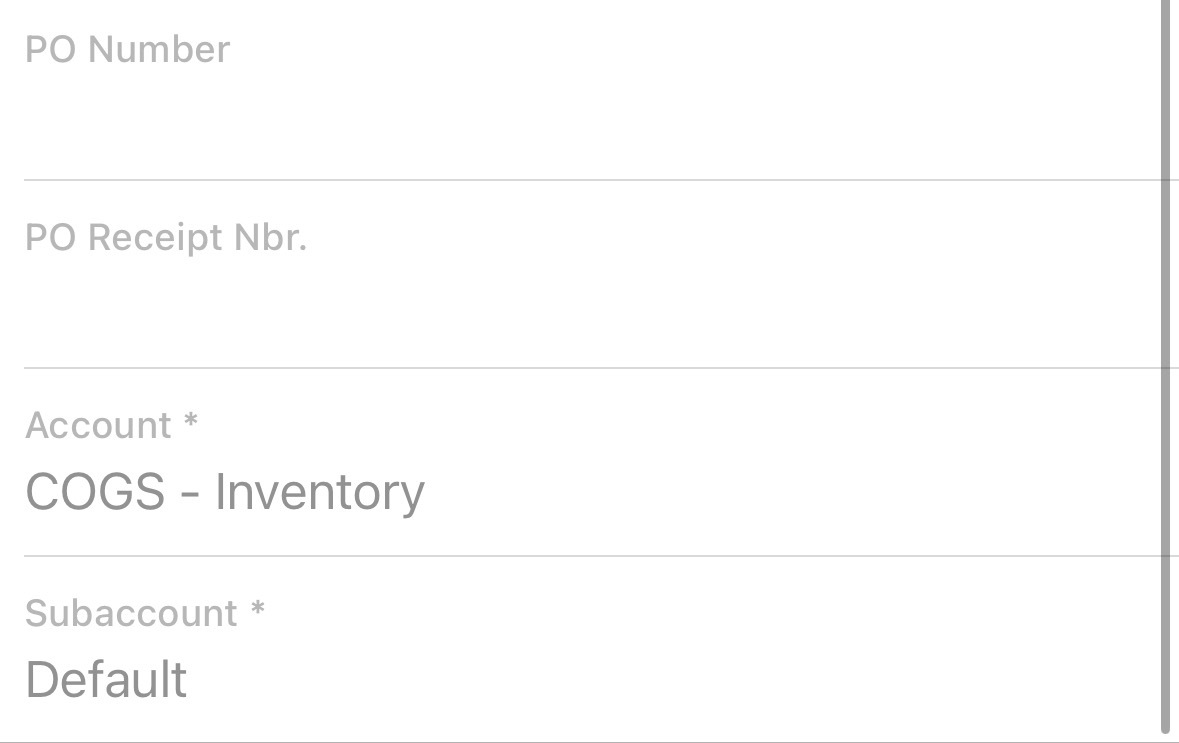
Any ideas?
 

Best answer by dcomerford

@krausef77 try this the AccountID and SubID are not fields.


Update container “Details” {

add field “Account” {

selectorDisplayFormat = Key }

add field “Subaccount {

selectorDisplayFormat = Key }

}

3 replies

Forum|alt.badge.img
  • Freshman II
  • March 17, 2025

Hello, did you find a solution for this? I am actually wondering why these fields aren’t displayed out-of-box, too. 


dcomerford
Captain II
Forum|alt.badge.img+15
  • Captain II
  • Answer
  • March 17, 2025

@krausef77 try this the AccountID and SubID are not fields.


Update container “Details” {

add field “Account” {

selectorDisplayFormat = Key }

add field “Subaccount {

selectorDisplayFormat = Key }

}


Forum|alt.badge.img+1
  • Author
  • Semi-Pro II
  • March 24, 2025

@krausef77 try this the AccountID and SubID are not fields.


Update container “Details” {

add field “Account” {

selectorDisplayFormat = Key }

add field “Subaccount {

selectorDisplayFormat = Key }

}

Thank you, this is exactly how I solved for it.
Never a day where you don’t learn something new.

Appreciate your input!

