


Answer

PXFilterProcessing selector pulling from a DateTime field

  • July 6, 2022
  • 6 replies
  • 184 views

Joe Schmucker
Captain II
Forum|alt.badge.img+3

I have a processing screen that pulls records based on a date range.  

        public PXFilteredProcessing<AuditHistory, QTCAuditHistoryReportFilter, 
            Where<AuditHistory.screenID.IsEqual<QTCAuditHistoryReportFilter.screenID.FromCurrent>.
                And<AuditHistory.changeDate.IsBetween<QTCAuditHistoryReportFilter.startDate.FromCurrent, QTCAuditHistoryReportFilter.endDate.FromCurrent>>>> RecordsToProcess;
 

The filter screen looks like this.
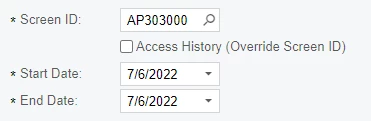
 

The problem is that if there is a record in the AuditHistory table with a change date of

2022-07-06 21:44:08.583 it won’t get selected.  I need my selector to just look for the DATE portion and ignore the time portion.  

Is there something I can do in my selector to just use the Date portion?

Best answer by Naveen Boga

Hi @joe21 To get those records, you can have a view delegate like below and verify.


 protected virtual IEnumerable recordsToProcess()
        {
            QTCAuditHistoryReportFilter filter = Filter.Current;
            if (filter != null && !string.IsNullOrEmpty(filter.ScreenID) && filter.StartDate != null && filter.EndDate != null)
            {
                PXSelectBase<AuditHistory> preparedorder = new PXSelect<AuditHistory, 
                                                      Where<AuditHistory.screenID, Equal<Required<AuditHistory.screenID>>,
                                                      And<AuditHistory.changeDate,GreaterEqual<Required<AuditHistory.changeDate>>,
                                                      And<AuditHistory.changeDate, Less<Required<AuditHistory.changeDate>>>>>>(this);
                return preparedorder.Select(filter.ScreenID, filter.StartDate, filter.EndDate.Value.AddDays(1).AddTicks(-1));

}
}


6 replies

Leonardo Justiniano
Jr Varsity II
Forum|alt.badge.img+4

Hi @joe21 


This article might help you dealing with Dates in BQL


https://stackoverflow.com/questions/27726383/does-bql-allow-for-datepart


Naveen Boga
Captain II
Forum|alt.badge.img+19
  • Captain II
  • Answer
  • July 6, 2022

Hi @joe21 To get those records, you can have a view delegate like below and verify.


 protected virtual IEnumerable recordsToProcess()
        {
            QTCAuditHistoryReportFilter filter = Filter.Current;
            if (filter != null && !string.IsNullOrEmpty(filter.ScreenID) && filter.StartDate != null && filter.EndDate != null)
            {
                PXSelectBase<AuditHistory> preparedorder = new PXSelect<AuditHistory, 
                                                      Where<AuditHistory.screenID, Equal<Required<AuditHistory.screenID>>,
                                                      And<AuditHistory.changeDate,GreaterEqual<Required<AuditHistory.changeDate>>,
                                                      And<AuditHistory.changeDate, Less<Required<AuditHistory.changeDate>>>>>>(this);
                return preparedorder.Select(filter.ScreenID, filter.StartDate, filter.EndDate.Value.AddDays(1).AddTicks(-1));

}
}


Joe Schmucker
Captain II
Forum|alt.badge.img+3
  • Author
  • Captain II
  • July 6, 2022

Hi @Naveen Boga 

I put the code in and it compiles.  How does this method get called?  I mean, how do I actually implement that?  If you get a chance, I have another topic where I’m trying to get my processing delegate to fire.

This code you provided would need to be part of that solution.  If you can look at that, I’d be much obliged.


Leonardo Justiniano
Jr Varsity II
Forum|alt.badge.img+4

Hi @joe21 

Acumatica handles IEnumerable by having methods with the same name as the view. In your case your processing view is RecordsToProcess. The respective view method is recordsToProcess (with lower case).

@Naveen Boga is also correct in proposing this approach as you can handle the data that is delivered when the view is invoked.


Naveen Boga
Captain II
Forum|alt.badge.img+19
  • Captain II
  • July 6, 2022

@joe21  View Delegates will be invoked for every action that is performed for the VIEW.


In this case, as soon as you select the FromDate/ToDate/Screen ID is selected on the screen, View Delegate will invoke and execute the BQL.


Joe Schmucker
Captain II
Forum|alt.badge.img+3
  • Author
  • Captain II
  • July 6, 2022

Thanks guys for the quick support.  Thanks @Naveen Boga  for the code (which works great!) and @Leonardo Justiniano  for explaining WHY it works!!

