Solved

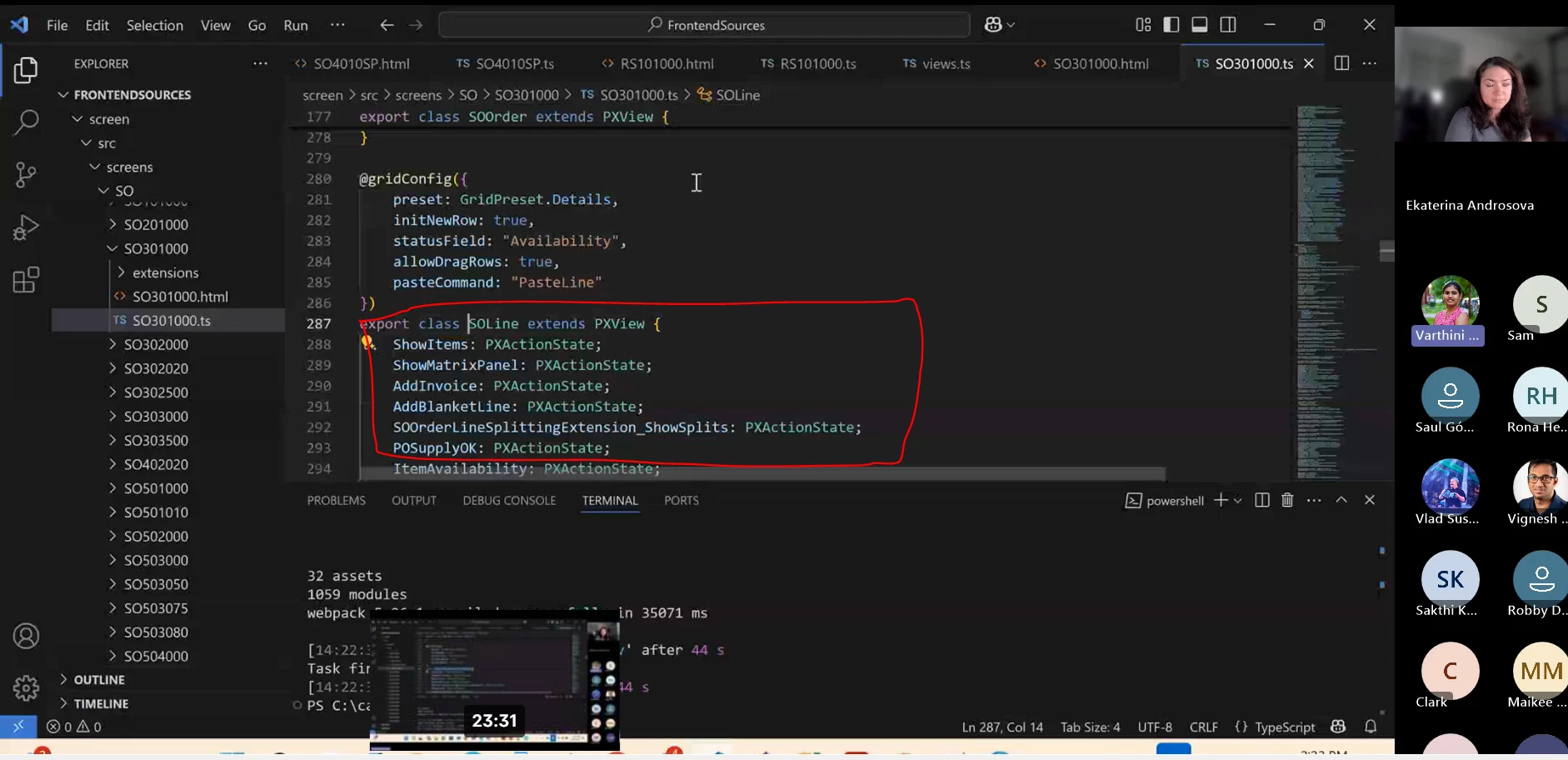
PXAction created on Graph ext Show on Modern UI grid Header

  • April 30, 2025
  • 7 replies
  • 180 views

Forum|alt.badge.img

I have create an action with PXAction on my Graph extension, I am trying to add this action on the grid header, after converting code to Modern UI, it is not showing on grid Header, although I have verified this action is added in view class in ts file like…

--------------------ts file------------------

export class EWPM3030 extends PXScreen {

BatchFormulaMaterials = createCollection(BatchMatl);

}

export class BatchMatl extends PXView  {

    AddPackagingMatl: PXActionState;

}

---------------html---------------

<qp-grid id="FormulaMaterials_gridMatl" statusField="Availability" view.bind="BatchFormulaMaterials"></qp-grid>


please let me know if anything is more required

Best answer by aiwan

My apologies ​@ashrivastava42, I was confused by the ‘Header’ part in your question.


Once you have added the PXActionState I believe you need to add @gridConfig({})

Something like this:

@gridConfig({ 
topBarItems: {
index: 0,
config: {
commandName: "YourActionName",
text: "YourActionUIName",
}
}
}

They might provide a better explanation within the video, alternatively the T290 course should provide some good guidance.

7 replies

Forum|alt.badge.img+9
  • Captain II
  • April 30, 2025

Hi ​@ashrivastava42 


From my understanding, you should not need to declare the PXActionState for a graph action.

Refer to below video which explains the Modern UI.

Save the date: Coffee & Code - Modern UI Apr 22 | Community


Forum|alt.badge.img

Thanks for sharing link, as of my best understanding want to clear two things

1) use for view class instead of graph (screen class)

export class BatchMatl extends PXView  {

    AddPackagingMatl: PXActionState;

}

2) there is also declare the PXActionState in view class, refer to shared video


please suggest 


Forum|alt.badge.img+9
  • Captain II
  • May 1, 2025

That is because the actions are being used on toolbar grids rather than the form header.


Forum|alt.badge.img

Yes, I need to used button on toolbar grids, and I define it on the view class and I am facing issue in only Modern UI 

on my classic UI structure

in C# file this respective PXAction define my Graph extension file using 

public class MyGraphExt: PXGraphExtension<MyGraph>{

public PXAction<EWPMBatchEntry> AddFormulaMatl;

}

in the aspx file we use below code with <px:PXGrid>

<px:PXToolBarButton runat="server" Text="ADD ALL MATERIAL" CommandName="AddFormulaMatl" CommandSourceID="ds"> 
<AutoCallBack>
       <Behavior CommitChanges="True" PostData="Page"></Behavior>
</AutoCallBack>
</px:PXToolBarButton>


I think I have explained my problem, please let me know anything is missed 


Forum|alt.badge.img+9
  • Captain II
  • Answer
  • May 1, 2025

My apologies ​@ashrivastava42, I was confused by the ‘Header’ part in your question.


Once you have added the PXActionState I believe you need to add @gridConfig({})

Something like this:

@gridConfig({ 
topBarItems: {
index: 0,
config: {
commandName: "YourActionName",
text: "YourActionUIName",
}
}
}

They might provide a better explanation within the video, alternatively the T290 course should provide some good guidance.


Joe Schmucker
Captain II
Forum|alt.badge.img+3

I have the same issue.  The action is not showing in the grid menu.

Where do I put the code as provided by ​@aiwan?

This is the automatically created code.  My Allocation ID field shows in the grid.  I just don’t know how to put in the code shown as the answer to this.  My action name in the graph extension is AllocateLine.

(ALL THE OTHER IMPORTS EXCLUDED FOR BREVITY)

import { AP301000, APTran } from "src/screens/AP/AP301000/AP301000";

export interface AP301000_ICSAllocations_converted extends AP301000 {}

export class AP301000_ICSAllocations_converted {
AllocateLine: PXActionState;
}

export interface AP301000_APTran_ICSAllocations_converted extends APTran { }
export class AP301000_APTran_ICSAllocations_converted {
@placeAfterProperty("CuryLineAmt")
@columnConfig({
editorConfig: {
allowEdit: true,
parameters: null,
},
width: 140,
})
UsrAllocationID: PXFieldState<PXFieldOptions.CommitChanges>;

@placeAfterProperty("UsrAllocationID")
DiscPct: PXFieldState<PXFieldOptions.CommitChanges>;
}


Joe Schmucker
Captain II
Forum|alt.badge.img+3

Here is what I did to add the action to the grid toolbar.  It is a little different than the solution provided above.


export interface AP301000_APTran_ICSAllocations_converted extends APTran { }
@gridConfig({
    topBarItems: {
        AddNew: { index: 0, config: { commandName: "AllocateLine", text: "Allocate Line" } }
    }
})