Answer

Publish two projects on the same screen

  • November 9, 2020
  • 7 replies
  • 486 views

SadokHanini
Freshman II

I’m trying to publish two projects on the same screen but im getting this error 
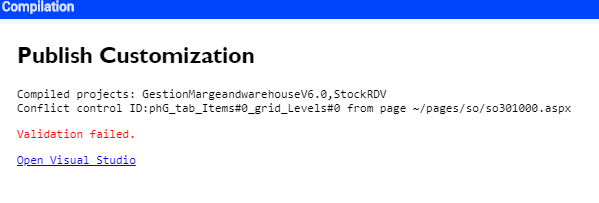
Should i merge the two projects or there’s another solution ?


Thanks :)

Best answer by SadokHanini

Hi @SadokHanini,

We can do this in 2 different ways.

  1. You can merge the code into a single package
  2. Still, you can have 2 different packages, by providing the different graph extension names like below.
    1. SOOrderEntryAAAExt
    2. SOOrderEntryBBBExt.

From Package 1:

 public class SOOrderEntryAAAExt : PXGraphExtension<SOOrderEntry>

{ }

From Package 2:

 public class SOOrderEntryBBBExt : PXGraphExtension<SOOrderEntry>

{

}

Best Regards,

Naveen B

Perfect !!

7 replies

Naveen Boga
Captain II
Forum|alt.badge.img+19
  • Captain II
  • November 9, 2020

Hi @SadokHanini,


Please provide different levels to the packages and publish them again.


Best Regards,

Naveen B


SadokHanini
Freshman II
  • Author
  • Freshman II
  • November 9, 2020

Hi @SadokHanini,


Please provide different levels to the packages and publish them again.


Best Regards,

Naveen B

i tried this solution, yes i dont have anymore an error but only the project with higher level works


Naveen Boga
Captain II
Forum|alt.badge.img+19
  • Captain II
  • November 9, 2020

Hi @SadokHanini,

When we customize the same screen in different packages, while publishing will get this issue. When we provide the levels to these packages according to our customizations, then this will resolve customization will works as expected! 

Best Regards,
Naveen B


Gabriel Michaud
Captain II
Forum|alt.badge.img+11

Hi @SadokHanini,


Please provide different levels to the packages and publish them again.


Best Regards,

Naveen B

i tried this solution, yes i dont have anymore an error but only the project with higher level works
 

@SadokHanini do you happen to have a graph extension with the same file name in two projects? That could explain why only one works. 


SadokHanini
Freshman II
  • Author
  • Freshman II
  • November 10, 2020

Hi @SadokHanini,


Please provide different levels to the packages and publish them again.


Best Regards,

Naveen B

i tried this solution, yes i dont have anymore an error but only the project with higher level works
 

@SadokHanini do you happen to have a graph extension with the same file name in two projects? That could explain why only one works. 

Yes exactly, in this case i need to merge them ? or there’s a solution .


Naveen Boga
Captain II
Forum|alt.badge.img+19
  • Captain II
  • November 10, 2020

Hi @SadokHanini,

We can do this in 2 different ways.

  1. You can merge the code into a single package
  2. Still, you can have 2 different packages, by providing the different graph extension names like below.
    1. SOOrderEntryAAAExt
    2. SOOrderEntryBBBExt.

From Package 1:

 public class SOOrderEntryAAAExt : PXGraphExtension<SOOrderEntry>

{ }

From Package 2:

 public class SOOrderEntryBBBExt : PXGraphExtension<SOOrderEntry>

{

}

Best Regards,

Naveen B


SadokHanini
Freshman II
  • Author
  • Freshman II
  • Answer
  • November 10, 2020

Hi @SadokHanini,

We can do this in 2 different ways.

  1. You can merge the code into a single package
  2. Still, you can have 2 different packages, by providing the different graph extension names like below.
    1. SOOrderEntryAAAExt
    2. SOOrderEntryBBBExt.

From Package 1:

 public class SOOrderEntryAAAExt : PXGraphExtension<SOOrderEntry>

{ }

From Package 2:

 public class SOOrderEntryBBBExt : PXGraphExtension<SOOrderEntry>

{

}

Best Regards,

Naveen B

Perfect !!