

Answer

Publish to multiple instances confusion

  • April 25, 2025
  • 3 replies
  • 156 views

Forum|alt.badge.img+1

Hello, 

I have a customisation which is already published on one tenant and I would like to publish it to other tenants. 

The customisation contains files, sql scripts, generic inquires and site maps, and if I install on the current tenant I understand that:
Files (such as dlls) are stored central and will affect all tenants.
Sql scripts will affect the database which all tenants share.
Generic inquiries and site maps will only affect the current tenant, and not be seen on other tenants. 

This is all quite painful and sharing dll files across a live and test tenant makes testing in a test tenant very difficult. But that’s how it is.

The site has about 20 customisations, and I want to publish one of them to the other tenants. 
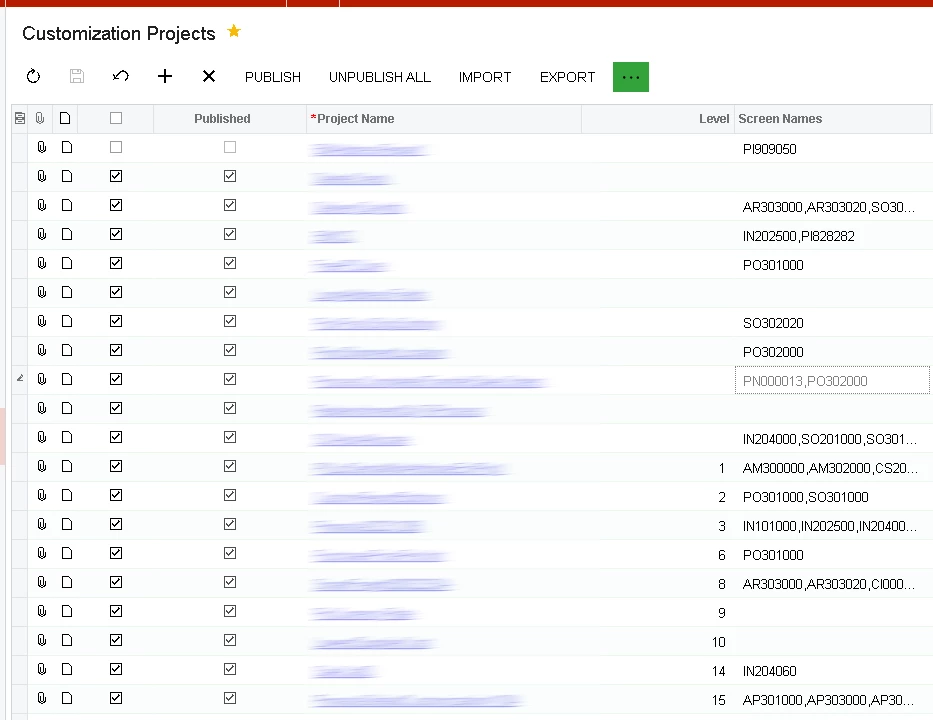

The only option seems to be to use the ‘Publish to Multiple Tenants’. When I click this I see the following pop up window. 
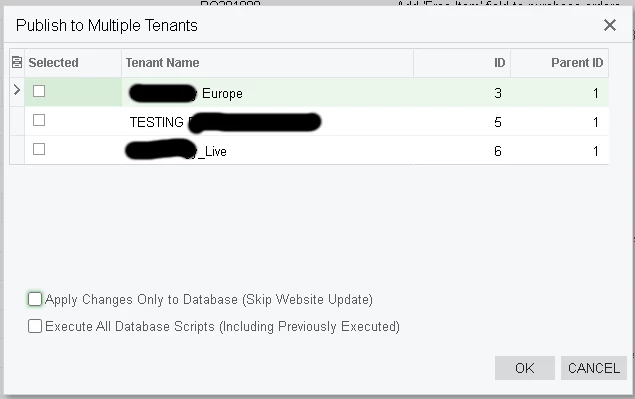
But I’m not sure what happens next, the screen allows me to select Tenants, but I’ve not been able select which Customisations will be published to these tenants. I certainly don’t want to publish all customisations to all tenants. 

Can anyone assist please?

Best answer by harutyungevorgyan

Hi ​@harutyungevorgyan , thanks for your reply, the explanation is much appreciated. I have been thinking about adding the ability to switch features on/off within code and receiving this type of detail is very useful. 

However, the issue I’m struggling with is the with the ‘Publish to Multiple Tenants’ option. Is it possible to publish just one customisation to multiple tenants, or will Acumatica attempt to publish all customisations to all tenants?

I don’t want to publish all GIs, Reports, and Sitemaps for all customisation to other tenants, but I think this is what is going to happen.  

Acumatica will only publish the customization packages you’ve selected — but during that process, it will also unpublish any previously published packages that are not selected.

So the best approach is to first publish to all tenants with the shared packages, and then select only the tenant-specific packages and run a simple publish again. That way, you ensure each tenant has exactly what it needs, without affecting others.

3 replies

harutyungevorgyan
Jr Varsity I
Forum|alt.badge.img+2

Hello ​@stephenward03 ,

Really interesting question — this kind of use case definitely deserves a place in Acumatica ERP workflows.

I completely understand your concern about testing a customization package. Ideally, testing should happen in a dedicated test or sandbox instance. And even if you don’t have an additional license, you can always spin up a local instance with the SalesDemo data for that purpose.

However, it’s worth noting that you are allowed to test a package on your live environment, as long as it’s in a separate tenant and does not yet affect production users.

You also correctly pointed out that Acumatica uses a centralized DLL structure — there’s only one Bin folder for the whole site, and any DLLs you publish will be shared across all tenants.

In this case, the cleanest approach is to control feature activation via a simple checkbox.

Here’s how you can do it:

  1. Add a checkbox on a relevant setup screen (it can be global or tenant-specific).

  2. Enable this checkbox only for the tenants where you want the code to be active.

  3. In your Graph or Cache Extensions, use the IsActive() method to check the checkbox's value.

  4. For custom DACs or Graphs, you can use a check in the constructor, just like Acumatica does with graphs, which require some data from preferences.

If the feature isn't enabled, you can throw a PXSetupNotEnteredException like this:
 

throw new PXSetupNotEnteredException<YourDAC>("Your custom message here");

This pattern gives you full control over which tenants run your custom logic, even though the DLLs are shared.


Forum|alt.badge.img+1
  • Author
  • Varsity III
  • April 25, 2025

Hi ​@harutyungevorgyan , thanks for your reply, the explanation is much appreciated. I have been thinking about adding the ability to switch features on/off within code and receiving this type of detail is very useful. 

However, the issue I’m struggling with is the with the ‘Publish to Multiple Tenants’ option. Is it possible to publish just one customisation to multiple tenants, or will Acumatica attempt to publish all customisations to all tenants?

I don’t want to publish all GIs, Reports, and Sitemaps for all customisation to other tenants, but I think this is what is going to happen.  


harutyungevorgyan
Jr Varsity I
Forum|alt.badge.img+2

Hi ​@harutyungevorgyan , thanks for your reply, the explanation is much appreciated. I have been thinking about adding the ability to switch features on/off within code and receiving this type of detail is very useful. 

However, the issue I’m struggling with is the with the ‘Publish to Multiple Tenants’ option. Is it possible to publish just one customisation to multiple tenants, or will Acumatica attempt to publish all customisations to all tenants?

I don’t want to publish all GIs, Reports, and Sitemaps for all customisation to other tenants, but I think this is what is going to happen.  

Acumatica will only publish the customization packages you’ve selected — but during that process, it will also unpublish any previously published packages that are not selected.

So the best approach is to first publish to all tenants with the shared packages, and then select only the tenant-specific packages and run a simple publish again. That way, you ensure each tenant has exactly what it needs, without affecting others.
