Answer

Project Pro forma Custom fields enabled when status is closed

  • September 9, 2024
  • 13 replies
  • 189 views

lbarker
Semi-Pro II
Forum|alt.badge.img+3

I have managed to add two custom fields to the Line details (Time and Material) of the pro forma screen.

We need them to be editable once the status is closed, but in doing so using code, all the fields are editable which is a bit dangerous as the invoice is already released. 

I then checked the workflow and it has no setting for disabling all the Pro Forma Line line (All Fields) in the Closed Status.  I thought, lets add it.  Still all are editable.


Really need to stop all the other fields from being editable so hoping for some help here.


My code:

  public class ProformaEntry_Extension : PXGraphExtension<PX.Objects.PM.ProformaEntry>
  {
    #region Event Handlers

    protected void PMProformaTransactLine_RowSelected(PXCache cache, PXRowSelectedEventArgs e)
    {
      
      var row = (PMProformaTransactLine)e.Row;
      
    if (row == null) return;
        cache.AllowUpdate = true;
       PXUIFieldAttribute.SetEnabled(cache, row, true);
       PXUIFieldAttribute.SetEnabled<PMProformaLineExt.usrMAnoteID>(cache, row, true);
        PXUIFieldAttribute.SetEnabled<PMProformaLineExt.usrMAflag>(cache, row, true);

      

Best answer by lbarker

Looks like the system marked it as answered but I have tried your suggestions and no luck. 

The entire line is still enabled.  Will keep investigating it with my dev team as as not wanting all the fields editable as too dangerous.

Thanks for your advise so far, appreciate it.

13 replies

jinin
Pro I
Forum|alt.badge.img+11
  • Pro I
  • September 9, 2024

Hi @lbarker ,

We can enable the fields using workflow. 

Please refer to the below link
2021 R1 Enable Locked Fields | Community (acumatica.com)


lbarker
Semi-Pro II
Forum|alt.badge.img+3
  • Author
  • Semi-Pro II
  • September 9, 2024

That did not work, hence why I did code for this screen.  


Forum|alt.badge.img+7
  • Captain II
  • September 9, 2024

This blog post has slightly different code than you have (aside from running on a different graph). Naveen is setting Base.Document.Cache.AllowUpdate to true along with Base.Transactions.Cache. But he is not calling SetEnabled on the whole row, just the required fields.

He also mentioned needing to do changes in the workflow as well.

Hopefully that helps!


https://asiablog.acumatica.com/2021/10/enable-customization-fields-when-document-is-completed.html


lbarker
Semi-Pro II
Forum|alt.badge.img+3
  • Author
  • Semi-Pro II
  • September 10, 2024

Thanks so much but it also does not work, as if I don’t enable the row first, it leaves the custom fields disabled so something is different with this screen, so this was the only solution.   

Hoping someone worked out how to do this on this screen.


Forum|alt.badge.img+8
  • Captain II
  • September 10, 2024

Hi @lbarker 

Have you tried:

if(row.Status != “C”)

{

PXUIFieldAttribute.SetEnabled(cache, row, true);

       PXUIFieldAttribute.SetEnabled<PMProformaLineExt.usrMAnoteID>(cache, row, true);

        PXUIFieldAttribute.SetEnabled<PMProformaLineExt.usrMAflag>(cache, row, true);

}


Also, if this is not a custom screen, you should override the event handler e.g., _(Events.RowSelected<PMProformaTransactLine> e, PXRowSelected b)


Hope this helps!

Aleks


Forum|alt.badge.img+8
  • Captain II
  • September 16, 2024

Hi @lbarker 


You will also need to add the following line into your code to get the DAC extension.

PMProformaTransactLine rowExt = PXCache<PMProformaTransactLine>.GetExtension<PMProformaTransactLineExt>(row);


Aleks


lbarker
Semi-Pro II
Forum|alt.badge.img+3
  • Author
  • Semi-Pro II
  • Answer
  • September 23, 2024

Looks like the system marked it as answered but I have tried your suggestions and no luck. 

The entire line is still enabled.  Will keep investigating it with my dev team as as not wanting all the fields editable as too dangerous.

Thanks for your advise so far, appreciate it.


Chris Hackett
Community Manager
Forum|alt.badge.img
  • Acumatica Community Manager
  • November 13, 2024

Hi @lbarker were you able to find a solution? Thank you!


bpickleskcm
Jr Varsity II
Forum|alt.badge.img
  • Jr Varsity II
  • June 24, 2025

Would like a solution to this as well.


Forum|alt.badge.img+1
  • Jr Varsity I
  • July 2, 2025

You most likely should not be setting the whole row as enabled. Have you gone into the workflow and made a custom workflow extension and added your custom fields for the states that you want them to be enabled in? That should accomplish what you are looking for, you often need to make the change in the workflow.


Forum|alt.badge.img+1

@Josiah Lisle is right.

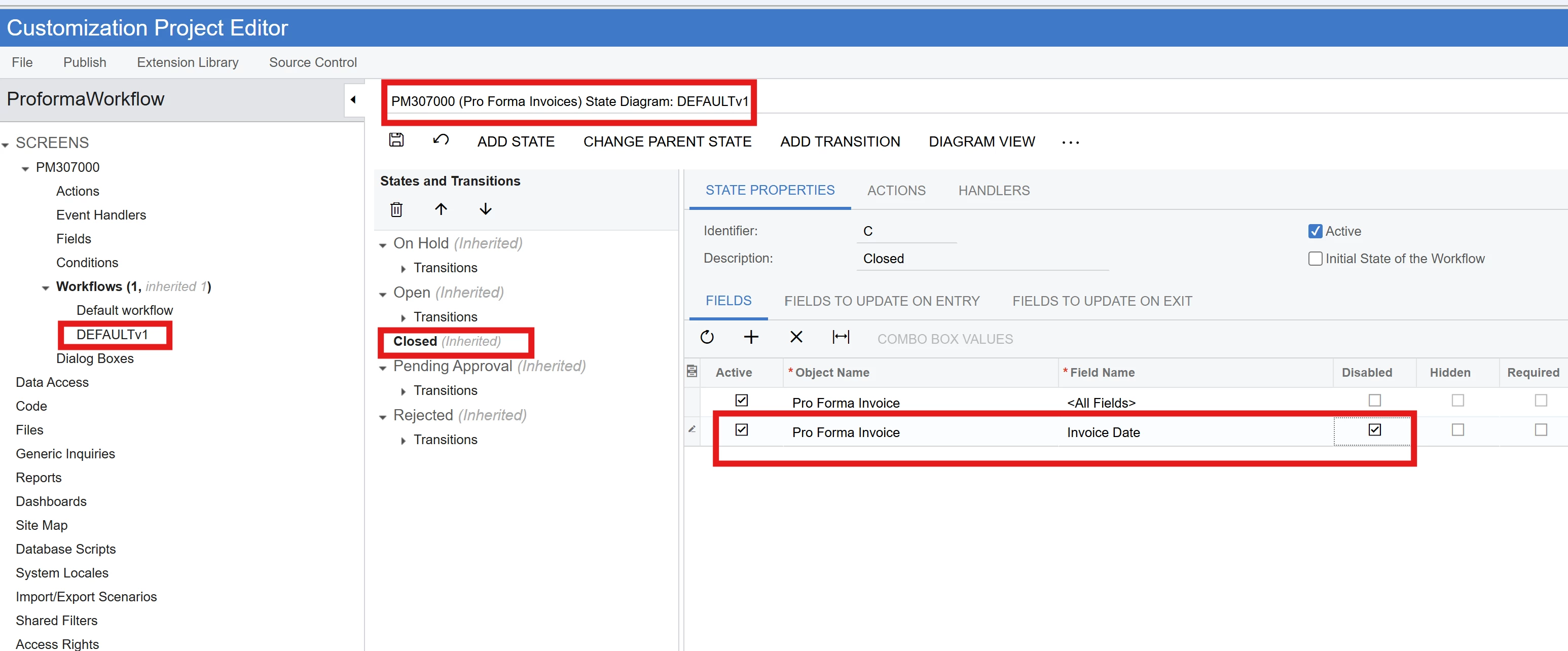
In having to enable the custom field in closed state, I suppose all the fields have been enabled in the closed state. In this case, individual field states should be set through the extended workflow.

For example, here on the extended defaultv1 workflow, on closed status, the invoice date field is disabled. Similarly, other fields can be disabled.


lbarker
Semi-Pro II
Forum|alt.badge.img+3
  • Author
  • Semi-Pro II
  • August 13, 2025

Hi

Yes I did try this, but its as though the workflow does not apply at all.  I tried also to enable the line in code too and then in the workflow to disable the other fields, and also does not work.


Forum|alt.badge.img+1
  • Jr Varsity I
  • August 13, 2025

Hi

Yes I did try this, but its as though the workflow does not apply at all.  I tried also to enable the line in code too and then in the workflow to disable the other fields, and also does not work.

I would recommend to unpublish all customizations, restart your instance, and verify that the behavior has returned to the system default.

Then I would recommend creating an entirely new customization package, extending the workflow, go into the extended workflow and add the specific field you want to enable in that status, as ​@varthinibhaskaran18 suggested. Then make sure you set this workflow extension as active, and publish this customization.