

Solved

Programmatically applying documents to AR Payment via REST API in 25.200.001

  • March 17, 2026
  • 2 replies
  • 34 views

We are building a remittance automation tool that needs to create an AR Payment and apply it to multiple invoices (1,300+ lines) via the REST API in Acumatica 25.200.001.

What we've tried:

  1. PUT to /entity/Default/25.200.001/Payment with DocumentsToApply array containing AdjdDocType, AdjdRefNbr, and CuryAdjgAmt — returns HTTP 200 and updates LastModifiedDateTime but AppliedToDocuments stays 0. Documents are not applied.
  2. Import Scenario via the UI with a CSV provider mapping to the Payments and Applications screen (AR302000) — fails with "The system failed to commit the Adjustments row."
  3. Screen-based API POST to AR302000 — modern Acumatica 25.x loads the screen via JavaScript so DataSourceSessionID and DataSourceLoginID are not present in the initial HTML response.
  4. REST API /entity/Default/25.200.001/ImportScenario — returns 404, endpoint does not exist.

Question:

What is the correct method to programmatically create an AR Payment and apply it to multiple invoices in version 25.200.001? Is there a specific action endpoint, a different field name for document application, or a recommended approach for bulk payment application via API?

Any working code samples would be greatly appreciated.
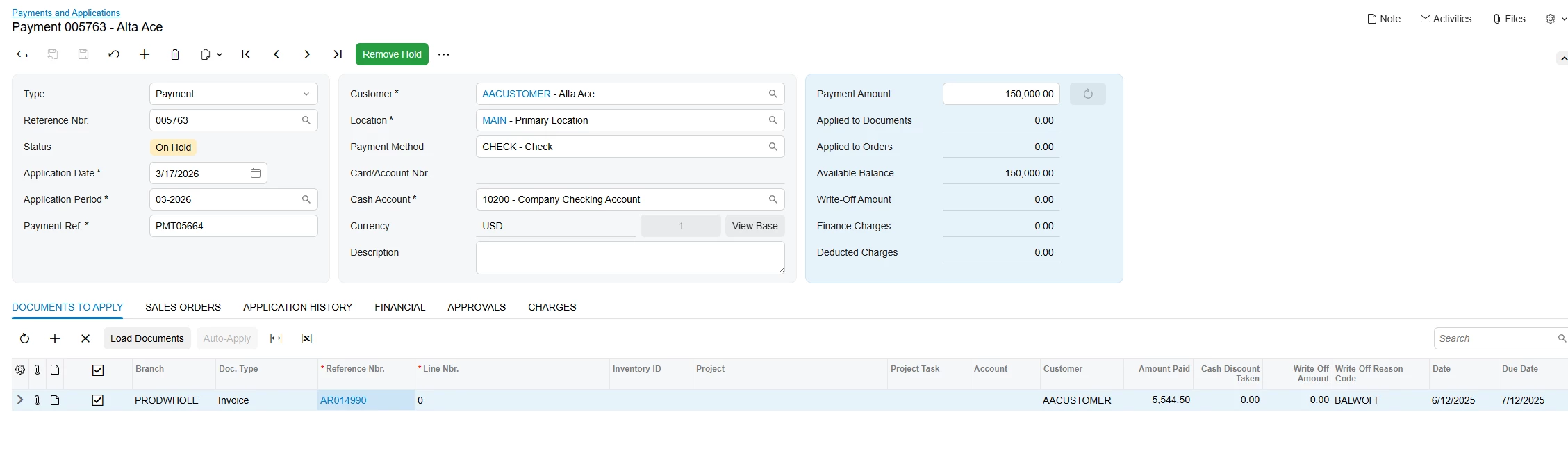
Best answer by andriihavrylow29

Hi ​@mguillen ,

To insert data to DocumentsToApply grid, you need to send them as separate PUT request (example from sales demo)
 

{
"id": "some_guid",
"DocumentsToApply": [
{
"DocType": { "value": "Invoice" },
"ReferenceNbr": { "value": "AR014990" },
"AmountApplied": { "value": 100.00 }
}
]
}


you may notice in response that 
  "DocumentsToApply": [], → which may seem empty, but actually it is there and Acumatica doesn’t return grid content to save bandwhich.

Just tested on local instance of 25R2 to ensure that it worked
 

Successful example


Request that i have sent:


{
"Type": { "value": "Payment" },
"CustomerID": { "value": "AACUSTOMER" },
"PaymentMethod": { "value": "CHECK" },
"CashAccount": { "value": "10200" },
"PaymentAmount": { "value": 150000.00 },
"Hold": { "value": true }
}

grab “id” from response and then


{
"id": "a1748cb8-3722-f111-a7da-010101010000",
"DocumentsToApply": [
{
"DocType": { "value": "Invoice" },
"ReferenceNbr": { "value": "AR014990" },
"AmountApplied": { "value": 100.00 }
}
]
}

and result is on screenshot above

2 replies

Hi ​@mguillen ,

To insert data to DocumentsToApply grid, you need to send them as separate PUT request (example from sales demo)
 

{
"id": "some_guid",
"DocumentsToApply": [
{
"DocType": { "value": "Invoice" },
"ReferenceNbr": { "value": "AR014990" },
"AmountApplied": { "value": 100.00 }
}
]
}


you may notice in response that 
  "DocumentsToApply": [], → which may seem empty, but actually it is there and Acumatica doesn’t return grid content to save bandwhich.

Just tested on local instance of 25R2 to ensure that it worked
 

Successful example


Request that i have sent:


{
"Type": { "value": "Payment" },
"CustomerID": { "value": "AACUSTOMER" },
"PaymentMethod": { "value": "CHECK" },
"CashAccount": { "value": "10200" },
"PaymentAmount": { "value": 150000.00 },
"Hold": { "value": true }
}

grab “id” from response and then


{
"id": "a1748cb8-3722-f111-a7da-010101010000",
"DocumentsToApply": [
{
"DocType": { "value": "Invoice" },
"ReferenceNbr": { "value": "AR014990" },
"AmountApplied": { "value": 100.00 }
}
]
}

and result is on screenshot above


  • Author
  • Freshman I
  • March 18, 2026

Thank you! This helped tremendously!