



Answer

Popup Message Triggering Unexpectedly on Shipments Screen

  • June 6, 2025
  • 12 replies
  • 143 views

DipakNilkanth
Pro III
Forum|alt.badge.img+13

Hi Acumatica Community,

I’m working on a customization for the Shipments screen (SO302000) and could use some help or insights.

I’ve added a custom field under the Shipping tab that stores special notes (UsrNotes). The goal is:
If this field contains a value, I want a popup message to appear when the shipment record is accessed.

I’m using PopupNoteManager.Message inside the RowSelected event. It works mostly as expected. However, I noticed that when I navigate to a new blank record (e.g., using the navigation arrows or Add New), the popup still appears—even though it shouldn’t.

Here’s a simplified version of my code:


private bool _prompted = false;
protected void SOShipment_RowSelected(PXCache cache, PXRowSelectedEventArgs e, PXRowSelected InvokeBaseHandler)

{
if (InvokeBaseHandler != null)
InvokeBaseHandler(cache, e);
var row = (SOShipment)e.Row;
if (row == null || _prompted || Base.IsContractBasedAPI || Base.IsImport) return;

var ext = PXCache<SOShipment>.GetExtension<SOShipmentExt>(row);


PopupNoteManager.Message = null;

if (row.ShipmentNbr != null && !_prompted && !string.IsNullOrWhiteSpace(ext?.UsrNotes))
{
_prompted = true; // ensure it runs only once per view

PopupNoteManager.Message = "Check Notes.";

}
}

Has anyone done something similar or encountered this behavior?
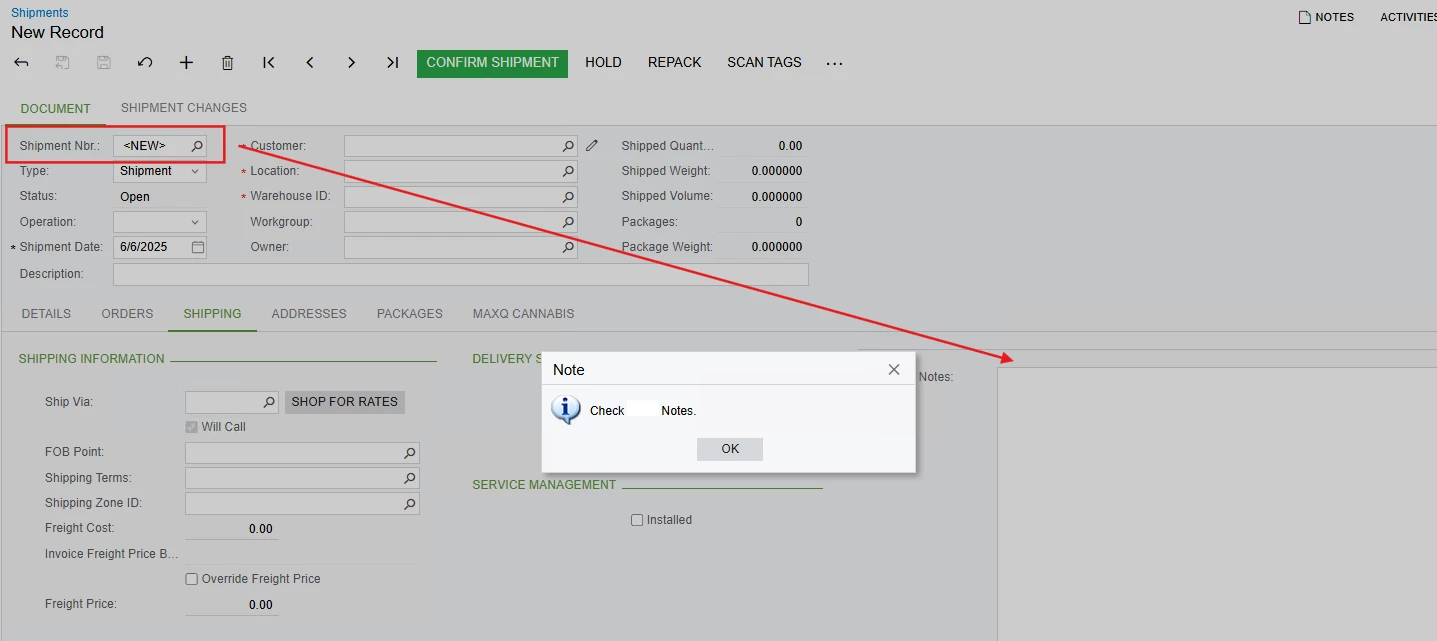

Is there a better way to suppress the popup for newly inserted records or improve how this is triggered?

Any advice or best practices would be greatly appreciated!

Thanks in advance!

Best answer by DipakNilkanth

I used the SOShipment_RowSelecting event instead of the RowSelected event for the Shipments, and utilized the RegisterText method of the PopupNoteManager to display the popup message.

  PopupNoteManager.RegisterText(
sender.Graph.Caches[typeof(SOShipment)],
row,
ext.UsrNotes,
"Check Notes."
);

I also overrode the Persist method to suppress the popup during the save operation, since the RowSelecting event was being triggered during save as well—causing the popup to appear again unnecessarily.

This approach might be helpful for anyone facing a similar issue.

12 replies

DrewNisley
Pro I
Forum|alt.badge.img+3
  • Pro I
  • June 6, 2025

Maybe include another condition checking whether the cache is inserted? It should only pop up if it is not in the inserted status right?

Edit: Something like this: Base.Document.Cache.GetStatus(Base.Document.Current) != PXEntryStatus.Inserted


DipakNilkanth
Pro III
Forum|alt.badge.img+13

Hi ​@DrewNisley

Thanks for the response!

Yes, I tried adding a check to see if the record status is Inserted using the following code:

 private bool _prompted = false;
        protected void SOShipment_RowSelected(PXCache cache, PXRowSelectedEventArgs e, PXRowSelected InvokeBaseHandler)

        {
            if (InvokeBaseHandler != null)
               InvokeBaseHandler(cache, e);
                var row = (SOShipment)e.Row;
            if (row == null || _prompted || Base.IsContractBasedAPI || Base.IsImport) return;

            var ext = PXCache<SOShipment>.GetExtension<SOShipmentExt>(row);


            PopupNoteManager.Message = null;
            bool isNew = (cache.GetStatus(row) == PXEntryStatus.Inserted);
            if (row.ShipmentNbr != null && !_prompted && !string.IsNullOrWhiteSpace(ext?.UsrNotes) && !isNew)
            {
                _prompted = true; // ensure it runs only once per view

                PopupNoteManager.Message = "Check Notes.";

            }
        }


DrewNisley
Pro I
Forum|alt.badge.img+3
  • Pro I
  • June 6, 2025

It still is popping up the box after adding that?


DipakNilkanth
Pro III
Forum|alt.badge.img+13

Yes, I’ve tested that, but the popup still appears for the <NEW> record when navigating using the arrow buttons (not via the Add New (+) button).

I debugged the code and found that when navigating from a record that has a Notes value, the system seems to retain the previous record's data temporarily. In the debugger, I can see that the ShipmentNbr is still populated with the previous record’s value, and since that record had Notes, the popup logic gets triggered again.

So essentially, the popup is being shown based on the old record’s data while navigating to the blank record. Still exploring how to best handle this scenario.


DrewNisley
Pro I
Forum|alt.badge.img+3
  • Pro I
  • June 6, 2025

Have you debugged to see why it thinks that the UsrNotes field isn’t blank? It should be blank for all newly created shipments, so I’m not sure as to why it’s getting past that point.

Edit: Oops, hand’t refreshed the screen to see your reply.


darylbowman
Captain II
Forum|alt.badge.img+15

I did this exact things several months ago. I'm not in a position to check how I handled it. I'll let you know next week.


darylbowman
Captain II
Forum|alt.badge.img+15

I’m a bit confused, because while I remember experiencing exactly what you are describing, the code that I found doesn’t have any distinct circumventions of that. If I remember correctly, using the cache to store the shown flag solved the problem.

Here’s the essence of my code:

protected virtual void _(Events.RowSelected<SOShipment> e, PXRowSelected b)
{
b?.Invoke(e.Cache, e.Args);

SOShipment row = e.Row;
if (row is null) return;

var rowExt = row?.GetExtension<DXSOShipmentExt>();

if (!Base.IsContractBasedAPI && !Base.IsProcessing &&
!Base.IsImport && !Base.IsExport)
{
string popupMessage = "";

if (rowExt?.UsrDXShipNoteShown == false)
{
Base.Document.SetValueExt<DXSOShipmentExt.usrDXShipNoteShown>(row, true);

if (!string.IsNullOrWhiteSpace(popupMessage))
PopupNoteManager.RegisterText(e.Cache, row, "ShipmentNbr", popupMessage);
}
}
}


darylbowman
Captain II
Forum|alt.badge.img+15

...It should be blank for all newly created shipments...

...the popup is being shown based on the old record’s data while navigating to the blank record...

Having spent some time with the ‘notes’ mechanism, I can confidently say that while I don’t completely understand how it’s working, there are some very interesting ‘goings on’ in the backend to make the notes work and any oddities can be chalked up to that.


DipakNilkanth
Pro III
Forum|alt.badge.img+13

Hi ​@darylbowman

Thank you so much for your response — I really appreciate it.

Yes, my scenario is slightly different. I want to show a popup for the current shipment only when accessing it from the Shipments GI or while navigating using the arrows. The popup should appear only if the custom field UsrNotes has a value for the current shipment.

Right now, it’s working fine for me except in one case:
When the record on screen is <NEW>, and the previously accessed record had a value in UsrNotes, the popup still shows. In this case, I don’t want the popup to appear, because the current shipment is a new (unsaved) record.


darylbowman
Captain II
Forum|alt.badge.img+15

...my scenario is slightly different.

How is it different?


DipakNilkanth
Pro III
Forum|alt.badge.img+13
  • Author
  • Pro III
  • Answer
  • June 23, 2025

I used the SOShipment_RowSelecting event instead of the RowSelected event for the Shipments, and utilized the RegisterText method of the PopupNoteManager to display the popup message.

  PopupNoteManager.RegisterText(
sender.Graph.Caches[typeof(SOShipment)],
row,
ext.UsrNotes,
"Check Notes."
);

I also overrode the Persist method to suppress the popup during the save operation, since the RowSelecting event was being triggered during save as well—causing the popup to appear again unnecessarily.

This approach might be helpful for anyone facing a similar issue.


Chris Hackett
Community Manager
Forum|alt.badge.img
  • Acumatica Community Manager
  • June 23, 2025

Thank you for sharing your solution with the community ​@Nilkanth Dipak!

