

Answer

Populate checkbox on details grid on Sales Order screen

  • August 20, 2024
  • 12 replies
  • 170 views

Forum|alt.badge.img+1

Hello,

I got question on how to set checkbox value for a custom field in gridview on Sales Order screen? Here is my DAC

public class SOLineExt : PXCacheExtension<PX.Objects.SO.SOLine>
{

[PXBool]
[PXUIField(DisplayName= "Is Restricted")]
public virtual bool? UsrIsRestrictedField { get; set; }
public abstract class usrIsRestrictedField : PX.Data.BQL.BqlString.Field<usrIsRestrictedField> { }

}

and here is my graph extension


public class SOOrderEntry_Extension : PXGraphExtension<PX.Objects.SO.SOOrderEntry>
{


#region Event Handlers
protected void SOLine_RowSelected(PXCache cache, PXRowSelectedEventArgs e)
{

var row = (SOLine)e.Row;
if(row != null)
{
ClaLimitInv.SOLineExt itemExt = PXCache<SOLine>.GetExtension<ClaLimitInv.SOLineExt>(row);
itemExt.UsrIsRestrictedField = true;
cache.SetStatus(row, PXEntryStatus.Updated);

}

}
}

in Customization Studio I set chebox like
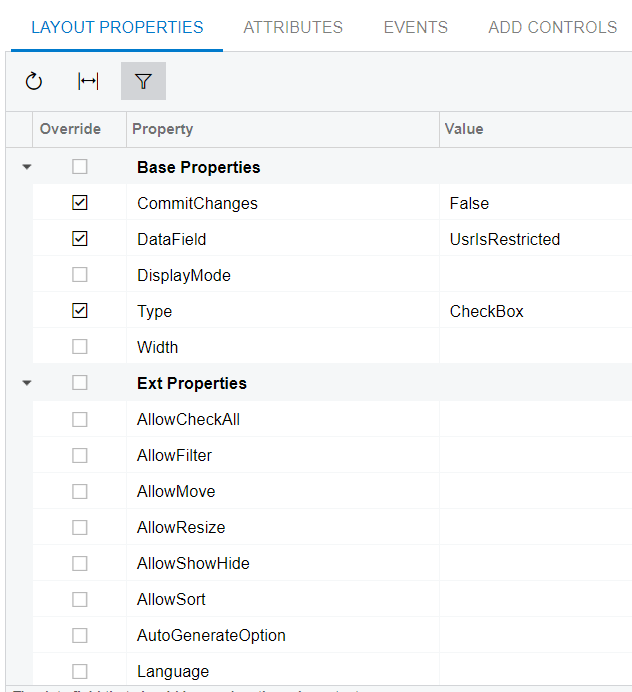
and here is how my grid looks:

The problem “IsRestricted” checkbox is never set to checked  

Best answer by hotdok

protected void SOLine_UsrIsRestrictedField_FieldSelecting(PXCache cache, PXFieldSelectingEventArgs e)
{
var row = (SOLine)e.Row;
if (row != null)
{
// checking condition
if(limits.Count > 0)
{
// set checkbox
e.ReturnState = true;
}
}
}

We need to use FieldSelecting event and when criterias are matched set ReturnState

12 replies

Naveen Boga
Captain II
Forum|alt.badge.img+19
  • Captain II
  • August 20, 2024

Hi @hotdok 

We should avoid setting any values in the RowSelected event, as its primary purpose is to control the enabling, disabling, visibility, or invisibility of fields.

Could you clarify when exactly you need to check the "Is Restricted" checkbox as part of your functionality? Are you looking to have this checked by default, or is there a specific logic or condition you'd like to apply?


Forum|alt.badge.img+1
  • Author
  • Varsity I
  • August 20, 2024

Hi @Naveen Boga 

Thanks for reply. I just want to figure out how can I set checkbox as checked in gridview based on some complex bql request from several DACs.


Naveen Boga
Captain II
Forum|alt.badge.img+19
  • Captain II
  • August 20, 2024

@hotdok  

You've defined an unbound field (i.e., not a database field). Please note that even if you set a value and refresh the screen, the value will be cleared.

If you want to set a value and have it persist in the database, you'll need to create a database field as shown below.


 public class SOLineExt : PXCacheExtension<PX.Objects.SO.SOLine>
{

[PXDBBool]
[PXDefault(false, PersistingCheck = PXPersistingCheck.Nothing)]
[PXUIField(DisplayName = "Is Restricted")]
public virtual bool? UsrIsRestrictedField { get; set; }
public abstract class usrIsRestrictedField : PX.Data.BQL.BqlBool.Field<usrIsRestrictedField> { }

}


Use below logic to update the field


ClaLimitInv.SOLineExt itemExt = row.GetExtension<ClaLimitInv.SOLineExt>();
itemExt.UsrIsRestrictedField = true;
Base.Transaction.Cache.Update(row);


Forum|alt.badge.img+1
  • Author
  • Varsity I
  • August 20, 2024

@Naveen Boga Thanks. Could you please suggest which event to use to update the field?


Naveen Boga
Captain II
Forum|alt.badge.img+19
  • Captain II
  • August 20, 2024

@hotdok Can you please let me know when exactly you wanted to set this value as TRUE?

Like After entering the Inventory ID, you wanted to check some condition and set the value as TRUE or while saving the Order?


Forum|alt.badge.img+1
  • Author
  • Varsity I
  • August 21, 2024

I want to set it on page load at first. So once  the exact sales order is open this calculation should happen. I do not want to save checkbox state in db.


Naveen Boga
Captain II
Forum|alt.badge.img+19
  • Captain II
  • August 21, 2024

@hotdok  If you do not want to save the field value in the database then you can go ahead with Unbound field and you can set the default value as TRUE in the DAC itself like below. 

Hope this code helps you.


public class SOLineExt : PXCacheExtension<PX.Objects.SO.SOLine>
{

[PXBool] // This is Unbound field
[PXDefault(true, PersistingCheck = PXPersistingCheck.Nothing)] // Setting the Default Value as TRUE
[PXUIField(DisplayName = "Is Restricted")]
public virtual bool? UsrIsRestrictedField { get; set; }
public abstract class usrIsRestrictedField : PX.Data.BQL.BqlBool.Field<usrIsRestrictedField> { }

}


Forum|alt.badge.img+1
  • Author
  • Varsity I
  • August 21, 2024

no I want to set checbox state based on complex BQL query when screen is opened. So Im trying to understand what event to use for it. I tried to use [PXFormula] attribute for it but it works only with current DAC but I need selecting data from 2 DACs to determine if checkbox should be set or not. I wanted to populate checkbox in RowSelected event handler but it didnt work for me. Moreover it highly not recommended to do. I have BQL request like

[PXFormula(typeof(Exists<Select<ClaLimitInv, Where<ClaLimitInv.inventoryID, Equal<SOLine.inventoryID.FromCurrent>, 
And<ClaLimitInv.orderSourceID, Equal<PX.Objects.SO.SOOrder.orderNbr.FromCurrent>>>>>))]

in realty it will be even more complex adding 2 more DACs with joining.


Forum|alt.badge.img+1
  • Author
  • Varsity I
  • August 24, 2024

Now Im trying to implement at least checkbox setting by inventory update - doesn’t work as well

public class SOOrderEntry_Extension : PXGraphExtension<PX.Objects.SO.SOOrderEntry>
{

protected void SOLine_InventoryID_FieldUpdated(PXCache cache, PXFieldUpdatedEventArgs e)
{

var row = (SOLine)e.Row;
if (row != null)
{
ClaLimitInv.SOLineExt itemExt = PXCache<SOLine>.GetExtension<ClaLimitInv.SOLineExt>(row);
itemExt.UsrIsRestrictedField = true;

}

}
}

please suggest how to implement


Chris Hackett
Community Manager
Forum|alt.badge.img
  • Acumatica Community Manager
  • September 10, 2024

Hi @hotdok were you able to find a solution? Thank you!


darylbowman
Captain II
Forum|alt.badge.img+15

...Im trying to understand what event to use for it…

Have you tried [PXDBScalar]?


Forum|alt.badge.img+1
  • Author
  • Varsity I
  • Answer
  • January 21, 2025
protected void SOLine_UsrIsRestrictedField_FieldSelecting(PXCache cache, PXFieldSelectingEventArgs e)
{
var row = (SOLine)e.Row;
if (row != null)
{
// checking condition
if(limits.Count > 0)
{
// set checkbox
e.ReturnState = true;
}
}
}

We need to use FieldSelecting event and when criterias are matched set ReturnState


