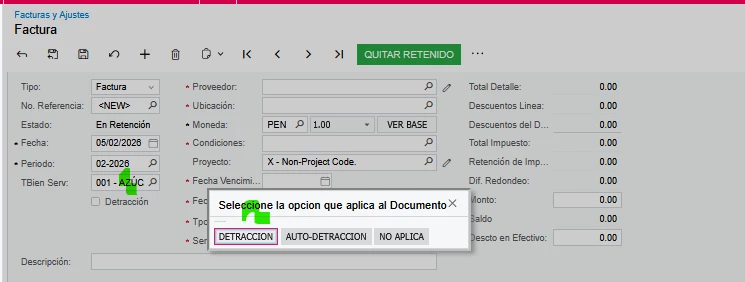
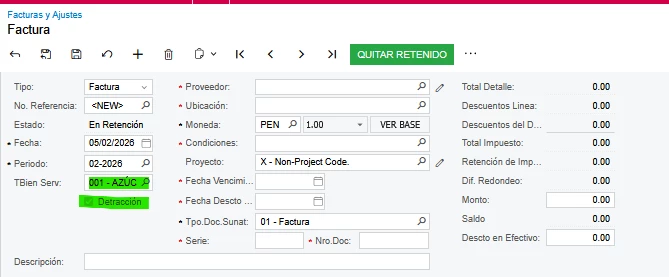
Details: This popup works in the classic version, but it no longer works after migrating. Specification: When the "good service type" field is selected, a popup appears with three options: "Detraction," "Auto-Detraction," or "Not Applicable." If I select "Detraction," the "Detraction" field is checked; if I select "Auto-Detraction," it's checked; if I select "Not Applicable," nothing happens, the checkmarks are removed. The popup works up to this point, but the problem is that when I select one of the options, it disappears.
Here I share images
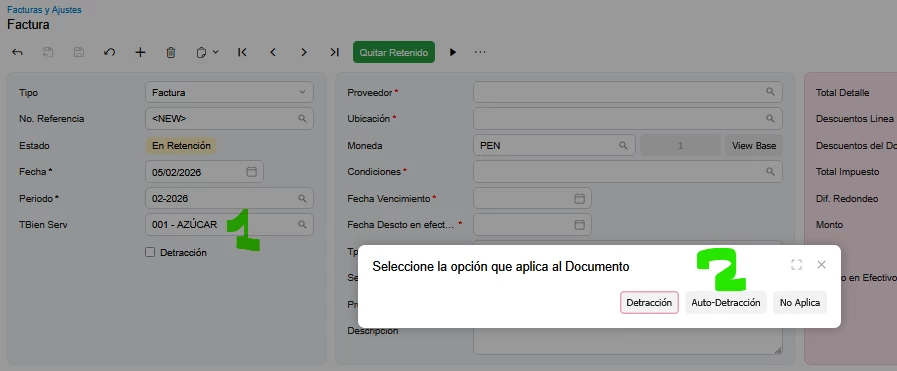
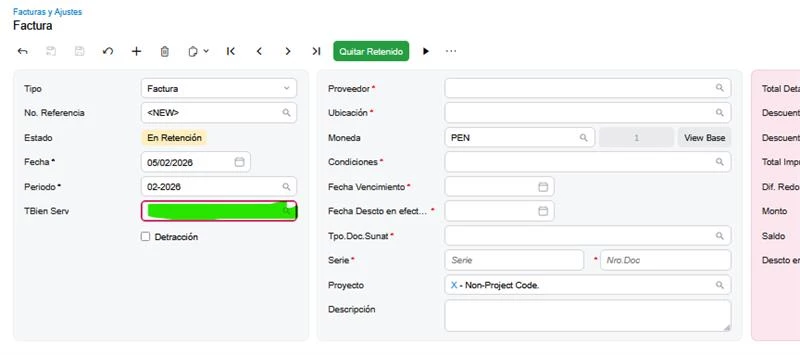
Here my code: event, ts and html:
Code event:
protected virtual void APInvoice_TBienServ_FieldUpdated(PXCache cache, PXFieldUpdatedEventArgs e)
{
APInvoice api = e.Row as APInvoice;
if (api == null) return;
var apiExt = api.GetExtension<XTAPInvoice>();
TaxRev trRow = PXSelectJoin<TaxRev,
InnerJoin<xtb08Sunat,
On<xtb08Sunat.taxCD, Equal<TaxRev.taxID>>>,
Where<xtb08Sunat.tGdsSvcsCD, Equal<Required<xtb08Sunat.tGdsSvcsCD>>>>.Select(Base, apiExt.TBienServ);
if (api != null && apiExt != null)
{
if (api.DocType == APDocType.Invoice || api.DocType == APDocType.CreditAdj)
{
if (Base.IsCopyPasteContext == true)
{
apiExt.TBienServ = "000";
}
if (trRow == null || trRow.TaxRate == null || trRow.TaxRate == 0)
{
apiExt.Detraccion = false;
apiExt.AutoDetraccion = false;
if (api.DocType == APDocType.Invoice && apiExt.TDocSunat != "RG")//***
{
apiExt.TDocSunat = null;
}
}
else
{
if (Base.Document.AskExt() == WebDialogResult.Yes)
{
apiExt.Detraccion = true;
apiExt.AutoDetraccion = false;
PXUIFieldAttribute.SetVisible<XTAPInvoice.detraccion>(cache, api, true);
PXUIFieldAttribute.SetVisible<XTAPInvoice.autodetraccion>(cache, api, false);
}
else if (Base.Document.AskExt() == WebDialogResult.No)
{
apiExt.AutoDetraccion = true;
apiExt.Detraccion = false;
PXUIFieldAttribute.SetVisible<XTAPInvoice.autodetraccion>(cache, api, true);
PXUIFieldAttribute.SetVisible<XTAPInvoice.detraccion>(cache, api, false);
}
else if (Base.Document.AskExt() == WebDialogResult.OK)
{
apiExt.Detraccion = false;
apiExt.AutoDetraccion = false;
}
}
}
}
}
ts:
export interface APInvoice_TestCST_generated extends APInvoice {}
export class APInvoice_TestCST_generated {
@autoRefresh TBienServ: PXFieldState<PXFieldOptions.CommitChanges>;
AutoDetraccion: PXFieldState;
Detraccion: PXFieldState;
}
html:
<qp-panel id="Document" caption="Seleccione la opción que aplica al Documento" auto-repaint="true" wg-container="Document">
<footer style="text-align:center;">
<qp-button id="btnYes" dialog-result="Yes" caption="Detracción"></qp-button>
<qp-button id="btnNo" dialog-result="No" caption="Auto-Detracción"></qp-button>
<qp-button id="btnOk" dialog-result="OK" caption="No Aplica"></qp-button>
</footer>
</qp-panel>
Here's the classic image that actually works.