Question

PO Link in code

  • October 26, 2022
  • 5 replies
  • 261 views

wikusvorster42
Jr Varsity II
Forum|alt.badge.img

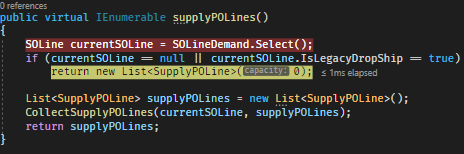
I can successfully create a SO and create a PO from the SO in code. I can receipt the PO on the screen and then ship the SO on the screen. It all works 100%. 

The PO Link on the SO is enabled but when I click on it the link is empty. How can I build the link in code?

5 replies

Leonardo Justiniano
Jr Varsity II
Forum|alt.badge.img+4

Hi @wikusvorster42 

When you are linking SOs to POs you need to do it via Supply. This is an excerpt of how you link both:


...
var soEntryPOLinkDialog = soEntry.GetExtension<POLinkDialog>();
var soEntryPurchaseToSOLinkDialog = soEntry.GetExtension<PurchaseToSOLinkDialog>();
...


foreach (SupplyPOLine po3 in soEntryPOLinkDialog.
SupplyPOLines.
Select().
RowCast<SupplyPOLine>().
Where(w => w.OrderNbr == soLineLnk.POOrderNbrTo &&
w.OrderType == soLineLnk.POOrderTypeTo))
{
if(!(po3.Selected ?? false))
{
poLinkAttempt = true;
soEntryPOLinkDialog.SupplyPOLines.Current = po3;
po3.Selected = true;
soEntryPOLinkDialog.SupplyPOLines.Update(po3);

// This is who does the linking work
soEntryPurchaseToSOLinkDialog.LinkPOSupply(soEntry.Transactions.Current);
}
}

...

Of course you have to validate if SOLines are POCreate enabled previous to this.


Hope this can help you in your journey.


wikusvorster42
Jr Varsity II
Forum|alt.badge.img
  • Author
  • Jr Varsity II
  • October 27, 2022

Thank for the reply, Leo.

At what stage do I do the code you sent. After the PO was created?

I did this but I can’t get the POLink to work:

public void AddLinkPOSupplyEx(POLine line, SOLine soLine)
        {
            var soEntryPOLinkDialog = Base.GetExtension<POLinkDialog>();
            var soEntryPurchaseToSOLinkDialog = Base.GetExtension<PurchaseToSOLinkDialog>();

            var supply = new SupplyPOLine
            {
                OrderType = line.OrderType,
                OrderNbr = line.OrderNbr,
                LineNbr = line.LineNbr,
                InventoryID = line.InventoryID,
                SiteID = line.SiteID,
                BaseOrderQty = line.BaseOrderQty,
                PlanID = line.PlanID
            };
            supply = soEntryPOLinkDialog.SupplyPOLines.Insert(supply);
            soEntryPOLinkDialog.SupplyPOLines.Current = supply;
            
            soEntryPurchaseToSOLinkDialog.LinkPOSupply(soLine);

        }


Leonardo Justiniano
Jr Varsity II
Forum|alt.badge.img+4

Hi @wikusvorster42 

To make the link work both the SO and the PO must exist. You could automatically link SOs after a PO has been created (Ex. RowPersisted event) or in a custom process or even adding a button in the PO screen to link any SO related to the purchased items.

The code provided works better on a processing context and shows how to deal with the linking functions in the Sales Order side of things. 

Acumatica Linking process is done by the function

soEntryPurchaseToSOLinkDialog.LinkPOSupply(<SOLine>);

As you can see this works in the context of the Sales Order Screen. You have to work with the provided Acumatica structures.

When you see things like:

po3.Selected = true;
soEntryPOLinkDialog.SupplyPOLines.Update(po3);

Is more like the user is clicking the checkbox in the UI. Several events are triggered. And you want Acumatica do the same thing but in an automated way.

In summary, you have to load the Sales Order and then go to the specific structure and automate the selection of the linking, similar to the code provided, and according to your requirements and needs.


wikusvorster42
Jr Varsity II
Forum|alt.badge.img
  • Author
  • Jr Varsity II
  • October 31, 2022

 Hi Leo,

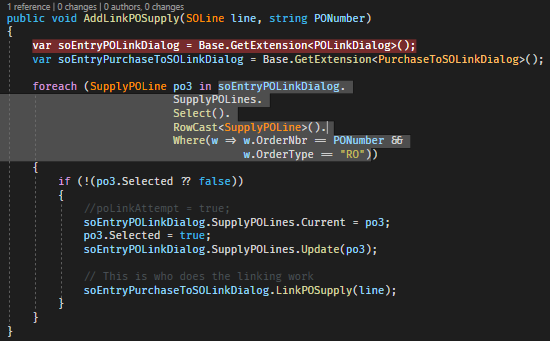
When I execute the soEntryPOLinkDialog.SupplyPOLines.Select() and step into the code, it doesn't find any data. I do this after the PO was created from the SO. I attached my code.


wikusvorster42
Jr Varsity II
Forum|alt.badge.img
  • Author
  • Jr Varsity II
  • October 31, 2022

Hi Leo,

I managed to get past the above issue but there is still no record(s) in the PO Link. I changed the code as follows:

SOOrderEntry iegraph = PXGraph.CreateInstance<SOOrderEntry>();
iegraph.Document.Current = iegraph.Document.Search<SOOrder.orderNbr>(soorder.OrderNbr, soorder.OrderType);
foreach (SOLine orderLine in orderLines)
{
iegraph.Transactions.Current = orderLine;
var extgraph = iegraph.GetExtension<SOOrderEntry_Extension>();
extgraph.AddLinkPOSupply(orderLine, PONumber);
}