Question

Payment Method GUID

  • August 8, 2026
  • 2 replies
  • 22 views

Jupiter
Freshman I
Forum|alt.badge.img

Hi All, we have our inhouse application integrated via API to  MYOB Acumatica where we create customer payment method and MYOB returns a GUID for each payment method.  I am trying to find out is it possible to display this GUID in a GI screen with MYOB user interface all?  If so, which table and column I need to integrate.  Is this explained somewhere, appreciate the help in advance.

2 replies

Forum|alt.badge.img+4
  • Jr Varsity II
  • August 9, 2026

Hi ​@Jupiter ,

The GUID you're looking for is the NoteID field on the CustomerPaymentMethod DAC (table CustomerPaymentMethod).
Here's what you need for your Generic Inquiry:
- Table (DAC): PX.Objects.AR.CustomerPaymentMethod
- Column: NoteID
This is the system-generated GUID that the API returns when you create a customer payment method record. Every record in Acumatica that supports the INotable interface has a NoteID which serves as the record's unique identifier (GUID) used by the Contract-Based API.
To set up the GI:
1. Go to System > Generic Inquiries (SM208000)
2. Add CustomerPaymentMethod as a table in the Tables tab
3. In the Results Grid tab, add the NoteID field from CustomerPaymentMethod
4. You can also add other useful fields like BAccountID, PaymentMethodID, Descr, PMInstanceID, etc.
The NoteID is the same GUID value that the API returns in the id field of the response when you create or query a Customer Payment Method via the REST API (e.g., PUT /entity/Default/24.200.001/CustomerPaymentMethod).


Hope above helps!!


Jupiter
Freshman I
Forum|alt.badge.img
  • Author
  • Freshman I
  • August 10, 2026

Hi ​@Jupiter ,

The GUID you're looking for is the NoteID field on the CustomerPaymentMethod DAC (table CustomerPaymentMethod).
Here's what you need for your Generic Inquiry:
- Table (DAC): PX.Objects.AR.CustomerPaymentMethod
- Column: NoteID
This is the system-generated GUID that the API returns when you create a customer payment method record. Every record in Acumatica that supports the INotable interface has a NoteID which serves as the record's unique identifier (GUID) used by the Contract-Based API.
To set up the GI:
1. Go to System > Generic Inquiries (SM208000)
2. Add CustomerPaymentMethod as a table in the Tables tab
3. In the Results Grid tab, add the NoteID field from CustomerPaymentMethod
4. You can also add other useful fields like BAccountID, PaymentMethodID, Descr, PMInstanceID, etc.
The NoteID is the same GUID value that the API returns in the id field of the response when you create or query a Customer Payment Method via the REST API (e.g., PUT /entity/Default/24.200.001/CustomerPaymentMethod).


Hope above helps!!

Awesome ​@Rakshanda , thank you very much for the above details.  I did manage to add the column, but given my limited knowledge on GI’s, couple more questions. 

  • How can I change the column header in the Results Grid, currently it is showing as ‘CustomerPaymentMethod_noteID’ and I want to change to some text?
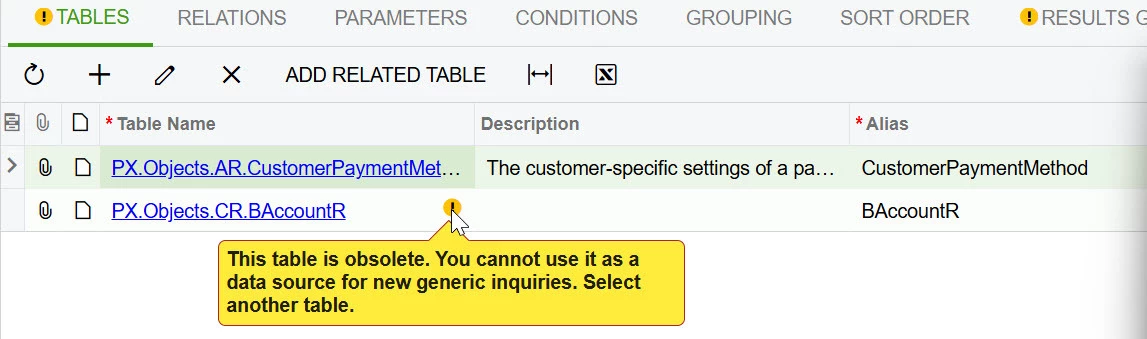
  • Also, while changing one of our GI, I got this obsolete error which is confusing, because the GI still works and customer customer data and I can see all columns from that Table in Results grid.  So not sure why the warning and this is in 2023R1.