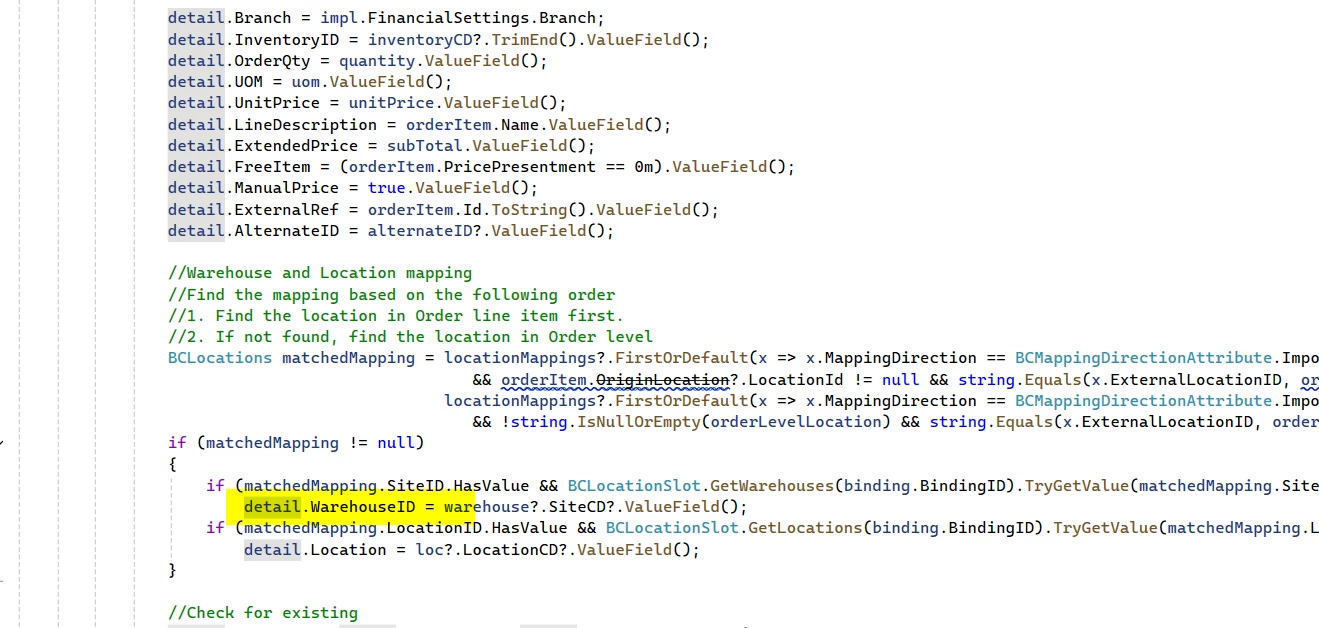
I’m trying to create a customization so that when orders get created from the acumatica commerce connector. I want too modify the Warehouse ID for specific stock items on “SP” order types.
I created the customization and extended the sales order screen but no luck so far. I thought I could listen for RowInserted event for order Details but nothing is working and when I add trace logs I don’t see them.
using System;
using System.Collections;
using System.Collections.Generic;
using System.Diagnostics;
using System.Linq;
using System.Text;
using PX.Common;
using PX.Data;
using PX.Objects.AP;
using PX.Objects.AR;
using PX.Objects.CA;
using PX.Objects.CM;
using PX.Objects.CR;
using PX.Objects.CS;
using PX.Objects.DR;
using PX.Objects.EP;
using PX.Objects.GL;
using PX.Objects.IN;
using PX.Objects.PM;
using PX.Objects.PO;
using PX.Objects.TX;
using POLine = PX.Objects.PO.POLine;
using POOrder = PX.Objects.PO.POOrder;
using PX.CarrierService;
using PX.Concurrency;
using CRLocation = PX.Objects.CR.Standalone.Location;
using PX.Objects.AR.CCPaymentProcessing;
using PX.Objects.AR.CCPaymentProcessing.Common;
using PX.Objects.AR.CCPaymentProcessing.Helpers;
using PX.Objects.AR.CCPaymentProcessing.Interfaces;
using ARRegisterAlias = PX.Objects.AR.Standalone.ARRegisterAlias;
using PX.Objects.AR.MigrationMode;
using PX.Objects.Common;
using PX.Objects.Common.Discount;
using PX.Objects.Common.Extensions;
using PX.CS.Contracts.Interfaces;
using Message = PX.CarrierService.Message;
using PX.TaxProvider;
using PX.Data.DependencyInjection;
using PX.Data.WorkflowAPI;
using PX.LicensePolicy;
using PX.Objects.Extensions.PaymentTransaction;
using PX.Objects.SO.GraphExtensions.CarrierRates;
using PX.Objects.SO.GraphExtensions.SOOrderEntryExt;
using PX.Objects.SO.Attributes;
using PX.Objects.Common.Attributes;
using PX.Objects.Common.Bql;
using OrderActions = PX.Objects.SO.SOOrderEntryActionsAttribute;
using PX.Objects.SO.DAC.Projections;
using PX.Data.BQL.Fluent;
using PX.Data.Localization;
using PX.Data.Reports;
using PX.Objects.IN.InventoryRelease;
using PX.Data.BQL;
using PX.Objects.IN.InventoryRelease.Utility;
using PX.Objects.SO.Standalone;
using PX.Objects.IN.InventoryRelease.Accumulators.QtyAllocated;
using PX.Objects;
using PX.Objects.SO;

namespace PX.Objects.SO
{
    public class SOOrderEntry_Extension : PXGraphExtension<PX.Objects.SO.SOOrderEntry>
    {
        #region

        protected void SOLine_RowInserted(PXCache cache, PXRowInsertedEventArgs e, PXRowInserted InvokeBaseHandler)
        {
            // Always invoke the base handler first to ensure standard Acumatica logic runs.
            InvokeBaseHandler?.Invoke(cache, e);

            var line = (SOLine)e.Row;

            if (line != null)
            {
                string currentSKU = line.InventoryID?.ToString();
                if (currentSKU == "12345" || currentSKU == "54321")
                {
                    line.SiteID = 112233;
                }
            }
        }

        #endregion
    }
}