Answer

Not Commit changes value in dialog window.

  • November 28, 2025
  • 1 reply
  • 52 views

Forum|alt.badge.img+1

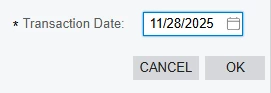
I have a dialog window with a date field. When I manually type a date and immediately click the OK button, the value is passed as null, because at the moment I click OK, the focus is still on the Transaction Date field. However, if I select the date using the calendar picker, everything works correctly.
CommitChanges = True.

Best answer by aleksejslusar19

Hi, ​@bihalivan15 

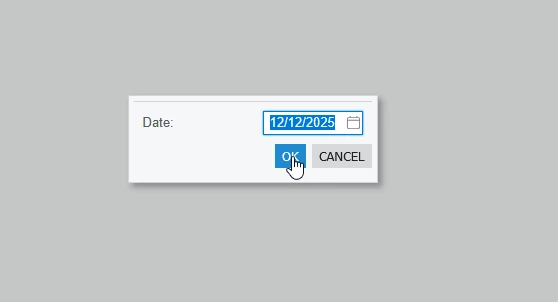
I tried to reproduce the issue, but couldn't :)
I set the CommitChanges property to true & false - it doesn't affect the result.

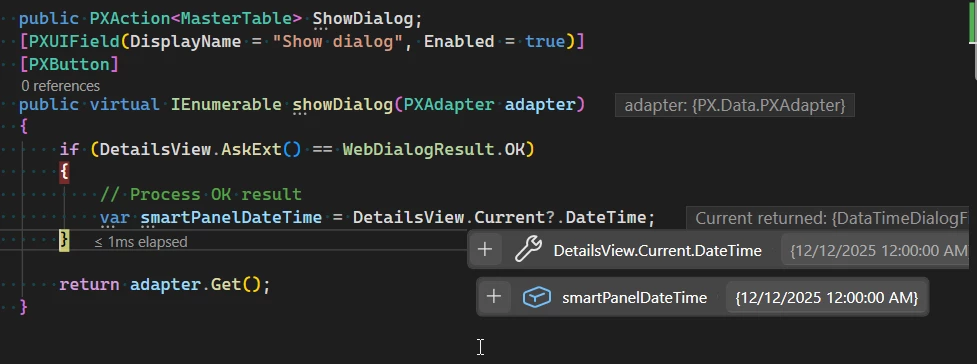
Here's my code that I quickly threw together:

<px:PXSmartPanel runat="server" ID="CstSmartPanel7" Key="DetailsView">
<px:PXFormView runat="server" ID="CstFormView8" DataMember="DetailsView" DataSourceID="ds">
<Template>
<px:PXDateTimeEdit CommitChanges="True" runat="server" ID="CstPXDateTimeEdit9" DataField="DateTime" ></px:PXDateTimeEdit></Template></px:PXFormView>
<px:PXPanel runat="server" ID="PanelLinkSalesOrdersButtons" SkinID="Buttons">
<px:PXButton runat="server" Text="OK" DialogResult="OK" ID="LinkSalesLine" ></px:PXButton>
<px:PXButton runat="server" Text="Cancel" DialogResult="Cancel" ID="CancelLink" /></px:PXPanel>
public PXAction<MasterTable> ShowDialog;
[PXUIField(DisplayName = "Show dialog", Enabled = true)]
[PXButton]
public virtual IEnumerable showDialog(PXAdapter adapter)
{
if (DetailsView.AskExt() == WebDialogResult.OK)
{
// Process OK result
var smartPanelDateTime = DetailsView.Current?.DateTime;
}

return adapter.Get();
}


Can you share your code?

1 reply

Forum|alt.badge.img+1
  • Jr Varsity III
  • Answer
  • November 28, 2025

Hi, ​@bihalivan15 

I tried to reproduce the issue, but couldn't :)
I set the CommitChanges property to true & false - it doesn't affect the result.

Here's my code that I quickly threw together:

<px:PXSmartPanel runat="server" ID="CstSmartPanel7" Key="DetailsView">
<px:PXFormView runat="server" ID="CstFormView8" DataMember="DetailsView" DataSourceID="ds">
<Template>
<px:PXDateTimeEdit CommitChanges="True" runat="server" ID="CstPXDateTimeEdit9" DataField="DateTime" ></px:PXDateTimeEdit></Template></px:PXFormView>
<px:PXPanel runat="server" ID="PanelLinkSalesOrdersButtons" SkinID="Buttons">
<px:PXButton runat="server" Text="OK" DialogResult="OK" ID="LinkSalesLine" ></px:PXButton>
<px:PXButton runat="server" Text="Cancel" DialogResult="Cancel" ID="CancelLink" /></px:PXPanel>
public PXAction<MasterTable> ShowDialog;
[PXUIField(DisplayName = "Show dialog", Enabled = true)]
[PXButton]
public virtual IEnumerable showDialog(PXAdapter adapter)
{
if (DetailsView.AskExt() == WebDialogResult.OK)
{
// Process OK result
var smartPanelDateTime = DetailsView.Current?.DateTime;
}

return adapter.Get();
}


Can you share your code?