Answer

Not able to make the system force entring required fields by the user on Dialog

  • March 4, 2022
  • 10 replies
  • 468 views

aaghaei
Captain II
Forum|alt.badge.img+10

I have added a custome dialog to AP Bills. What I would like to happen is to force user to enter an “Assignee”. I have set the DAC to validate null values. in my dialog screen it shows * by the field but when user clicks on OK button, even if this field is not entered the dialog continues while it should raise an error that this fieled is not entered. below is my partial DAC:

        #region Owner
public abstract class owner : PX.Data.BQL.BqlInt.Field<owner> { }
protected Int32? _Owner;
[Owner(Required = true, ValidateValue = true)]
[PXDefault(PersistingCheck = PXPersistingCheck.Null)]
[PXUIField(DisplayName = "Assignee", Visibility = PXUIVisibility.SelectorVisible)]
[PXRestrictor(typeof(Where<Contact.contactID, NotEqual<Switch<Case<Where<Current<EPRoutingPanelDialog.status>, NotEqual<EPStatuses.routed>>, Current<AccessInfo.contactID>>, Zero>>>), EPMessages.AssigneeCannotBeSameAsTheCurrentUser)]
public virtual Int32? Owner
{
get
{
return this._Owner;
}
set
{
this._Owner = value;
}
}
#endregion

here is my partial aspx:

  <px:PXSelector runat="server" ID="edOwner" DataField="Owner" Width="300" Required="True"></px:PXSelector>

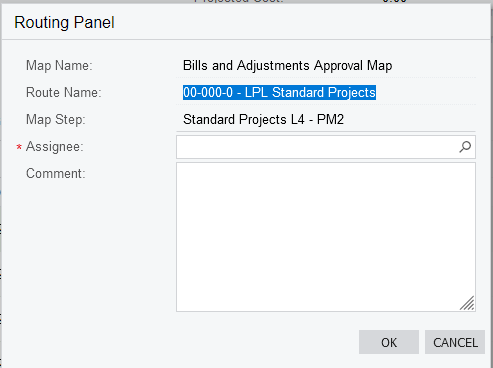
and here is the dialog snip:


what I’m doing wrong that dalog allows to proceed with OK without forcing user to enter the Assignee?



Best answer by deebhane

hi @aaghaei 

Thanks for sharing this, Can you make the below changes and try once 


protected virtual void PAGEPrimaryDACName_RowSelected(PXCache sender, PXRowSelectedEventArgs e, PXRowSelected InvokeBaseHandler)

{       

        if(RoutingPanelDialog.Current!=null)

        {

              ChangeOk.SetEnabled(RoutingPanelDialog.Current.Owner != null);

         }


}

10 replies

praveenpo
Semi-Pro III
Forum|alt.badge.img+3
  • Semi-Pro III
  • March 4, 2022

Hi @aaghaei ,

Instead of this

[PXDefault(PersistingCheck = PXPersistingCheck.Null)]

you can try this 

[PXDBDefault(PersistingCheck = PXPersistingCheck.NullOrBlank)].


deebhane
Semi-Pro I
Forum|alt.badge.img+1
  • Semi-Pro I
  • March 4, 2022

hi @aaghaei

The other way you can handle your requirement by disabling the Ok button until the assignee is provided in the Routing panel dialog box.

Below is the same code, that would help you to disable to ok button until the assignee is provided 

Step 1 : On aspx call back command set visible  = false 

<px:PXDSCallbackCommand CommitChanges="True" Name="CustomerreassignOK" Visible="False" />

Step 2 : 

protected virtual void DACNAME_RowSelected(PXCache sender, PXRowSelectedEventArgs e, PXRowSelected InvokeBaseHandler)

{

if (DailogboxView.Current.USRAssingee!= null)
{

  DailogboxOK.SetEnabled(true);
}

}

Hope this helps. 


aaghaei
Captain II
Forum|alt.badge.img+10
  • Author
  • Captain II
  • March 6, 2022

Thanks @praveenpo the NullOrBlank will make difference on String fields only while mine is numeric. 
 

thanks @deebhane I will test this but I believe there should be a better option as well. I have seen this validations on smart panels like as “Reasons” dialog that works without disabling buttons but validating values. 

I have achieved this with JS on panel but I know it is not standard way of Acumatica neither disability ok button. I’m looking for something that meets Acumatica’s coding standards.

any other thoughts?


aaghaei
Captain II
Forum|alt.badge.img+10
  • Author
  • Captain II
  • March 7, 2022

@deebhane i tried this and didn’t work.


deebhane
Semi-Pro I
Forum|alt.badge.img+1
  • Semi-Pro I
  • March 7, 2022

hi @aaghaei,

I believe this can achieved with out JS as well,  as you indicated the approach I have suggested you, you  have seen similar way of implementation in acumatica standard as well, this can be one of approach as well.

Since you have indicated you have achieved this via JS, in case you like to implement the approach suggest please confirm the below 

Please confirm, did row selected event trigger when popup ok button is clicked. 

Is “Ok” button disabled while the popup is opened?

if yes, can you please share your code snippet of the row selected event. 


aaghaei
Captain II
Forum|alt.badge.img+10
  • Author
  • Captain II
  • March 7, 2022

Hi @deebhane 

Even though the OK button enabled is set to false and when panel is loaded the “Owner” is null, it always is loaded as enabled. 

here is my View/Select;

public PXFilter<EPRoutingPanelDialog> RoutingPanelDialog;


here is my rowselected event handler:

protected virtual void EPRoutingPanelDialog_RowSelected(PXCache sender, PXRowSelectedEventArgs e, PXRowSelected InvokeBaseHandler)
{
if (RoutingPanelDialog.Current.Owner != null)
{
ChangeOk.SetEnabled(true);
}
}


here is my Smart Panel partial aspx:

<px:PXSmartPanel runat="server" ID="pnlOpenDialogBox" AutoReload="True" ShowAfterLoad="True" CaptionVisible="True" Caption="Routing Panel" Key="RoutingPanelDialog" AcceptButtonID="cbOk" CancelButtonID="cbCancel" AutoCallBack-Target="formOpenDialogBox" AutoCallBack-Command="Refresh" CloseButtonDialogResult="No">
<px:PXFormView runat="server" SkinID="Transparent" ID="formOpenDialogBox" DataSourceID="ds" DataMember="RoutingPanelDialog">
<Template>
<px:PXLayoutRule runat="server" StartColumn="True" LabelsWidth="SM" ControlSize="M" />
<px:PXSelector runat="server" ID="edOwner" DataField="Owner" Width="300" Required="True" CommitChanges="True"></px:PXSelector>
</Template>
</px:PXFormView>
<px:PXPanel runat="server" ID="PXPanelRoutingButton" SkinID="Buttons">
<px:PXButton runat="server" DialogResult="OK" Text="OK" CommandSourceID="ds" CommandName="ChangeOk" ID="cbOK" Enabled="False">
<AutoCallBack>
<Behavior CommitChanges="True" /></AutoCallBack></px:PXButton>
<px:PXButton runat="server" DialogResult="Cancel" Text="Cancel" CommandSourceID="ds" CommandName="ChangeCancel" ID="cbCancel" />
</px:PXPanel>
</px:PXSmartPanel>


deebhane
Semi-Pro I
Forum|alt.badge.img+1
  • Semi-Pro I
  • Answer
  • March 7, 2022

hi @aaghaei 

Thanks for sharing this, Can you make the below changes and try once 


protected virtual void PAGEPrimaryDACName_RowSelected(PXCache sender, PXRowSelectedEventArgs e, PXRowSelected InvokeBaseHandler)

{       

        if(RoutingPanelDialog.Current!=null)

        {

              ChangeOk.SetEnabled(RoutingPanelDialog.Current.Owner != null);

         }


}


aaghaei
Captain II
Forum|alt.badge.img+10
  • Author
  • Captain II
  • March 7, 2022

Thank you very much @deebhane. manupulating from the main DAC worked for my purpose. Here I have attached my revised event handler for reference. though, I have another question. When I was manupulating the fields through the panel DAC, my cache was the panel data. Now my cache data is APInvoice data. I was wondering is it possible to enable/disable the fields on the smart panel from the main DAC or I have to keep them in the smart panel DAC. In the below code what should I use instead of “cache” to disable “Step” field on the panel conditionally from the main DAC? 

        protected virtual void APInvoice_RowSelected(PXCache cache, PXRowSelectedEventArgs e)
{
var row = e.Row as APInvoice;
if (row != null)
{
bool Enabled = (row.Status == APStatuses.PendingApproval || row.Status == APStatuses.Rejected || row.Status == APStatuses.OnHold) ? true : false;
route.SetEnabled(Enabled);
}

if (RoutingPanelDialog.Current != null)
{
bool Enabled = false;
Enabled = (RoutingPanelDialog.Current.Status == EPStatuses.Routed) ? false : true;
PXUIFieldAttribute.SetEnabled<EPRoutingPanelDialog.step>(cache, null, Enabled);

Enabled = false;
if (RoutingPanelDialog.Current.Step != null)
{
if (RoutingPanelDialog.Current.Owner != null || RoutingPanelDialog.Current.Workgroup != null)
{
Enabled = true;
}
}

ChangeOk.SetEnabled(Enabled);
}
}


aaghaei
Captain II
Forum|alt.badge.img+10
  • Author
  • Captain II
  • March 7, 2022

nevermind @deebhane.  I figured it out. I just needed to replace “cache” with “RoutingPanelDialog.Cache”. Thanks


deebhane
Semi-Pro I
Forum|alt.badge.img+1
  • Semi-Pro I
  • March 8, 2022

hi @aaghaei 

Glad to hear that the solution worked.