Answer

Not able to hide buttons added to the base graph by a graph extension

  • May 14, 2022
  • 7 replies
  • 255 views

aaghaei
Captain II
Forum|alt.badge.img+10

Hello Gang,


I am trying to hide 3 buttons of Acumatica as I have added 5 custom buttons to either replace or add more functonality. Out of these 3 Acumatica buttons 1 (releaseFromHold)  is created by acumatica in Base Graph and the other 2 (approve and reject) in one of Acumatica’s own graph extensions. Using RowSelected event I’m trying to hide these 3 buttons. My code hides the one from the base graph (releaseFromHold) but the other two (approve & reject) remain visible. Why? Here is my little event code:


protected virtual void APInvoice_RowSelected(PXCache cache, PXRowSelectedEventArgs e)
{
var row = e.Row as APInvoice;

if (row == null) return;

APInvoiceEntry_ApprovalWorkflow BaseAM = Base.GetExtension<APInvoiceEntry_ApprovalWorkflow>();

Base.releaseFromHold.SetVisible(false);
BaseAM.approve.SetVisible(false);
BaseAM.reject.SetVisible(false);
}


Best answer by markusray17

You can still modify it via code, just not via the customization editor. That’s what I was referring to when you override the Configure method in a graph extension. 

7 replies

aaghaei
Captain II
Forum|alt.badge.img+10
  • Author
  • Captain II
  • May 16, 2022

UPDATE:

I tried this as well but no luck 

[PXOverride]
[PXHidden]
public PXAction<APInvoice> approve;
[PXButton(CommitChanges = true)]
[PXUIField(Visible = false)]
protected virtual IEnumerable Approve(PXAdapter adapter) => adapter.Get();


Also I set the  Vsible to false on screen but it didn’t work either


mvolshteyn
Acumatica Moderator
Forum|alt.badge.img+3
  • Technical Account Manager in the ISV Team
  • May 16, 2022

@aaghaei , 

1. you can hide approve/reject actions on the AP Preferences, approval tab (see attachment)

  1.  if you need to customize it through the code, you should not get the graph extension through the .GetExtension method (this is for the DAC extensions). You need to define the extension where you want to place the code as a graph extension of the APInvoiceEntry_ApprovalWorkflow:   
     
    public class APInvoiceEntry_ApprovalWorkflow_Ext : PXGraphExtension<APInvoiceEntry_ApprovalWorkflow,APInvoiceEntry_Workflow        , APInvoiceEntry>


Forum|alt.badge.img+5
  • Jr Varsity II
  • May 16, 2022

If you need to customize it via code you likely need to modify the visibility via the Workflow API, it will typically override any event based code(as it runs afterward). 

The GetExtension method does work for graph extensions and I’m fairly certain it is the proper way to get an extension from the base graph.

In order to modify the workflow via code though you would want to extend the specific graph(APInvoiceEntry_ApprovalWorkflow) and override the Configure method. The T270 training covers how to modify workflows.


aaghaei
Captain II
Forum|alt.badge.img+10
  • Author
  • Captain II
  • May 17, 2022

Thanks @mvolshteyn and @markusray17 

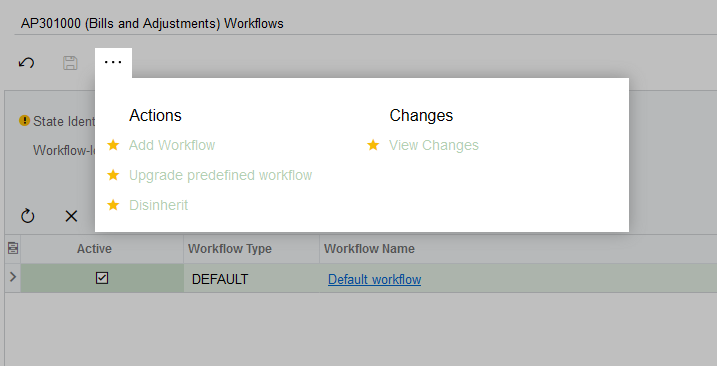
The problem with AP workflow is, it unlike other screens doesn’t allow to “Add Workflow” to the screen. In other screens we can but not in AP301000 and AR301000. I’m not sure why Acumatica has restricted them.


Forum|alt.badge.img+5
  • Jr Varsity II
  • Answer
  • May 17, 2022

You can still modify it via code, just not via the customization editor. That’s what I was referring to when you override the Configure method in a graph extension. 


aaghaei
Captain II
Forum|alt.badge.img+10
  • Author
  • Captain II
  • July 19, 2022

UPDATE

@markusray17 @mvolshteyn @Chris Hackett 

Finally I figured out what is happening. The case is if we add the actions to our favorites by staring (*) them, Acumatica will then adds them to “FavoriteActionRecord” table. It appears actions added to this table, overrides the Show/Hide in RowSelected event handler. When I remove the Star from actions, everything works just fine. When I star then system shows the action buttons on my screen all the time even if I try to hide them through an event handler.


Chris Hackett
Community Manager
Forum|alt.badge.img
  • Acumatica Community Manager
  • July 22, 2022

Thank you for sharing this update @aaghaei !