



I am trying to create a form/screen that will allow for the updating of INLocation records. A very basic form.
It starts at the first record, and allows the user to move PREV or NEXT. They can change a couple of fields, or delete the record.
I have it sort of working. The form runs correctly, drawing in the first record as expected.
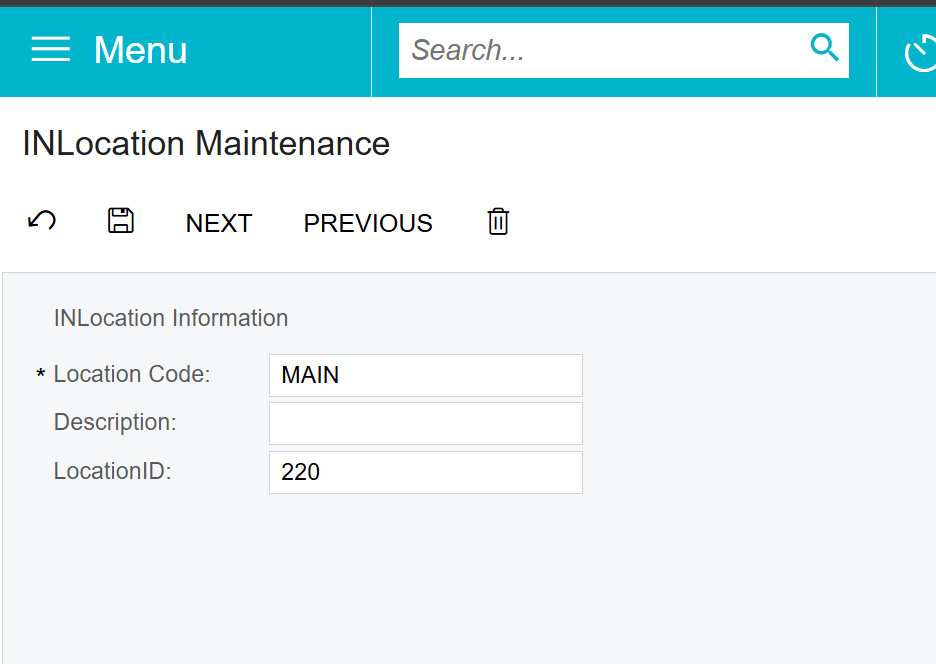
But when I hit NEXT or PREV, it is not updating the information on the screen (even tho it is correctly moving to the next or prev record in the data. I confirmed that using breakpoints and examining the data.)
This is my current ASPX:
<%@ Page Language="C#" MasterPageFile="~/MasterPages/FormView.master" AutoEventWireup="true" ValidateRequest="false" CodeFile="IN900100.aspx.cs" Inherits="Page_IN900100" Title="Untitled Page" %>
<%@ MasterType VirtualPath="~/MasterPages/FormView.master" %>

<asp:Content ID="cont1" ContentPlaceHolderID="phDS" Runat="Server">
  <px:PXDataSource ID="ds" runat="server" Visible="True" Width="100%"
        TypeName="ASGExecuteSQL.INLocationMaint"
        PrimaryView="Locations"
        >
    <CallbackCommands>

    </CallbackCommands>
  </px:PXDataSource>
</asp:Content>
<asp:Content ID="cont2" ContentPlaceHolderID="phF" Runat="Server">
  <px:PXFormView ID="form" runat="server" DataSourceID="ds" DataMember="Locations" Width="100%" AllowAutoHide="false">
    <Template>
      <px:PXLayoutRule runat="server" StartRow="True" ID="PXLayoutRule1" ></px:PXLayoutRule>
      <px:PXLayoutRule runat="server" ID="CstPXLayoutRule6" StartGroup="True" ></px:PXLayoutRule>
      <px:PXLabel runat="server" ID="CstLabel7" Text="INLocation Information" />
      <px:PXSegmentMask runat="server" ID="CstPXSegmentMask9" DataField="SiteID" />
      <px:PXSegmentMask runat="server" ID="CstPXSegmentMask8" DataField="LocationCD" CommitChanges="True" />
      <px:PXTextEdit runat="server" DataField="Descr" ID="edDescr" ></px:PXTextEdit>
      <px:PXTextEdit CommitChanges="True" runat="server" DataField="LocationID" ID="edLocationID" ></px:PXTextEdit></Template>
    <AutoSize Container="Window" Enabled="True" MinHeight="200" ></AutoSize>
  </px:PXFormView>
</asp:Content>
And this is my C# back end code:
using System;
using System.Collections;
using System.Collections.Generic;
using System.Linq;

using PX.Data;
using PX.Data.BQL.Fluent;
using PX.Objects.FS;
using PX.Objects.IN;
using static PX.Data.BQL.BqlPlaceholder;

namespace ASGExecuteSQL
{
    public class INLocationMaint : PXGraph<INLocationMaint>
    {
        // Primary view for INLocation DAC
        public PXCancel<INLocation> Cancel;
        public PXSave<INLocation> Save;
        public SelectFrom<INLocation>.View Locations;

        public INLocationMaint()
        {
            // Optionally load the first record into Locations.Current to initialize data

            if (Locations.Current == null)
            {
                Locations.Cache.AllowInsert = false; // don't let them create a blank record

                INLocation firstRecord = SelectFrom<INLocation>.View.Select(this);
                if (firstRecord != null)
                {
                    Locations.Current = firstRecord;
                }
                if (Locations.Current != null)
                {
                    var onCode = Locations.Current.LocationCD;
                    var onID = Locations.Current.LocationID;
                    var StopHere = 0;
                }
            }
        }

        protected void _(Events.RowSelected<INLocation> e)
        {
            var cache = e.Cache;
            // the default display for this is Location ID, which is confusing... so...
            PXUIFieldAttribute.SetDisplayName<INLocation.locationCD>(cache, "Location Code");

        }

        // NEXT button action
        public PXNext<INLocation> Next;
        [PXButton(CommitChanges = true)]
        [PXUIField(DisplayName = "Next", MapEnableRights = PXCacheRights.Select, MapViewRights = PXCacheRights.Select)]
        protected IEnumerable next(PXAdapter adapter)
        {
            INLocation current = Locations.Current;
            INLocation next = PXSelect<INLocation,
                Where<INLocation.locationID, Greater<Required<INLocation.locationID>>>,
                OrderBy<Asc<INLocation.locationID>>>
                .Select(this, current.LocationID)
                .FirstOrDefault();

            if (next != null)
            {
                Locations.Current = next;
                Locations.Cache.Update(next);
                Locations.View.RequestRefresh();
            }

            return adapter.Get();
        }

        // PREVIOUS button action
        public PXPrevious<INLocation> Previous;
        [PXButton(CommitChanges = true)]
        [PXUIField(DisplayName = "Previous", MapEnableRights = PXCacheRights.Select, MapViewRights = PXCacheRights.Select)]
        protected IEnumerable previous(PXAdapter adapter)
        {
            INLocation current = Locations.Current;
            INLocation prev = PXSelect<INLocation,
                Where<INLocation.locationID, Less<Required<INLocation.locationID>>>,
                OrderBy<Desc<INLocation.locationID>>>
                .Select(this, current.LocationID)
                .FirstOrDefault();

            if (prev != null)
            {
                Locations.Current = prev;
                Locations.Cache.Update(prev);
                Locations.View.RequestRefresh();
            }

            return adapter.Get();
        }

        // DELETE button action
        public PXDelete<INLocation> Delete;
        [PXButton(CommitChanges = true)]
        [PXUIField(DisplayName = "Delete", MapEnableRights = PXCacheRights.Select, MapViewRights = PXCacheRights.Select)]
        protected IEnumerable deleteLocation(PXAdapter adapter)
        {
            INLocation current = Locations.Current;
            if (current != null)
            {
                Locations.Delete(current);
                this.Actions.PressSave();
            }

            return adapter.Get();
        }
    }
}
Any idea why the screen isn’t correctly updating?


