Question

Need Help Replacing FSxARTran Functionality

  • December 9, 2024
  • 13 replies
  • 218 views

Forum|alt.badge.img

A couple of revisions ago, Acumatica Deprecated and removed the FSxARTran projection.

I thought I had worked around all of the issues this created, but one came back to bite me recently.

The use case is that we have a custom field called UsrASGPrintCheck which is a field we added to Inventory Items, Service Order line items, Appointment Line items, and ARTran Line Items.

The idea is that the customer can specify at the inventory level if it should default to being printed on an invoice. It can be overridden at the Service Order level, and again at the appointment level.

I have that working part fine. 

The issue is when thy go to print the invoice.

In the Appointment, when the “RUN BILLING” button is hit, it runs a method called InvoiceAppointment() which transfers the appointment detail to the ARTran database, and then runs the ARInvoiceEntry graph. 

But it is creating the records there with the default value from inventory and not the FSSOdet of the appointment (naturally since that is the default behavior...) 

The issue is that when I try to intercept the event in the ARInvoiceEntry to fix it, there is no refNbr to access. It is simply <NEW> until the record gets saved, but that is after it exits the ARInvoiceEntry graph (apparently).

Without a refNbr, I cannot get the appointment’s FSSODET line.  I need to look up the associated appointment, but I don’t see that anywhere in the ARInvoiceEntry graph’s cache.

We used to use FSxARTran here as a cross reference, which would allow us to get the FSService Order Information that linked to the FSARtran, but that is gone now. (I also think they changed the order in which RefNbr gets assigned. It seems that FSxARTran was created sooner… but that is a guess) 

Anyway… Does anyone have any idea how I can override the InvoiceAppointment() method, grabbing the appointment detail, and setting my flag before it brings the ARInvoiceEntry graph up to the user?

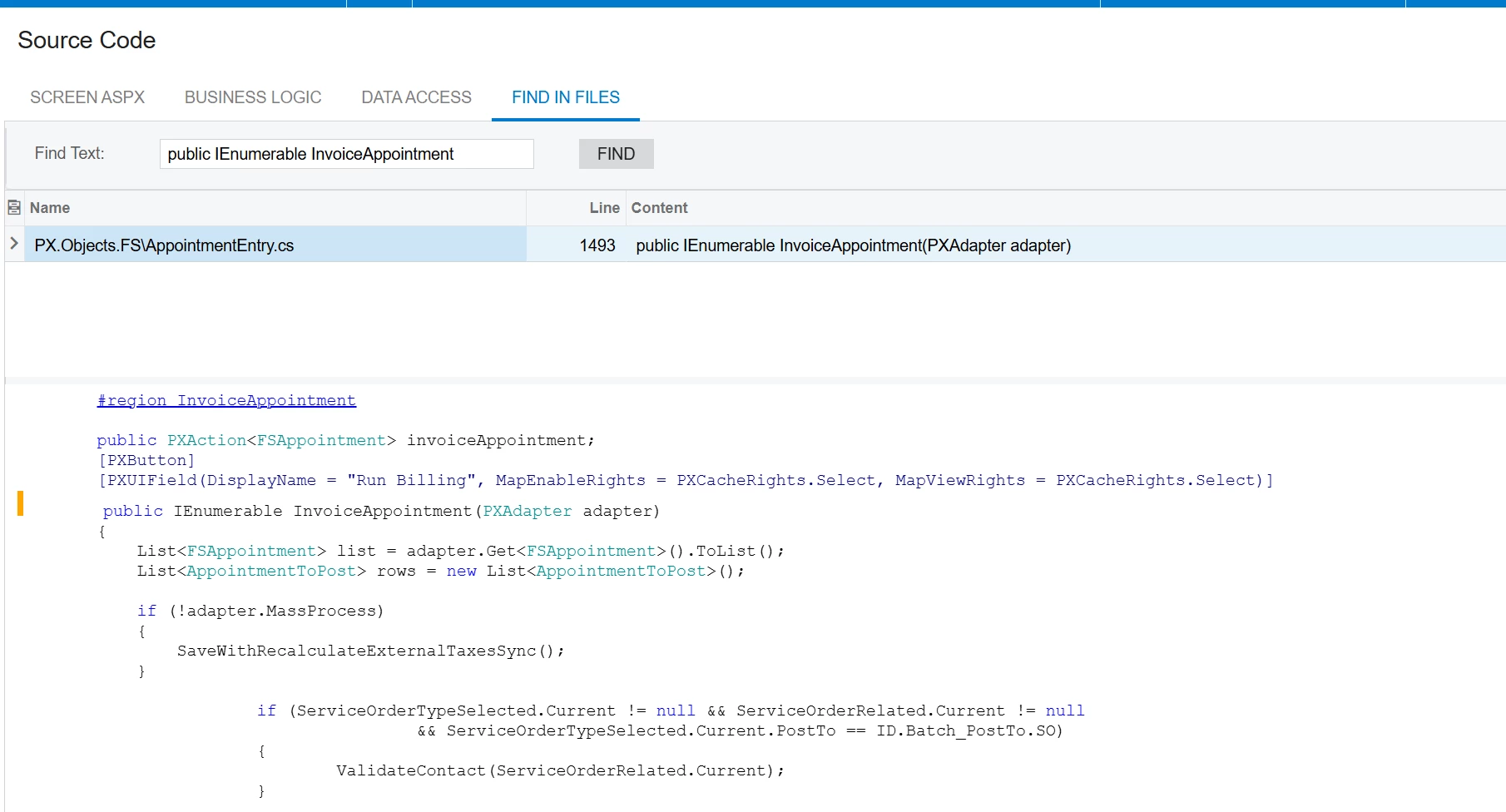
If it helps this is the InvoiceAppointment() method in the source code that gets called when the button is clicked.


public PXAction<FSAppointment> invoiceAppointment;
[PXButton]
[PXUIField(DisplayName = "Run Billing", MapEnableRights = PXCacheRights.Select, MapViewRights = PXCacheRights.Select)]
public IEnumerable InvoiceAppointment(PXAdapter adapter)
{
List<FSAppointment> list = adapter.Get<FSAppointment>().ToList();
List<AppointmentToPost> rows = new List<AppointmentToPost>();

if (!adapter.MassProcess)
{
SaveWithRecalculateExternalTaxesSync();
}

if (ServiceOrderTypeSelected.Current != null && ServiceOrderRelated.Current != null
&& ServiceOrderTypeSelected.Current.PostTo == ID.Batch_PostTo.SO)
{
ValidateContact(ServiceOrderRelated.Current);
}

foreach (FSAppointment fsAppointmentRow in list)
{
// Acuminator disable once PX1008 LongOperationDelegateSynchronousExecution [compatibility with legacy code]
PXLongOperation.StartOperation(
this,
delegate ()
{
SetServiceOrderStatusFromAppointment(ServiceOrderRelated.Current, fsAppointmentRow, ActionButton.InvoiceAppointment);

CreateInvoiceByAppointmentPost graphCreateInvoiceByAppointmentPost = PXGraph.CreateInstance<CreateInvoiceByAppointmentPost>();
graphCreateInvoiceByAppointmentPost.Filter.Current.PostTo = ServiceOrderTypeSelected.Current.PostTo == ID.SrvOrdType_PostTo.ACCOUNTS_RECEIVABLE_MODULE ? ID.Batch_PostTo.AR_AP : ServiceOrderTypeSelected.Current.PostTo;
graphCreateInvoiceByAppointmentPost.Filter.Current.IgnoreBillingCycles = true;
graphCreateInvoiceByAppointmentPost.Filter.Current.BranchID = fsAppointmentRow.BranchID;
graphCreateInvoiceByAppointmentPost.Filter.Current.LoadData = true;

if (fsAppointmentRow.ActualDateTimeEnd > Accessinfo.BusinessDate)
{
graphCreateInvoiceByAppointmentPost.Filter.Current.UpToDate = fsAppointmentRow.ActualDateTimeEnd;
graphCreateInvoiceByAppointmentPost.Filter.Current.InvoiceDate = fsAppointmentRow.ActualDateTimeEnd;
}

graphCreateInvoiceByAppointmentPost.Filter.Insert(graphCreateInvoiceByAppointmentPost.Filter.Current);

AppointmentToPost appointmentToPostRow = graphCreateInvoiceByAppointmentPost.PostLines.Current =
graphCreateInvoiceByAppointmentPost.PostLines.Search<AppointmentToPost.refNbr>(fsAppointmentRow.RefNbr, fsAppointmentRow.SrvOrdType);

if (appointmentToPostRow == null)
{
throw new PXSetPropertyException(TX.Error.DocumentCannotBeInvoiced, fsAppointmentRow.SrvOrdType, fsAppointmentRow.RefNbr);
}

rows = new List<AppointmentToPost>
{
appointmentToPostRow
};


Guid currentProcessID = graphCreateInvoiceByAppointmentPost.CreateInvoices(graphCreateInvoiceByAppointmentPost, rows, graphCreateInvoiceByAppointmentPost.Filter.Current, adapter.QuickProcessFlow, false);

if (graphCreateInvoiceByAppointmentPost.Filter.Current.PostTo == ID.SrvOrdType_PostTo.SALES_ORDER_MODULE
|| graphCreateInvoiceByAppointmentPost.Filter.Current.PostTo == ID.SrvOrdType_PostTo.SALES_ORDER_INVOICE)
{
foreach (PXResult<FSPostBatch> result in SharedFunctions.GetPostBachByProcessID(this, currentProcessID))
{
FSPostBatch fSPostBatchRow = (FSPostBatch)result;

graphCreateInvoiceByAppointmentPost.ApplyPrepayments(fSPostBatchRow);
}
}

AppointmentEntry apptGraph = PXGraph.CreateInstance<AppointmentEntry>();
apptGraph.AppointmentRecords.Current =
apptGraph.AppointmentRecords.Search<FSAppointment.refNbr>
(fsAppointmentRow.RefNbr, fsAppointmentRow.SrvOrdType);

if (!adapter.MassProcess || this.IsMobile == true)
{
using (new PXTimeStampScope(null))
{
apptGraph.AppointmentPostedIn.Current = apptGraph.AppointmentPostedIn.SelectWindowed(0, 1);
apptGraph.openPostingDocument();
}
}
});
}

return list;
}

I came up with something like this in the AppointmentEntry Graph, but Acuminator was complaining about my method signature, and I wasn’t sure what to change it to. I could disable the error check, but didn’t know if that would cause other problems:

        // Override Invoice Method so we can set the appropriate values for our PrintFlag
// Override the InvoiceAppointment action
// Acuminator disable once PX1096 PXOverrideSignatureMismatch [Doesn't like method]
[PXOverride]
public IEnumerable InvoiceAppointment(PXAdapter adapter, Func<PXAdapter, IEnumerable> baseMethod)
{
// Access the selected appointments
List<FSAppointment> list = adapter.Get<FSAppointment>().ToList();
foreach (FSAppointment appointment in list)
{
// Add custom logic here if needed
}

// Call the base method to retain existing functionality
IEnumerable result = baseMethod(adapter);

// Your custom logic AFTER the base method runs
foreach (FSAppointment appointment in list)
{
// Modify ARTran records or any post-processing logic here
UpdateARTranPrintCheck(appointment);
}

return result;
}

 

13 replies

darylbowman
Captain II
Forum|alt.badge.img+15
public delegate IEnumerable InvoiceAppointmentDelegate(PXAdapter adapter);
[PXOverride]
public IEnumerable InvoiceAppointment(PXAdapter adapter, InvoiceAppointmentDelegate baseMethod)
{

}


Forum|alt.badge.img
  • Author
  • Varsity I
  • December 10, 2024
public delegate IEnumerable InvoiceAppointmentDelegate(PXAdapter adapter);
[PXOverride]
public IEnumerable InvoiceAppointment(PXAdapter adapter, InvoiceAppointmentDelegate baseMethod)
{

}


Well, unfortunately, when I try this I get this error:

The System.Collections.IEnumerable InvoiceAppointment(PX.Data.PXAdapter) method in the ASGCORE.Features.SelectivePrint.AppointmentEntry_Extension graph extension is marked as [PXOverride], but no original method with this name has been found in PXGraph.


And yet this method DOES exist in AppointmentEntry graph, according to the source code:


I tried it with the signature: 


        public delegate IEnumerable InvoiceAppointmentDelegate(PXAdapter adapter);
// Acuminator disable once PX1096 PXOverrideSignatureMismatch [Justification]
[PXOverride]
public IEnumerable InvoiceAppointment(PXAdapter adapter)

As well as the signature:

        public delegate IEnumerable InvoiceAppointmentDelegate(PXAdapter adapter);
// Acuminator disable once PX1096 PXOverrideSignatureMismatch [Needed baseMethod]
[PXOverride]
public IEnumerable InvoiceAppointment(PXAdapter adapter, InvoiceAppointmentDelegate baseMethod)
{

Both give the same error.

What am I missing?


darylbowman
Captain II
Forum|alt.badge.img+15
  • December 10, 2024

I’ve written a lot of override methods, and I’ve never encountered this before, but I’m getting the same issue (in 24 R1). ​@Dmitrii Naumov 


Dmitrii Naumov
Acumatica Moderator
Forum|alt.badge.img+7
  • Acumatica Moderator
  • December 10, 2024

Yeah, I’ve tested and it seems broken. Reported for further investigation


Dmitrii Naumov
Acumatica Moderator
Forum|alt.badge.img+7
  • Acumatica Moderator
  • December 11, 2024

@darylbowman ​@mjgrice32 the method is not virtual, so it cannot be overridden like that. 

You can still override it like that though:

 public PXAction<FSAppointment> invoiceAppointment;
 [PXButton]
 [PXUIField(DisplayName = "Run Billing", MapEnableRights = PXCacheRights.Select, MapViewRights = PXCacheRights.Select)]
 public IEnumerable InvoiceAppointment(PXAdapter adapter)
 {

//your code

}


Forum|alt.badge.img
  • Author
  • Varsity I
  • December 11, 2024

@darylbowman ​@mjgrice32 the method is not virtual, so it cannot be overridden like that. 

You can still override it like that though:

 public PXAction<FSAppointment> invoiceAppointment;
 [PXButton]
 [PXUIField(DisplayName = "Run Billing", MapEnableRights = PXCacheRights.Select, MapViewRights = PXCacheRights.Select)]
 public IEnumerable InvoiceAppointment(PXAdapter adapter)
 {

//your code

}

Thanks… I will play with this. I need to add the baseMethod to it as Daryl showed, but that seems to be acceptable, as I compile with no errors...


darylbowman
Captain II
Forum|alt.badge.img+15
  • December 11, 2024

Since it’s public, you can probably just call the method, although I’m not sure. It may also end in a loop / stack overflow:

public PXAction<FSAppointment> invoiceAppointment;
[PXButton]
[PXUIField(DisplayName = "Run Billing", MapEnableRights = PXCacheRights.Select, MapViewRights = PXCacheRights.Select)]
public IEnumerable InvoiceAppointment(PXAdapter adapter)
{
var result = Base.InvoiceAppointment(adapter);
}


Forum|alt.badge.img
  • Author
  • Varsity I
  • December 12, 2024

Daryl,

I used your code, and it lets me execute Base.InvoiceAppointment(adapter); (And surprisingly, did not create an infinite loop. It soky advanced to the next line of code...)

Unfortunately, the Result is simply a list of Appointments (which in my case is always just the one appointment I am running the billing from), and that won’t help me. 

I need the ARTRan items created via the InvoiceAppointment method, so I can set the extended field (printFlag) in ARTran. 

Restating the above, I cannot accomplish this in the ARInvoiceEntry graph, since there is no RefNbr attached to the items on the update or insert events. (It is simply <New>) So I have no way of finding the Appointment’s FSSODet to see what the appointment had the extended field (printFlag) set to.

I need someway of getting the ARTran and the Appointment that created it together in a method so I can set the print flag. And I ahve to do it before my user sees the ARTran in the ARInvoiceEntry so they will know their printFlag has carried through correctly.

Any idea at all how I can accomplish this feat?


@Dmitrii Naumov 

@darylbowman 


darylbowman
Captain II
Forum|alt.badge.img+15
  • December 12, 2024

 (And surprisingly, did not create an infinite loop...)


Any idea at all how I can accomplish this feat?

Then try this:

public PXAction<FSAppointment> invoiceAppointment;
[PXButton]
[PXUIField(DisplayName = "Run Billing", MapEnableRights = PXCacheRights.Select, MapViewRights = PXCacheRights.Select)]
public IEnumerable InvoiceAppointment(PXAdapter adapter)
{
PXGraph.InstanceCreated.AddHandler<ARInvoiceEntry>((g) =>
{
g.RowPersisting.AddHandler<ARInvoice>((cache, e) =>
{
var invoiceGraph = cache.Graph as ARInvoiceEntry;
var transactions = invoiceGraph.Transactions.Select()?.FirstTableItems;

ARInvoice invoice = (ARInvoice)e.Row;

foreach (ARTran tran in transactions)
{
// Can use SetValueExt just like regular event handlers
cache.SetValueExt<ARInvoiceExt.usrPrintFlag>(tran, false);
}
});
});

var result = Base.InvoiceAppointment(adapter);
}

I didn’t test this at all, but this is something I would try. Obviously update the logic to do what you’re trying to do.


Forum|alt.badge.img
  • Author
  • Varsity I
  • December 16, 2024

 (And surprisingly, did not create an infinite loop...)


Any idea at all how I can accomplish this feat?

Then try this:

public PXAction<FSAppointment> invoiceAppointment;
[PXButton]
[PXUIField(DisplayName = "Run Billing", MapEnableRights = PXCacheRights.Select, MapViewRights = PXCacheRights.Select)]
public IEnumerable InvoiceAppointment(PXAdapter adapter)
{
PXGraph.InstanceCreated.AddHandler<ARInvoiceEntry>((g) =>
{
g.RowPersisting.AddHandler<ARInvoice>((cache, e) =>
{
var invoiceGraph = cache.Graph as ARInvoiceEntry;
var transactions = invoiceGraph.Transactions.Select()?.FirstTableItems;

ARInvoice invoice = (ARInvoice)e.Row;

foreach (ARTran tran in transactions)
{
// Can use SetValueExt just like regular event handlers
cache.SetValueExt<ARInvoiceExt.usrPrintFlag>(tran, false);
}
});
});

var result = Base.InvoiceAppointment(adapter);
}

I didn’t test this at all, but this is something I would try. Obviously update the logic to do what you’re trying to do.

@darylbowman I tried this, but the handler is never hit. Everything compiles fine, but when I add a breakpoint, it never hits, and it doesn’t seem to be working when it comes to setting my flag.

Any idea what might cause that?


darylbowman
Captain II
Forum|alt.badge.img+15
  • December 17, 2024

There is an assumptions here that an instance of ARInvoiceEntry is created. I couldn't trace the code to a specific graph. You could try random graphs or maybe you're better at reading source code.

There's also an assumption that the graph is being saved. I understood that from your previous comments. If not, another event handler could be used.


Forum|alt.badge.img
  • Author
  • Varsity I
  • January 30, 2025

OK, I couldn’t figure out how to implement this solution (which was frustrating because, I think there is a way.)

I went back to the use case which is:

When an “Run Billing” is selected from an appointment, it creates an Invoice, which is a master record of ARInvoice, with detail records copied from the AppointmentDet to ARTran records. There is a custom field on the AppointmentDet record called UsrPrintFlag, which the user may have set. I need to make sure the values of the AppointmentDet record’s UsrPrintFlag is copied to the ARTran’s usr field of the same name.


The challenge was that when the AppointmentDet records are first copied over, the Invoice does not have a reference number, and the ARTRan records do not have most of the fields. The Appointment is not part of the ARInvoiceEntry graph,and there is no cache or link is available to find the Apppintment that created the ARInvoice. Therefore, overriding the RowInserted method is useless. (previously there was a projection called FSxARTran which carried the Appointment information, but it was deprecated and deleted several releases ago.)

My solution is to put the logic in 

Events.FieldUpdated<ARTran, ARTran.inventoryID> e


I reasoned that if they are creating a sparse ARTRan record, eventually the underlying method would have to copy the InventoryID over, since it would be required in the Invoice. 

It isn’t nice and clean, but it gives me a handle on things.

Fortunately, the CustomerID and LineNbr are fields carried over into the sparse ARTRan records created by Insert. I also know that the “RUN BILLING” option does not appear to the user until the Appointment is closed. When the InventoryID is given to me, I am able to look up all “closed” appointments for the customer, and start working through them one by one (starting at the newest appointment which is probably the one we want.)

I then work though the AppointmentDet lines, matching the Inventory ID and the LineNbr. If those match, I consider it a hit, and I use that AppointmentDet values to set the User defined fields as needed.

I can come up with some scenarios where this theoretically might fail,  but those don’t seem like reasonable possibilities in real life. 

In case anyone else runs into this, here is some sample code:

        protected virtual void _(Events.FieldUpdated<ARTran, ARTran.inventoryID> e)
{
if (e is null) return;
if (!IsPrintFeatureEnabledForFS()) return; // if not active, just leave

var tran = e.Row as ARTran;
// Best I can determine, if an Invoice is created for a SALES ORDER
// the SOOrderType in ARTran is "SO" -- if it is a SERVICE ORDER
// SOOrderType will == NULL
if (tran.SOOrderType != null)
return;
ARTranExt rowExt = e.Row.GetExtension<ARTranExt>();
if (rowExt == null) return;
if (e.OldValue is null)
{
if (IsPrintFeatureEnabledForFS())
{
// Add Check to see what ScreenID created this record. We only care about FS300200
if (tran.CreatedByScreenID == "FS300200")
{
var ApptTransaction = FindMatchingAppointmentDetail(tran.CustomerID, tran.LineNbr, tran.InventoryID);
if (ApptTransaction != null)
{
FSAppointmentDetExt apDetExt = ApptTransaction.GetExtension<FSAppointmentDetExt>();
rowExt.UsrASGPrintCheck = apDetExt?.UsrASGPrintCheck;
}
}

}
}
}

And the magic function to find the appointment:

        private FSAppointmentDet FindMatchingAppointmentDetail(int? CustomerID, int? LineNbr, int? InventoryID)
{

// We want to see the Apppointment closed since that is where they "Run Billing" From
var appointments = SelectFrom<FSAppointment>
.Where<FSAppointment.customerID.IsEqual<@P.AsInt>
.And<FSAppointment.status.IsEqual<@P.AsString>>>
.OrderBy<Desc<FSAppointment.actualDateTimeEnd>>
.View.Select(Base, CustomerID, "Z"); // "Z" for closed status, Billing would be 'B'


foreach (PXResult<FSAppointment> result in appointments)
{
FSAppointment fsAppointment = result;
PXTrace.WriteInformation($"Checking Appointment: {fsAppointment.AppointmentID} (Date: {fsAppointment.ActualDateTimeEnd})");

// Get all appointment details for this appointment

var appointmentDetails = PXSelect<FSAppointmentDet,
Where<FSAppointmentDet.appointmentID, Equal<Required<FSAppointment.appointmentID>>,
And<FSAppointmentDet.lineNbr, Equal<Required<FSAppointmentDet.lineNbr>>>>>
.Select(Base, fsAppointment.AppointmentID, LineNbr);


foreach (FSAppointmentDet fsAppointmentDet in appointmentDetails)
{
// Check if LineNbr matches and InventoryID does, we have a match. This could possibly
// give us a false positive, but it seems HIGHLY unlikely.

if (fsAppointmentDet.InventoryID == InventoryID)
{
PXTrace.WriteInformation($"Match found! AppointmentID: {fsAppointment.AppointmentID}, LineNbr: {fsAppointmentDet.LineNbr}");
return fsAppointmentDet; // Return the first match (newest first)
}
}
}
PXTrace.WriteWarning("No matching appointment detail found.");
return null; // No match found
}

If anyone can think of a better / cleaner way, LMK. 

Otherwise I’ll call this the answer and move on for now.

Thanks to everyone who took a shot at this. I appreciate the help this community provides!


Chris Hackett
Community Manager
Forum|alt.badge.img
  • Acumatica Community Manager
  • January 31, 2025

Thank you for sharing your solution with the community ​@mjgrice32!