Answer

Multiselect combo not returning values

  • July 10, 2024
  • 7 replies
  • 160 views

Forum|alt.badge.img+1

Hello, 

I have followed this article to create a multiselect combo box. 

https://asiablog.acumatica.com/2016/03/multiselect-combo-box.html

Everything operates in the way it is shown in the article, values are displayed in the combo box, I can select 2 values and those values are saved to the database. 

However, when I leave the current record and then return to the record, the combo box value is empty. The values are in the database but they don’t appear on the combo box. 

Here is my DAC

[PXDBString(255, IsUnicode = true)]
[PXUIField(DisplayName = "Brands")]
[PXStringList(new string[] { "D", "C", "T", "I" }, new string[] { "Development", "Consulting", "Training", "Implementation" }, MultiSelect = true)]
public virtual string UsrBrands { get; set; }
public abstract class usrBrands : PX.Data.BQL.BqlString.Field<usrBrands> { }

..and the ASPX

<px:PXDropDown runat="server" ID="CstPXSelector334" Size="M" DataField="usrBrands" AllowMultiSelect="True" />

I’m not sure what else is required, can anyone help please?

Best answer by Naveen Boga

@josiahl64  Here is the Problem. Please find the details below.

You might have extended the DAC PX.Objects.CR.CROpportunity but also you need to extend the PX.Objects.CR.Standalone.CROpportunity DAC as well for the same field then only value will be persisted in the Database. 2018 R1(and later) the PX.Objects.CR.CROpportunity DAC is a projection DAC.

Please review the below link for your reference

https://www.augforums.com/forums/everything-else/custom-date-field-in-opportunity-screen-not-displaying-data/

https://stackoverflow.com/questions/50880116/custom-field-on-cropportunity-doesnt-display-saved-value-since-upgrading-from-6

7 replies

Naveen Boga
Captain II
Forum|alt.badge.img+19
  • Captain II
  • July 10, 2024

Hi @stephenward03  Are you adding this field in the GRID? 


Forum|alt.badge.img+1
  • Author
  • Varsity III
  • July 10, 2024

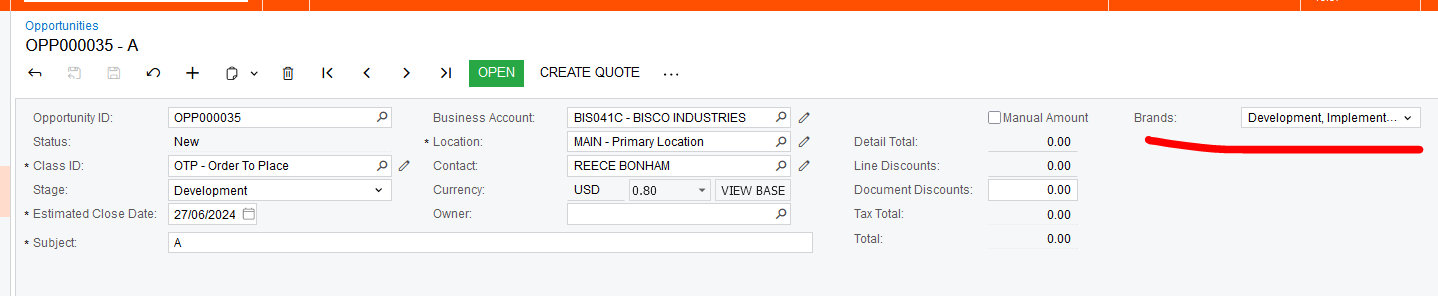
It’s on the opportunities form. See below. It has values in the screen shot, but if I click the Previous record button and then the Next button, the combo box is empty.


Forum|alt.badge.img+1
  • Jr Varsity I
  • July 10, 2024

Have you tried DataField="UsrBrands" (capital ‘U’) in your aspx? In my examples, the DataField is the Public Virtual String and it is working


Forum|alt.badge.img+1
  • Author
  • Varsity III
  • July 10, 2024

Thanks for the suggestion. Just changed from usrBrands to UsrBrands but the problem still occurs. 


Naveen Boga
Captain II
Forum|alt.badge.img+19
  • Captain II
  • Answer
  • July 10, 2024

@josiahl64  Here is the Problem. Please find the details below.

You might have extended the DAC PX.Objects.CR.CROpportunity but also you need to extend the PX.Objects.CR.Standalone.CROpportunity DAC as well for the same field then only value will be persisted in the Database. 2018 R1(and later) the PX.Objects.CR.CROpportunity DAC is a projection DAC.

Please review the below link for your reference

https://www.augforums.com/forums/everything-else/custom-date-field-in-opportunity-screen-not-displaying-data/

https://stackoverflow.com/questions/50880116/custom-field-on-cropportunity-doesnt-display-saved-value-since-upgrading-from-6


Forum|alt.badge.img+1
  • Author
  • Varsity III
  • July 10, 2024

Hi @Naveen Boga, you are correct. I extended the PX.Objects.CR.Standalone.CROpportunity DAC and now values are returned from the db and displayed correctly on screen. The problem was the projection DAC, not the multiselect combo. 

Thanks for sharing your knowledge. 


Naveen Boga
Captain II
Forum|alt.badge.img+19
  • Captain II
  • July 10, 2024

Yes, you are right, the problem is with Projection DAC . I’m glad that problem is resolved.