I’ve been extolling the virtues of the Modern UI to my colleagues, especially how straight forward it is to code. Unfortunately I’ve found myself stuck on a screen where I simply cannot see the issue. The classic UI version of the screen is working fine, but I cannot get the Modern UI screen to work. The environment is 2025R2.
The screen is supported by the following DAC
using System;
using PX.Data;
using PX.Objects.CS;

namespace SoImportDemo
{
	[PXCacheName(Helpers.Messages.ZZSoImportSetup)]
	[PXPrimaryGraph(typeof(ZZSoImportSetupMaint))]
	public class ZZSoImportSetup : PXBqlTable, IBqlTable
	{
		#region NumberingID
		[PXDBString(10, IsUnicode = true, InputMask = "")]
        [PXSelector(typeof(Numbering.numberingID),
            DescriptionField = typeof(Numbering.descr))]
        [PXUIField(DisplayName = "Numbering Sequence")]
		[PXDefault("SOIMPORT")]
        public virtual string NumberingID { get; set; }
		public abstract class numberingID : PX.Data.BQL.BqlString.Field<numberingID> { }
		#endregion

		#region ClientID
		[PXDBString(50, IsUnicode = true, InputMask = "")]
		[PXUIField(DisplayName = "Client ID")]
		public virtual string ClientID { get; set; }
		public abstract class clientID : PX.Data.BQL.BqlString.Field<clientID> { }
		#endregion

		#region TenantID
		[PXDBString(50, IsUnicode = true, InputMask = "")]
		[PXUIField(DisplayName = "Tenant ID")]
		public virtual string TenantID { get; set; }
		public abstract class tenantID : PX.Data.BQL.BqlString.Field<tenantID> { }
		#endregion

		#region Secret
		[PXDBString(100, IsUnicode = true, InputMask = "")]
		[PXUIField(DisplayName = "Secret")]
		public virtual string Secret { get; set; }
		public abstract class secret : PX.Data.BQL.BqlString.Field<secret> { }
		#endregion

		#region Scope
		[PXDBString(100, IsUnicode = true, InputMask = "")]
		[PXUIField(DisplayName = "Scope")]
		public virtual string Scope { get; set; }
		public abstract class scope : PX.Data.BQL.BqlString.Field<scope> { }
		#endregion

		/// system field removed for brevity ///
	}
}
and Graph
using System;
using PX.Data;
using PX.Data.BQL.Fluent;

namespace SoImportDemo
{
	public class ZZSoImportSetupMaint : PXGraph<ZZSoImportSetupMaint>
	{

		public PXSave<ZZSoImportSetup> Save = null;
		public PXCancel<ZZSoImportSetup> Cancel = null;

		public SelectFrom<ZZSoImportSetup>.View SetupView = null;

    }
}
And here is the Tyepscript and HTML for the screen
import { createSingle, graphInfo, PXView, PXScreen, PXFieldState, viewInfo } from "client-controls";

@graphInfo({
    graphType: "SoImportDemo.ZZSoImportSetupMaint",
    primaryView: "SetupView",
})
export class ZZ101000 extends PXScreen {
    @viewInfo({ containerName: "SO Import Preferences" })
    SetupView = createSingle(ZZSoImportSetup);

}

export class ZZSoImportSetup extends PXView {
    NumberingID: PXFieldState;
    ClientID: PXFieldState;
    TenantID: PXFieldState;
    Secret: PXFieldState;
    Scope: PXFieldState;
}
<template>
<qp-template id="form-Setup" name="7-10-7" class="equal-height">
<qp-fieldset id="columnA-Setup" view.bind="SetupView" slot="A">
<field name="NumberingID"></field>
</qp-fieldset>
<qp-fieldset id="columnB-Setup" view.bind="SetupView" slot="B">
<field name="ClientID"></field>
<field name="TenantID"></field>
<field name="Secret"></field>
<field name="Scope"></field>
</qp-fieldset>
</qp-template>
</template>When the screen is opened the following error is show in the trace
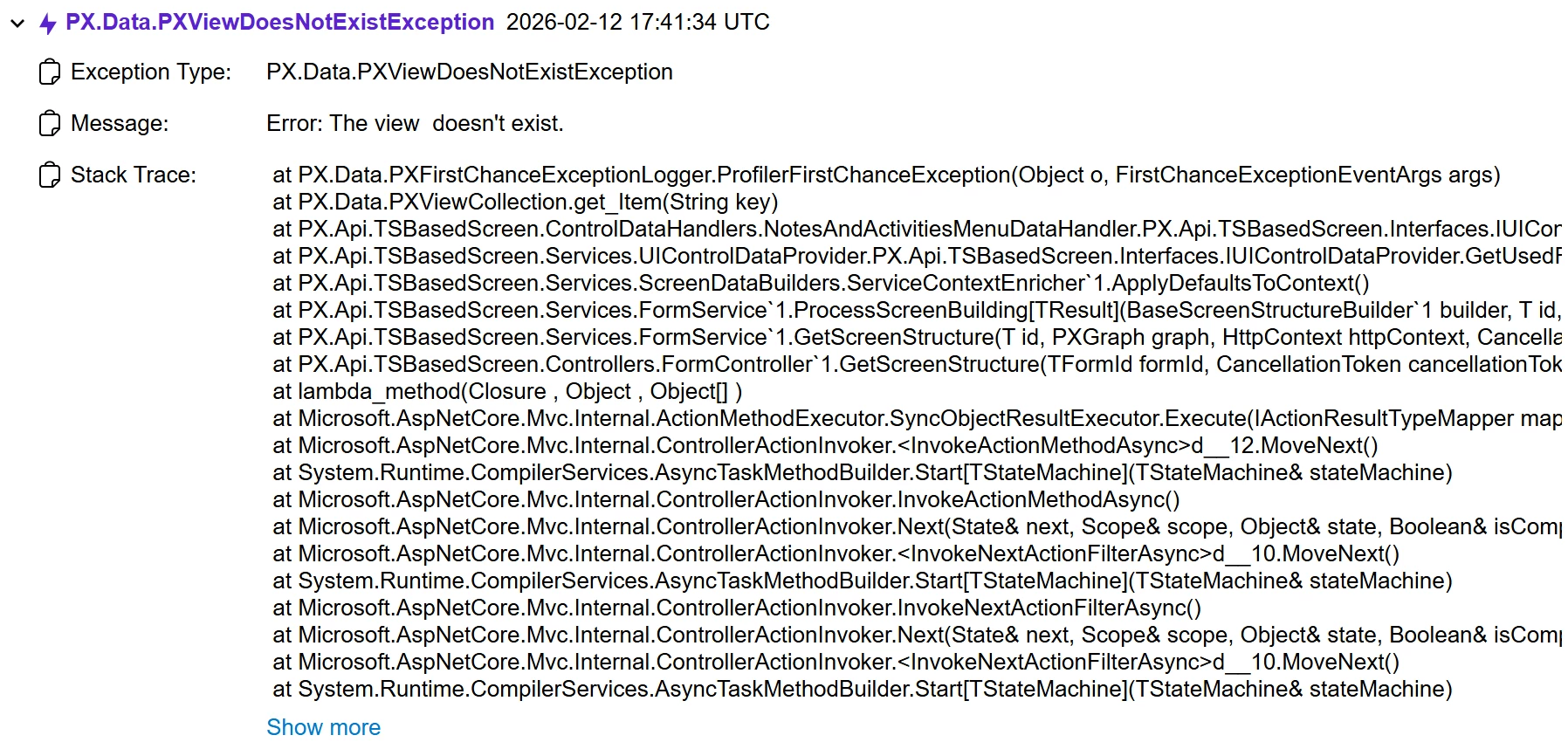
I cannot for the life of me see what the issue is. The view names are correct the field names are all correct as far as I can see. Any help would be greatly appriciated.