Question

Modern UI: New Custom Tab Not Displaying on Customers Screen (AR303000)

  • January 23, 2026
  • 5 replies
  • 92 views

I am facing an issue while adding a new custom tab in the Modern UI on the Customers screen, and I would appreciate your guidance.

Screen

  • Customers (AR303000)

Issue Description

I have created a customization to add a new EDI Integration tab on the Customers screen using Modern UI (TypeScript + HTML).

The customization builds successfully, and there are no runtime errors; however, the custom tab is not displayed on the Customers screen.


TypeScript Code

import {
    PXFieldState,
    createSingle,
    viewInfo
} from "client-controls";

import {
    AR303000,
    Customer
} from "../AR303000";


export interface AR303000_EDIIntegration extends AR303000 { }

export class AR303000_EDIIntegration extends AR303000 {

    @viewInfo({ containerName: "EDI Integration" })
    Customer = createSingle(Customer_EDI);
}

export class Customer_EDI extends Customer {

    UsrEDI810: PXFieldState;
    UsrEDI850: PXFieldState;
    UsrEDI855: PXFieldState;
    UsrEDI856: PXFieldState;
    UsrEDIBuyerCode: PXFieldState;
}
 

HTML Code

<template>
    <qp-tab after="#tabMailingPrinting" id="tab-EDIIntegration"
            caption="EDI Integration">
        <qp-template id="formEDIIntegration"  class="label-size-m">
            <qp-fieldset  view.bind="Customer" id="CustEDIIntegrationView">

                <field name="UsrEDI810" />
                <field name="UsrEDI850" />

                <field name="UsrEDI855" />
                <field name="UsrEDI856" />

                <field name="UsrEDIBuyerCode" />

            </qp-fieldset>
        </qp-template>


    </qp-tab>
</template>
Classic UI 
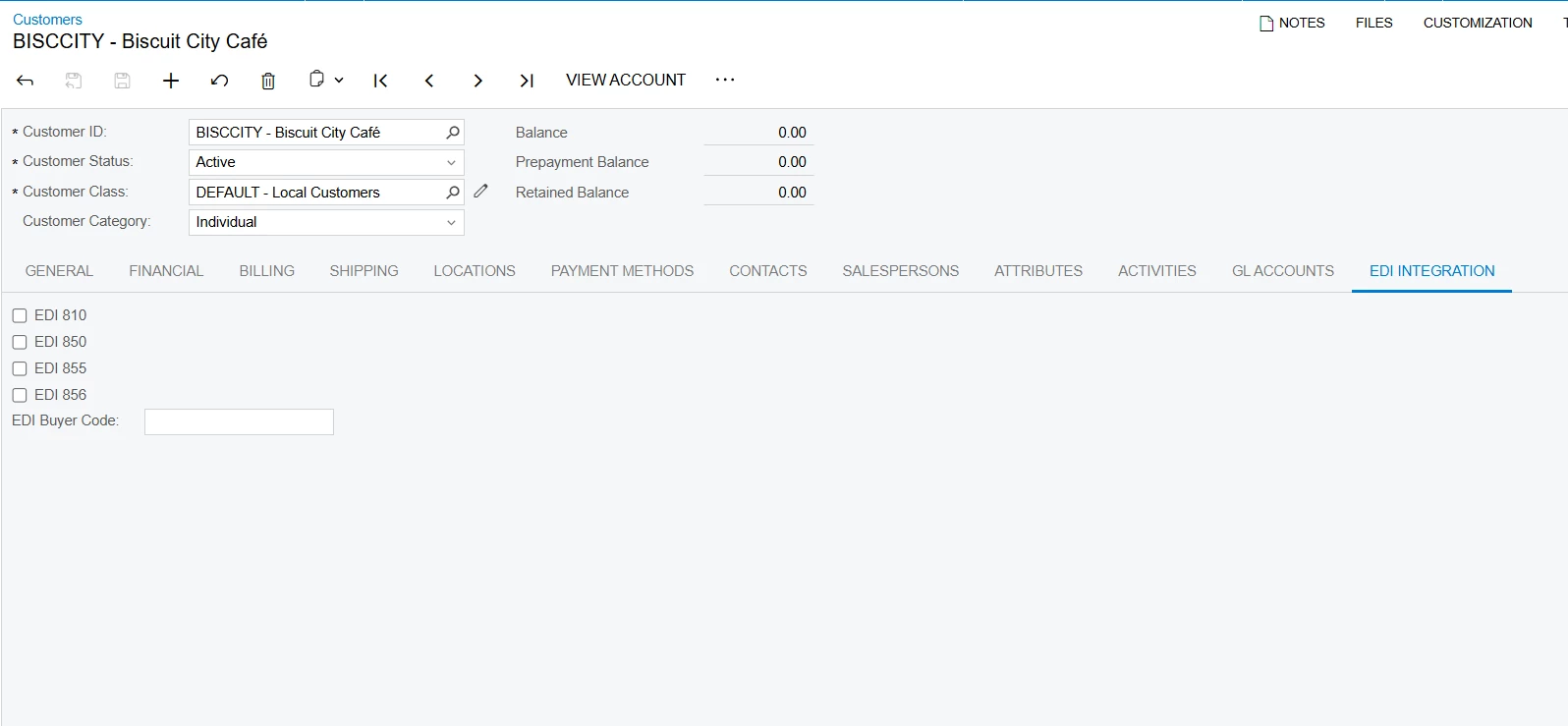
 

5 replies

Forum|alt.badge.img

@purva59 
 

Your view name, container name, and HTML bindings are not aligned the way Modern UI expects.

In Modern UI:

  • Tab rendering depends on the view being correctly registered

  • If the view is not recognized, the tab silently does not appear
    ContainerName
     must match the tab caption, not be arbitrary

  • @viewInfo({ containerName: "EDI Integration" })
    Customer = createSingle(Customer_EDI);

    Replace your code with the below one.
     @viewInfo({ containerName: "EDI Integration" })
        EDIIntegration = createSingle(Customer_EDI);

    In the  HTML 
     <qp-template id="formEDIIntegration"  class="label-size-m">
                <qp-fieldset  view.bind="Customer" id="CustEDIIntegrationView">

    Replace the above  code  with this

    <qp-template class="label-size-m">
                <qp-fieldset view.bind="EDIIntegration"
                             id="CustEDIIntegrationView">  


darylbowman
Captain II
Forum|alt.badge.img+16

If you are extending the existing ‘Customer’ class, you don’t need to define the view again. You can use the existing ‘Customer’ view from the base screen.


Forum|alt.badge.img+9
  • Captain II
  • January 30, 2026

Similar to what ​@darylbowman said, your extension should look something like this:

export interface Customer_EDI extends Customer { } 
export class Customer_EDI {

UsrEDI810: PXFieldState;
UsrEDI850: PXFieldState;
UsrEDI855: PXFieldState;
UsrEDI856: PXFieldState;
UsrEDIBuyerCode: PXFieldState;
}

The HTML looks fine, you should have an id attribute in your qp-template tag.


Forum|alt.badge.img
  • Jr Varsity II
  • January 30, 2026

Hi ​@purva59 , Refer to this and if the view is custom, replace the Customer to your view. 

TS Code:

import {

    PXFieldState,

    createSingle,

    viewInfo

} from "client-controls";

import {

    AR303000,

    Customer

} from "src/screens/AR/AR303000/AR303000";

export interface AR303000_EDIIntegration extends AR303000 { }

export class AR303000_EDIIntegration {

        Customer = createSingle(Customer);

}

export class Customer extendsPXView{

your fields….

…..

}


HTML Code:

<template>
    <qp-tab after="#tabMailingPrinting" id="tab-EDIIntegration"
            caption="EDI Integration">

<qp-template id="EDIIntegration" name="1-1-1">
    <qp-fieldset id="EDIIntegration1" view.bind="Customer" Slot="A">
        <field name="UsrEDI810"></field>
    </qp-fieldset>

</qp-template>

</template>


Jhon Reeve Penuela
Freshman I

Hi ​@purva59 . here may sample code in Service Order Screen. I create a custom tab with name Purchase Order Tab.

This is HTML File

<template>
<qp-tab id="purchaseOrderTab" caption="Purchase Order" load-on-demand.bind="true" after="#profitabilityTab">
<qp-grid id="PXGridPurchaseOrders" view.bind="PurchaseOrders"></qp-grid>
</qp-tab>
</template>s

and this TS File

import {
PXFieldState,
PXView,
viewInfo,
gridConfig,
GridPreset,
createCollection
} from "client-controls";
import { FS300100 } from "src/screens/FS/FS300100/FS300100";

export interface FS300100_AISPurchaseOrderTabInServiceOrder
extends FS300100 { }
export class FS300100_AISPurchaseOrderTabInServiceOrder {
@gridConfig({ preset: GridPreset.Inquiry })
@viewInfo({ containerName: "Purchase Order" })
PurchaseOrders = createCollection(POOrder);
}

export class POOrder extends PXView {
UsrAISServiceOrderNbr: PXFieldState;
UsrAISServiceOrderType: PXFieldState;
OrderType: PXFieldState;
OrderNbr: PXFieldState;
OrderDate: PXFieldState;
VendorID: PXFieldState;
VendorID_BAccountR_acctName: PXFieldState;
OrderTotal: PXFieldState;
Status: PXFieldState;
}

I hope this helps for you.