Is there another gridConfig parameter that I need to include to keep .Current up to date based on the user moving around in the grid like Classic UI does?
Best answer by Django
Solved. As I expected, it was something that I was doing. First, for future me:
The docs for syncPosition say this:
If an Acumatica ERP form contains a table and the form toolbar includes an action to process a single record that is selected in the table, the action delegate method must have a reference to the selected record in the cache. To use the Current property of a PXCache object to access the record selected in a table, the Current property must be synchronized with the record selected in the table. To force the system to provide this synchronization, you have to set the syncPosition property of the gridConfig decorator to true.
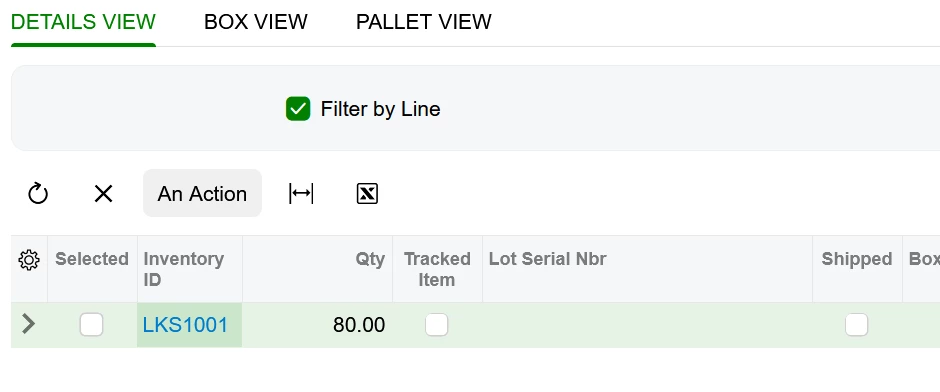
In my form I have three grids that show different views of the same DAC. Details view is where the user can edit the details. Box View and Pallet View are filtered views of the same DAC.
My tests:
Clicking on the Inventory ID link will call RowSelected twice. Once for Row 1, then once for the current current row #, then the pop-up window appears.
Clicking on my “An Action” button will call RowSelected four times. Once for Row 1, then once for the current row #, then twice more for row #1, then the action is invoked. After the action, RowSelected is invoked on all of the rows in that view, from the last row to the first.
And that’s where the lightbulb lit up. In my .ts file, all three grids had syncPosition set to true. So when the PXAction button was pressed, each grid, in turn, synced itself. The last grid’s position won.
There was no reason for the Box View and Pallet View to be synced so I removed that from the gridConfig and everything started to work.
I believe you are missing @columnConfig for the required columns in the grid. You should add those in your .ts file. You can refer to existing SO301000.ts. You can also set grid preset to Details.
preset: GridPreset.Details
You can try using Details.Cache to get the current instead of directly using Details.Current
Hi @Django. syncPosition: true isn't enough on its own. In Modern UI the grid's selected row only gets sent back to the server if the action is invoked from that grid. Your button sits at the form level, so the round trip only carries the header position and Details.Current ends up null.
Two things you can do:
Move the button into the grid toolbar, that's what gets the row position posted:
Are the master-detail grids working correctly otherwise?
Yes. When I click on the master grid, the detail grid filters appropriately. As I change the selected master grid row, my graph RowSelected code is run.
However, when I change the selected row in my Detail grid, the related RowSelected code is not run.
The Detail grid RowSelected code is run when I’m editing the field in the grid and when I change the master grid record ( runs multiple times as expected).
@Abhishek Niikam I switched the DAC that the action button is working on to both the master level as well as the detail level but I get the same result. The Current record for the detail grid is the first record in the grid no matter what line on the grid the user has selected.
@dnavasardyan37 Unfortunately, the adapter parameter contains almost no information at all and the Cache is always pointing to the first record in the detail DAC and not the record that the user has selected.
Perhaps the issue is related to the detail grid being within a splitter. I’m going to try removing that to see if it makes a difference.
Very frustrating given that Classic UI works perfectly for all of this.
Solved. As I expected, it was something that I was doing. First, for future me:
The docs for syncPosition say this:
If an Acumatica ERP form contains a table and the form toolbar includes an action to process a single record that is selected in the table, the action delegate method must have a reference to the selected record in the cache. To use the Current property of a PXCache object to access the record selected in a table, the Current property must be synchronized with the record selected in the table. To force the system to provide this synchronization, you have to set the syncPosition property of the gridConfig decorator to true.
In my form I have three grids that show different views of the same DAC. Details view is where the user can edit the details. Box View and Pallet View are filtered views of the same DAC.
My tests:
Clicking on the Inventory ID link will call RowSelected twice. Once for Row 1, then once for the current current row #, then the pop-up window appears.
Clicking on my “An Action” button will call RowSelected four times. Once for Row 1, then once for the current row #, then twice more for row #1, then the action is invoked. After the action, RowSelected is invoked on all of the rows in that view, from the last row to the first.
And that’s where the lightbulb lit up. In my .ts file, all three grids had syncPosition set to true. So when the PXAction button was pressed, each grid, in turn, synced itself. The last grid’s position won.
There was no reason for the Box View and Pallet View to be synced so I removed that from the gridConfig and everything started to work.