


I’m trying to add a fieldset on the Bills and Adjustments screen after the ‘columnFirstSummary’ fieldset. However, the only way I can get this to work is to physically remove the fields/fieldset and then re-add them in a separate div. This isn’t bad, but if the fields change in the future I’ll obviously have to update the customization any time it does. Is there a more futureproof way to add this fieldset in the same column? Or am I kind of stuck with this solution?
<template>
    <field remove="#columnFirstSummary FIELD[name='Status']"></field>
    <field remove="#columnFirstSummary FIELD[name='DocDate']"></field>
    <field remove="#columnFirstSummary FIELD[name='FinPeriodID']"></field>
    <field remove="#columnFirstSummary FIELD[name='InvoiceNbr']"></field>
    <field remove="#columnFirstSummary FIELD[name='IsJointPayees']"></field>
    <field remove="#columnFirstSummary FIELD[name='RefNbr']"></field>
    <field remove="#columnFirstSummary FIELD[name='DocType']"></field>
    <qp-fieldset remove="#columnFirstSummary"></qp-fieldset>
    <div slot="A" id="firstColumnDiv" prepend="#formSummary">
      <qp-fieldset id="columnFirstSummary" view.bind="Document">
        <field name="DocType"></field>
        <field name="RefNbr"></field>
        <field name="Status" class="colored" pinned></field>
        <field name="DocDate"></field>
        <field name="FinPeriodID" pinned="false"></field>
        <field name="InvoiceNbr" pinned="false"></field>
        <field name="IsJointPayees"></field>
      </qp-fieldset>
      <qp-fieldset id="Document_CstPXLayoutRule3_fs" view.bind="Document">
        <field name="UsrAllocationID"></field>
        <field name="UsrAccount"></field>
        <field name="UsrAllocationAmt"></field>
      </qp-fieldset>
    </div>
</template>
This is how it looks when working as I would expect:
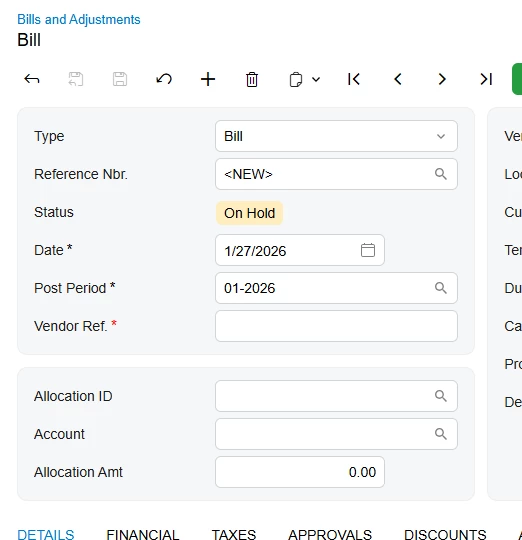
Originally I was just trying to both after/append the section after but it would never work as I expected.
<template>
      <qp-fieldset id="Document_CstPXLayoutRule3_fs" append="#columnFirstSummary" view.bind="Document">
        <field name="UsrAllocationID"></field>
        <field name="UsrAccount"></field>
        <field name="UsrAllocationAmt"></field>
      </qp-fieldset>
</template>
