MCP4Acumatica - An open source MCP server - Version 0.31.1

  • May 10, 2026
  • 10 replies
  • 513 views

Hi all,

Happy Mothers Day!

I needed a way to connect Claude to our Acumatica 2025 R2 instance right now, and the official Acumatica integration looks like it's still some time away. So I built one (entirely using Claude Code), ran it in production against our own ERP for a few weeks, and have now open-sourced it under Apache 2.0:

Repo: https://github.com/hallboys/MCP4Acumatica

MCP4Acumatica is  a remote MCP (Model Context Protocol) server that runs on Cloudflare Workers. Each user logs in with their own Acumatica credentials — the server holds nothing centrally beyond an encrypted refresh token, and a user's normal Acumatica role governs what records they can read. Any MCP client (Claude.ai, Claude Desktop, Claude Code, ChatGPT) can talk to it.

What's in the box (v0.31.1):

  • 38 read-only entity tools — Customer, Vendor, Sales Order, Invoice, Bill, Payment, Stock Item, Project, Case, Service Order, Shipment, Employee, and most of the common screens.
  • 6 utility/discovery tools — generic-inquiry listing/execution, entity schema discovery, and a cache-clear tool.
  • OAuth 2.1 against Acumatica's IdentityServer (Connected Application). No separate identity layer; Entra/SSO works automatically if your instance is configured for it.
  • Access gate via a "canary" Generic Inquiry assigned to an MCP Access role — users without the role get a clean 403 page rather than tools that silently fail.
  • Pattern-based redaction of sensitive fields (SSN, bank, salary, card numbers) before any data leaves the worker, with admin-configurable allow/deny lists.
  • Per-user rate limiting (3 concurrent / 40 per minute), KV-backed.
  • Audit logging to R2 — every tool call, every auth event, every redaction.
  • Admin console for runtime config, log review, and a preflight diagnostic that checks every external touch-point (OIDC discovery, Connected App grant, tenant OData, contract API version).

Install paths:

  • "Deploy to Cloudflare" button in the README — GUI only, no terminal required.
  • curl -fsSL https://mcp4acumatica.hallboys.com/install.sh | bash — one-line CLI install.
  • Clone and run ./setup.sh for full control.

Prerequisites on the Acumatica side (can't be automated): create a Connected Application, an MCP Access role, and a trivial MCPAccess Generic Inquiry assigned to that role with OData enabled. Full walkthrough in the README.

What I'd love from this community:

  • Discussion: is this useful to you? What workflows would you point Claude at first?
  • Issues: if you spin it up and something breaks against your instance (different version, different customizations, different SSO setup), please open a GitHub issue. There are entity quirks I've only seen against ours.
  • Enhancement ideas: the next two big tracks are write tools (create/update SO, customer, vendor) and action tools (release invoice, confirm shipment). There's also an open question about how to give the model richer descriptions of your custom Generic Inquiries — the GI design table doesn't carry descriptions, so curation has to come from somewhere; I'd love input on the right pattern.
  • Collaboration: PRs welcome. CONTRIBUTING.md and SECURITY.md are in the repo. Security disclosures via GitHub's private vulnerability reporting.

Apache 2.0, fork-friendly, self-hostable. Happy to answer technical questions in the thread.

— Sarat (Hall Boys, Inc.)

10 replies

  • Freshman I
  • June 9, 2026

.


  • Author
  • Freshman II
  • June 10, 2026

Pushed 0.33.2. Important bug fix regarding session disconnects.  If you’ve noticed that your session disconnects frequently and randomly, please try this version.Root cause is the server never requested the offline_access scope, so Acumatica/IdentityServer issued no refresh token.  In chasing this, the session managemnt was refined a bit.


TimRodmanTraild
Freshman I
Forum|alt.badge.img

Hey ​@saratvemuri,

Would you be up for coming on my Podcast to talk about this?

This would actually be your second appearance on the podcast since we did a short episode in Atlanta together last year 😀
AugForums.com/Episode151

I just sent you an email about it.


JKurtz29
Varsity II
Forum|alt.badge.img+1
  • Varsity II
  • June 18, 2026

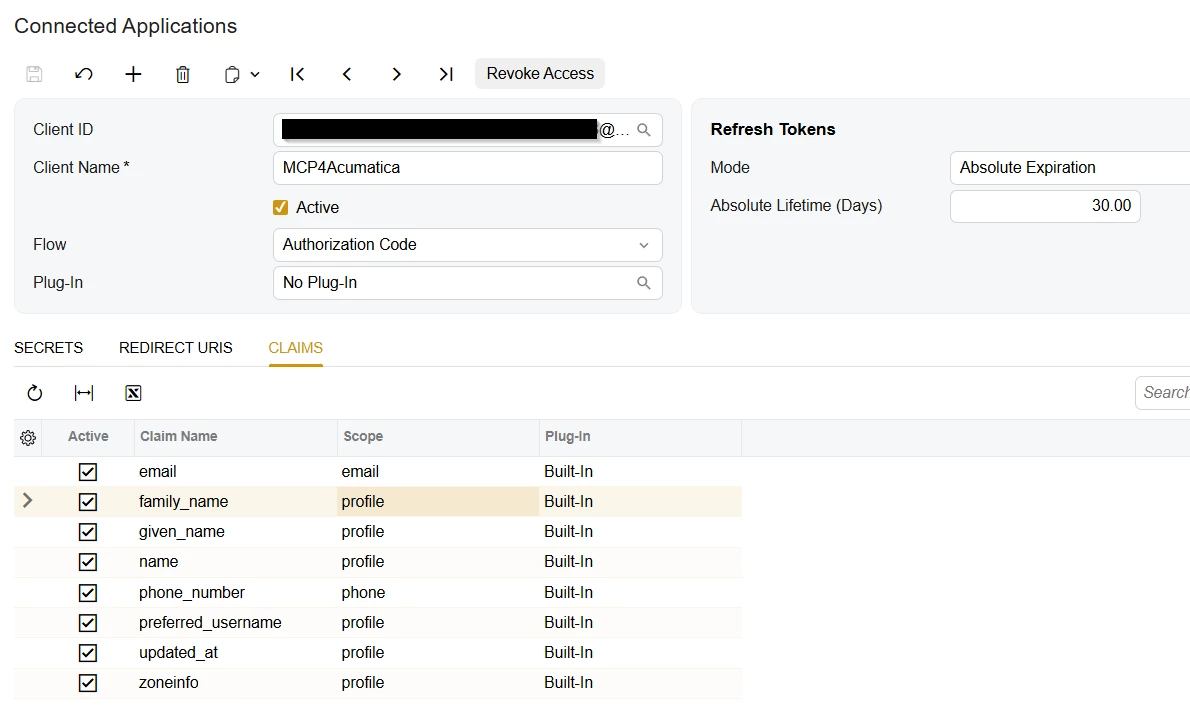
Do you have a screen shot for this, namely step 5 -- I don’t see where to set the scope:


Connected Application (SM303010)


  1. In Acumatica: System > Integration > Connected Applications (SM303010).
  2. Create a new Connected Application.
  3. Set the OAuth 2.0 Flow to Authorization Code.
  4. Add a redirect URI: https://<your-worker-url>/callback (use the *.workers.dev hostname or your custom domain).
  5. Set the scope to api openid profile email offline_access (offline_access is required so Acumatica issues refresh tokens).
  6. Note the Client ID and Client Secret — you'll provide these as secrets during deploy.

This is the screen I see in 25R2:


  • Author
  • Freshman II
  • June 18, 2026

Ahh the joys of vibe coding and let Claude do your documentation :-).  There is no explicit setting scope in Acumatica.  Claude threw that in there as a general OAuth flow mechanism.  So, you can ignore that step.  I will fix the documentation in the next push. 


JKurtz29
Varsity II
Forum|alt.badge.img+1
  • Varsity II
  • June 18, 2026

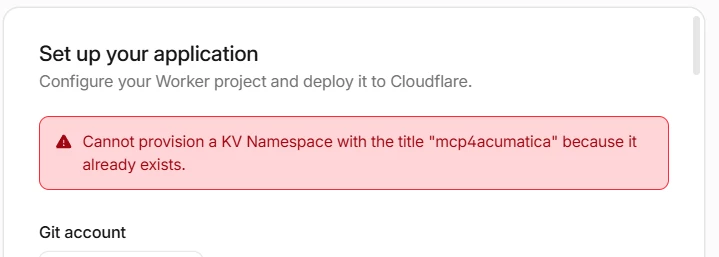
I guess since the docs were written with AI, can you figure out why the Cloudflare process doesn’t work?   I keep getting an error that the KV namespace “mcp4acumatica” exists, even if I change the names to something else.

UPDATE:  I manually created a “Workers KV” and “R2 Storage Objects” and selected those in the install wizard and got by this issue.


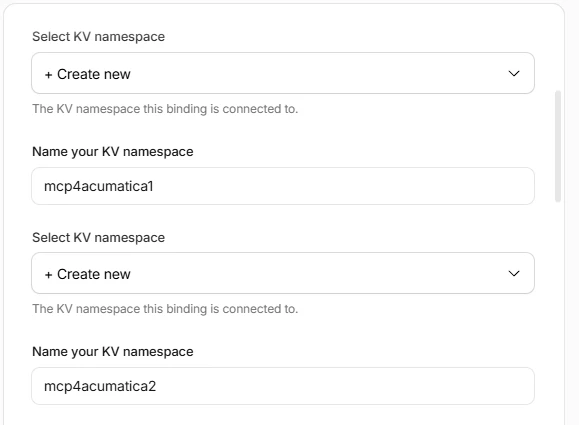
The process is asking me for the namespace twice.  Is that correct?  As you can see from the image, I even gave them different names and still got the same error.


  • Author
  • Freshman II
  • June 18, 2026

To be honest, I’ve never used the deploy to cloudflare button. A was deploying it from within claude code from a local repository.  I got Claude to update the README to clarify that two KV namespaces are required and they need to be distinct.  

This what was suggested:

The error is a structural quirk of Cloudflare's GUI auto-provisioning, not a bug in your config:

  1. Why it happens: auto-provisioning names new KV namespaces after the Worker (mcp4acumatica), so both the TOKEN_STORE and OAUTH_KV prompts default to mcp4acumatica. Two namespaces can't share a title → the second one fails, and the first attempt already created the orphan that now blocks retries.
  2. Fix now: Dashboard → Storage & Databases → KV → delete the orphaned mcp4acumatica namespace, then retry giving the two prompts distinct names (mcp4acumatica-appmcp4acumatica-oauth).
  3. If the GUI keeps failing: use the terminal installer (install.sh / setup.sh) — it creates one namespace and binds both to it, so no collision is possible.

If you already got past that, hope you will get it working.  Happy to help if needed


  • Freshman I
  • June 24, 2026

Thanks for this.  Works amazingly.  I had setup an MCP server via Claude as well, then saw yours.  Much better!  Setup via Claude/Cloudflare.  Now getting lots of insights.  Check out the 1st dashboard . . . Thanks again!


  • Author
  • Freshman II
  • June 25, 2026

Very Cool! If you could share how you built these dashboards that would be wonderful.  The thing I like about reasoning LLMs like Opus 4.8 is that they tend to (depending on your personal system prompt) offer insights that you didn’t even ask for but are obviously adjacent and noteworthy.


  • Freshman I
  • June 25, 2026

Agreed!  When I first started working with the tools I thought I’d condense a workweek into 20% of the normal time.  Instead, the insights have caused me to open my mind to what is possible.  Now there is so much more work than I ever imagined.  Fortunately, AI is there to do the heavy lifting.  I get to have my reasoning and thought processes challenged.  It’s very fulfilling, and it’s totally changed what’s possible in our business.
Our admin that does Collections saw the scoreboard and said she’d like to have one for her Collections data.  I told her I’d be happy to build it for her, if she could just brainstorm with Claude what she wanted and hand it off to me.  Instead, she ended up with a fully functional dashboard -I never had to touch it- that lives as a reusable html file, complete with pinks, purples, flowers and dragonflies!  Incredible.
Again, thanks for sharing your build.  It’s a significant bridge for our data.


Building a Live ERP Scoreboard on Cloudflare Pages

A practical guide to building a secure, single-page dashboard that reads live data from Acumatica and renders it as a "scoreboard" — searchable job/record views, manager rollups, pipeline summaries, and work-in-progress reporting. Every figure is pulled live, per user, with no data copied or warehoused.

What you're building

The architecture is deliberately small and has no server you maintain:

  • Frontend: a React single-page app built with Vite, served as static files.
  • Backend: Cloudflare Pages Functions — small TypeScript functions that run on Cloudflare's edge. These are the only thing that talks to Acumatica.
  • Auth: each user signs in with their own Acumatica login via OAuth 2.0 (Authorization Code + PKCE). The app never uses a shared service account at runtime, so every user sees exactly what their ERP permissions allow.
  • State: Cloudflare KV (a key-value store) holds two things — server-side session tokens (so the browser only ever holds an opaque cookie) and any computed caches or user-entered values.

A key idea worth internalizing up front: the MCP connection and the deployed app use two different paths to Acumatica. The MCP connection is a design-time tool — you use it (through your assistant) to explore the schema, validate queries, and decode how a report computes its numbers before you write any UI. The deployed app never uses MCP; at runtime it calls Acumatica's web APIs directly with each signed-in user's bearer token. Don't try to wire MCP into the running app — it's scaffolding, not a runtime dependency.


Browser (React SPA)
│ opaque session cookie

Cloudflare Pages Function ──bearer token──▶ Acumatica REST + OData


Cloudflare KV (sessions, caches, user inputs)

Prerequisites

  • Node.js 18+ and npm installed locally.
  • A Cloudflare account (the free tier is enough to start).
  • An Acumatica instance where you can create a Connected Application and publish endpoints.
  • The Acumatica MCP connection you already have, for data exploration.

Part 1 — Explore and validate your data first

Resist the urge to build UI immediately. The single biggest time-saver is confirming, against live data, exactly which fields hold the numbers you want and how they behave. Use your MCP-connected assistant to do this interactively.

For each metric you plan to show, answer three questions before writing code:

  1. Which entity or Generic Inquiry holds it? Acumatica exposes two query surfaces: contract-based REST (individual business objects like Project, ProjectBudget, Customer) and OData (Generic Inquiries — saved, possibly multi-table queries). Decide which one your number lives in.
  2. What's the exact field name and grain? A "total" column on a query might be a per-row value or a pre-aggregated one. A date column might be the record's true business date or an import/migration timestamp. Confirm with a couple of real rows.
  3. Does it behave under the runtime token? Some entities return data for an interactive user but 403 for a service account, and vice-versa. Validate against the same kind of access the app will use.

Write down the answers. That short data dictionary becomes the contract your backend implements.

If you need to reproduce a built-in report: Acumatica's report definitions (the RPL/report layer) are not reachable through REST or OData — those surfaces expose entities and inquiries only. To replicate a report's numbers, decode its formulas (the report designer shows them) and rebuild the dataset from the underlying entities/GIs. Validate your reproduction against a real exported run of the report before trusting it.

Part 2 — Acumatica setup

2.1 Create a Connected Application (OAuth client)

In Acumatica, open Connected Applications (screen SM303010) and create a new application:

  • Flow: Authorization Code.
  • Enable PKCE: yes (the SPA is a public client; PKCE is required for safety).
  • Redirect URI: your app's callback, e.g. https://your-app.pages.dev/auth/callback. Add a localhost variant too if you'll test locally.
  • Save the Client ID. With PKCE you don't ship a client secret in the browser; if your platform issues one, keep it only in Cloudflare's secret store (Part 7) — never in source or chat.

The OAuth endpoints on your instance are:


Authorize:  https://<your-instance>/identity/connect/authorize
Token: https://<your-instance>/identity/connect/token

Request the scope that grants API access (typically api offline_accessoffline_access gets you a refresh token so sessions survive token expiry).

2.2 Publish the data endpoints

  • Contract REST: Acumatica ships a default contract endpoint (e.g. Default/<version>). You can use it as-is or clone it under Web Service Endpoints (SM207060) to add custom entities. Your data calls will hit https://<your-instance>/entity/<EndpointName>/<version>/<Entity>.
  • Generic Inquiries: build any cross-table views you need in Generic Inquiry (GI301000). To reach a GI from the app, enable Expose via OData on the GI, and make sure the account that runs it has rights. OData lives at https://<your-instance>/OData/<Company>/<InquiryName>.

2.3 Know your data-model gotchas

These bite everyone; learning them here saves a debugging session later:

  • $select can 500. On some entities, selecting a specific subset of fields throws a server error ("key not present"). If that happens, omit $select and take the full row, or retry without it.
  • Amount/computed-field filters can fail. Server-side $filter on some computed or unbound columns errors or silently returns nothing. Filter on key/indexed fields and do the rest in your code.
  • OData GI runs cap at ~1000 rows with no automatic paging. Narrow with a filter, or page deliberately in the backend.
  • Generic Inquiries can "fan out." A GI that joins a header to its detail lines returns one row per detail line, not per header. If you count or sum those rows you'll massively overstate. Collapse to the natural key (e.g. one row per document number) before aggregating.
  • Header timestamps may be import dates. If a record was migrated in, its header CreatedDateTime can reflect the load date, not the real activity date. The true date often lives on a detail row.
  • Spreadsheet exports may not parse with standard libraries. ERP-generated .xlsx files sometimes trip up common parsers (e.g. a stylesheet quirk). If you're parsing an export at design time, fall back to reading the workbook XML directly (unzip + parse sharedStrings and the sheet XML).

Part 3 — Local project setup (Terminal)

Scaffold a Vite + React app:


bash

npm create vite@latest my-scoreboard -- --template react
cd my-scoreboard
npm install

Add the Cloudflare tooling and a KV-friendly dev setup:


bash

npm install --save-dev wrangler

Create the project layout. Pages Functions live in a top-level functions/ directory and are mapped to routes automatically by filename:


my-scoreboard/
├─ index.html
├─ vite.config.js
├─ wrangler.toml # Cloudflare config
├─ src/
│ ├─ main.jsx
│ └─ App.jsx # the SPA
└─ functions/
├─ _lib.ts # shared helpers (auth, fetch wrappers)
├─ _middleware.ts # optional: runs before every function
├─ auth/
│ ├─ login.ts # GET /auth/login → redirect to Acumatica
│ ├─ callback.ts # GET /auth/callback → exchange code for token
│ └─ logout.ts
└─ api/
├─ record/[id].ts # GET /api/record/:id
├─ summary.ts # GET /api/summary
└─ ...

Set the deploy script in package.json:


json

{
"scripts": {
"dev": "vite",
"build": "vite build",
"deploy": "vite build && wrangler pages deploy dist"
}
}

Note the && in deploy: if vite build fails, deployment stops and your old bundle stays live. A "nothing changed after deploy" symptom is almost always a silently failed build — watch the build output.

Part 4 — Authentication (OAuth + PKCE, sessions in KV)

The browser should never hold an Acumatica token. The flow:

  1. /auth/login generates a PKCE code_verifier + code_challenge, stashes the verifier in KV under a short-lived key, and redirects the user to Acumatica's authorize URL.
  2. The user signs in on Acumatica and is redirected back to /auth/callback with a code.
  3. The callback exchanges code + code_verifier at the token endpoint, gets an access token (and refresh token), stores them in KV under a new random session id, and sets that id as an HttpOnly, Secure cookie.
  4. Every API call reads the cookie, looks up the session in KV, and uses the stored bearer token. If the access token has expired, it refreshes it transparently.

A shared helper module keeps this DRY:


ts

// functions/_lib.ts
export interface Env {
SESSIONS: KVNamespace; // bound in wrangler.toml
ACU_BASE: string; // https://<your-instance>
ACU_CLIENT_ID: string;
ACU_ENDPOINT: string; // e.g. "Default/24.200.001"
ACU_ODATA: string; // e.g. https://<instance>/OData/<Company>
}

export async function loadSession(env: Env, req: Request) {
const sid = (req.headers.get("Cookie") || "")
.split(";").map(s => s.trim())
.find(s => s.startsWith("sid="))?.slice(4);
if (!sid) return null;
const raw = await env.SESSIONS.get(`sess:${sid}`);
return raw ? { sid, sess: JSON.parse(raw) } : null;
}

export async function validToken(env: Env, sid: string, sess: any): Promise<string> {
if (Date.now() < sess.expiresAt - 60_000) return sess.accessToken;
// refresh
const body = new URLSearchParams({
grant_type: "refresh_token",
refresh_token: sess.refreshToken,
client_id: env.ACU_CLIENT_ID,
});
const r = await fetch(`${env.ACU_BASE}/identity/connect/token`, {
method: "POST", headers: { "Content-Type": "application/x-www-form-urlencoded" }, body,
});
const t = await r.json();
const next = { ...sess, accessToken: t.access_token, refreshToken: t.refresh_token ?? sess.refreshToken, expiresAt: Date.now() + t.expires_in * 1000 };
await env.SESSIONS.put(`sess:${sid}`, JSON.stringify(next));
return next.accessToken;
}

// Contract-based REST GET
export async function acuGet(env: Env, token: string, entity: string, query: string) {
const url = `${env.ACU_BASE}/entity/${env.ACU_ENDPOINT}/${entity}?${query}`;
const r = await fetch(url, { headers: { Authorization: `Bearer ${token}`, Accept: "application/json" } });
if (!r.ok) throw new Error(`${entity} ${r.status}`);
return r.json();
}

// OData Generic Inquiry GET (handles names with spaces via encodeURI on the path)
export async function acuODataGet(env: Env, token: string, gi: string, query: string) {
const url = `${env.ACU_ODATA}/${encodeURIComponent(gi)}?${query}`;
const r = await fetch(url, { headers: { Authorization: `Bearer ${token}`, Accept: "application/json" } });
if (!r.ok) throw new Error(`${gi} ${r.status}`);
const j = await r.json();
return j.value ?? j;
}

export const json = (obj: unknown, status = 200) =>
new Response(JSON.stringify(obj), { status, headers: { "Content-Type": "application/json" } });

// Acumatica wraps some scalar values as { value: ... }
export const unwrap = (f: any) => (f && typeof f === "object" && "value" in f ? f.value : f);

Cookies must be HttpOnly; Secure; SameSite=Lax; Path=/. Store only the random session id in the cookie; everything sensitive stays in KV.

Part 5 — The backend API

Each file in functions/api/ becomes an endpoint. A typical "fetch a record and shape it for the UI" handler:


ts

// functions/api/record/[id].ts
import { type Env, loadSession, validToken, acuGet, json, unwrap } from "../../_lib";

export const onRequestGet: PagesFunction<Env> = async (ctx) => {
const s = await loadSession(ctx.env, ctx.request);
if (!s) return json({ ok: false, reason: "unauthenticated" }, 401);

const id = String(ctx.params.id);
const token = await validToken(ctx.env, s.sid, s.sess);

const rows = await acuGet(ctx.env, token, "Project",
`$filter=${encodeURIComponent(`ProjectID eq '${id}'`)}&$top=1`);
if (!rows.length) return json({ ok: true, found: false });

const p = rows[0];
return json({
ok: true, found: true,
id: unwrap(p.ProjectID),
description: unwrap(p.Description),
// ... shape exactly what the UI needs
});
};

Two patterns that make the backend robust:

  • Isolate each upstream call in its own try/catch and return partial data plus a diag map. One failing query then degrades a single tile instead of blanking the whole board.
  • Page large pulls in a helper that loops $top/$skip until a short page comes back, deduping by record id as it goes.

For anything you compute across many records (a portfolio rollup, a leaderboard), do the heavy fetching in the function, cache the result in KV with a short TTL, and let a ?fresh=1 query param bypass the cache on demand:


ts

const cached = await ctx.env.SESSIONS.get(`cache:summary:${period}`);
if (cached && !fresh) return json(JSON.parse(cached));
// ... compute ...
await ctx.env.SESSIONS.put(`cache:summary:${period}`, JSON.stringify(payload), { expirationTtl: 900 });

Part 6 — Computing your metrics

Most scoreboard math is straightforward once the data is in hand. A few patterns recur:

  • Roll up by a dimension (manager, owner, region) by grouping the per-record rows and summing. Take header fields from the first occurrence to avoid double-counting when a GI returns multiple rows per record.
  • Cap ratios like percent-complete at 100% (Math.min(actual / budget, 1)), and guard against divide-by-zero (budget > 0 ? ... : 0).
  • Keep one source of truth. If a value can be entered by users (a forecast, a target), store it in KV and have every view that needs it read from there, so a detail screen and a summary screen always agree. When the detail screen writes, bust the summary's cache key so the rollup stays in sync.
  • Reconcile rollups to drill-downs. If a summary row and the detail view it links to use different formulas, they'll disagree and the dashboard looks broken. Compute both the same way.

A subtle frontend bug worth pre-empting: don't let an API response field collide with your UI's state field. If your loader does setState({ status: "ok", ...response }) and the response also has a status field (the record's own status), the spread overwrites your load-state and your render guard fails silently. Spread first, then pin your own field last: setState({ ...response, status: "ok" }).

Part 7 — Cloudflare setup and deploy

7.1 Create the Pages project and KV namespace


bash

npx wrangler pages project create my-scoreboard
npx wrangler kv namespace create SESSIONS

The KV command prints a namespace id. Wire it and your config into wrangler.toml:


toml

name = "my-scoreboard"
pages_build_output_dir = "dist"
compatibility_date = "2024-01-01"

[[kv_namespaces]]
binding = "SESSIONS"
id = "<the-id-from-the-create-command>"

[vars]
ACU_BASE = "https://your-instance.acumatica.com"
ACU_ENDPOINT = "Default/24.200.001"
ACU_ODATA = "https://your-instance.acumatica.com/OData/YourCompany"
ACU_CLIENT_ID = "your-oauth-client-id"

7.2 Store secrets out of source

Never put a client secret (if your flow has one) in wrangler.toml or in chat. Set it as an encrypted secret:


bash

npx wrangler pages secret put ACU_CLIENT_SECRET

7.3 Deploy


bash

npm run deploy

This builds the SPA into dist/ and uploads both the static assets and the functions/ bundle. The command prints your live URL. To deploy from a zipped project on a fresh machine, unzip it, npm install, then npm run deploy.

Part 8 — Iterating safely

  • Blank page after deploy? In order of likelihood: the build failed silently (the && stopped the upload — check the build log), you're seeing a stale cached bundle (hard-refresh with Ctrl/Cmd+Shift+R), or a static asset 404'd (confirm dist/assets/*.js actually deployed). The asset filename carries a content hash — if the hash didn't change after a deploy, your source change never made it into the build.
  • Tab/section empty but the rest works? The data probably loaded and a render guard is failing — inspect the component's state and the relevant /api/... network response (status code + first line of the body). If an API route returns the HTML shell instead of JSON, that function didn't deploy.
  • Validate before you ship. A quick parse check on changed files (e.g. running them through an esbuild parse) catches syntax errors before a full deploy.
  • Keep a handoff note. A short living document of decisions — which field feeds which metric, which gotchas you hit, your deploy steps — pays for itself every time you come back to the project.

Appendix — Gotchas quick reference

Symptom Cause Fix
$select returns 500 Entity rejects field subset Omit $select; take full rows
Counts/sums way too high GI fans out header→detail Dedupe to natural key before aggregating
GI returns ≤1000 rows only OData run cap, no auto-paging Filter narrower or page in backend
403 on an entity Token's role lacks rights Verify under the runtime user's token, not a service account
Dates look wrong/clustered Header timestamp is the import date Use the detail-row business date
Blank SPA after deploy Build failed (&&) or stale bundle Read build log; hard-refresh; check asset hash changed
One tab empty, rest fine API field collided with UI state, or render guard Spread response first, set own status last
.xlsx export won't parse ERP stylesheet quirk Read workbook XML directly instead of a high-level parser

That's the whole build, generalized.  Drop this into Claude and build away!