MCP4Acumatica - An open source MCP server - Version 0.31.1

  • May 10, 2026
  • 7 replies
  • 462 views

Hi all,

Happy Mothers Day!

I needed a way to connect Claude to our Acumatica 2025 R2 instance right now, and the official Acumatica integration looks like it's still some time away. So I built one (entirely using Claude Code), ran it in production against our own ERP for a few weeks, and have now open-sourced it under Apache 2.0:

Repo: https://github.com/hallboys/MCP4Acumatica

MCP4Acumatica is  a remote MCP (Model Context Protocol) server that runs on Cloudflare Workers. Each user logs in with their own Acumatica credentials — the server holds nothing centrally beyond an encrypted refresh token, and a user's normal Acumatica role governs what records they can read. Any MCP client (Claude.ai, Claude Desktop, Claude Code, ChatGPT) can talk to it.

What's in the box (v0.31.1):

  • 38 read-only entity tools — Customer, Vendor, Sales Order, Invoice, Bill, Payment, Stock Item, Project, Case, Service Order, Shipment, Employee, and most of the common screens.
  • 6 utility/discovery tools — generic-inquiry listing/execution, entity schema discovery, and a cache-clear tool.
  • OAuth 2.1 against Acumatica's IdentityServer (Connected Application). No separate identity layer; Entra/SSO works automatically if your instance is configured for it.
  • Access gate via a "canary" Generic Inquiry assigned to an MCP Access role — users without the role get a clean 403 page rather than tools that silently fail.
  • Pattern-based redaction of sensitive fields (SSN, bank, salary, card numbers) before any data leaves the worker, with admin-configurable allow/deny lists.
  • Per-user rate limiting (3 concurrent / 40 per minute), KV-backed.
  • Audit logging to R2 — every tool call, every auth event, every redaction.
  • Admin console for runtime config, log review, and a preflight diagnostic that checks every external touch-point (OIDC discovery, Connected App grant, tenant OData, contract API version).

Install paths:

  • "Deploy to Cloudflare" button in the README — GUI only, no terminal required.
  • curl -fsSL https://mcp4acumatica.hallboys.com/install.sh | bash — one-line CLI install.
  • Clone and run ./setup.sh for full control.

Prerequisites on the Acumatica side (can't be automated): create a Connected Application, an MCP Access role, and a trivial MCPAccess Generic Inquiry assigned to that role with OData enabled. Full walkthrough in the README.

What I'd love from this community:

  • Discussion: is this useful to you? What workflows would you point Claude at first?
  • Issues: if you spin it up and something breaks against your instance (different version, different customizations, different SSO setup), please open a GitHub issue. There are entity quirks I've only seen against ours.
  • Enhancement ideas: the next two big tracks are write tools (create/update SO, customer, vendor) and action tools (release invoice, confirm shipment). There's also an open question about how to give the model richer descriptions of your custom Generic Inquiries — the GI design table doesn't carry descriptions, so curation has to come from somewhere; I'd love input on the right pattern.
  • Collaboration: PRs welcome. CONTRIBUTING.md and SECURITY.md are in the repo. Security disclosures via GitHub's private vulnerability reporting.

Apache 2.0, fork-friendly, self-hostable. Happy to answer technical questions in the thread.

— Sarat (Hall Boys, Inc.)

7 replies

  • Freshman I
  • June 9, 2026

.


  • Author
  • Freshman II
  • June 10, 2026

Pushed 0.33.2. Important bug fix regarding session disconnects.  If you’ve noticed that your session disconnects frequently and randomly, please try this version.Root cause is the server never requested the offline_access scope, so Acumatica/IdentityServer issued no refresh token.  In chasing this, the session managemnt was refined a bit.


TimRodmanTraild
Freshman I
Forum|alt.badge.img

Hey ​@saratvemuri,

Would you be up for coming on my Podcast to talk about this?

This would actually be your second appearance on the podcast since we did a short episode in Atlanta together last year 😀
AugForums.com/Episode151

I just sent you an email about it.


JKurtz29
Varsity II
Forum|alt.badge.img+1
  • Varsity II
  • June 18, 2026

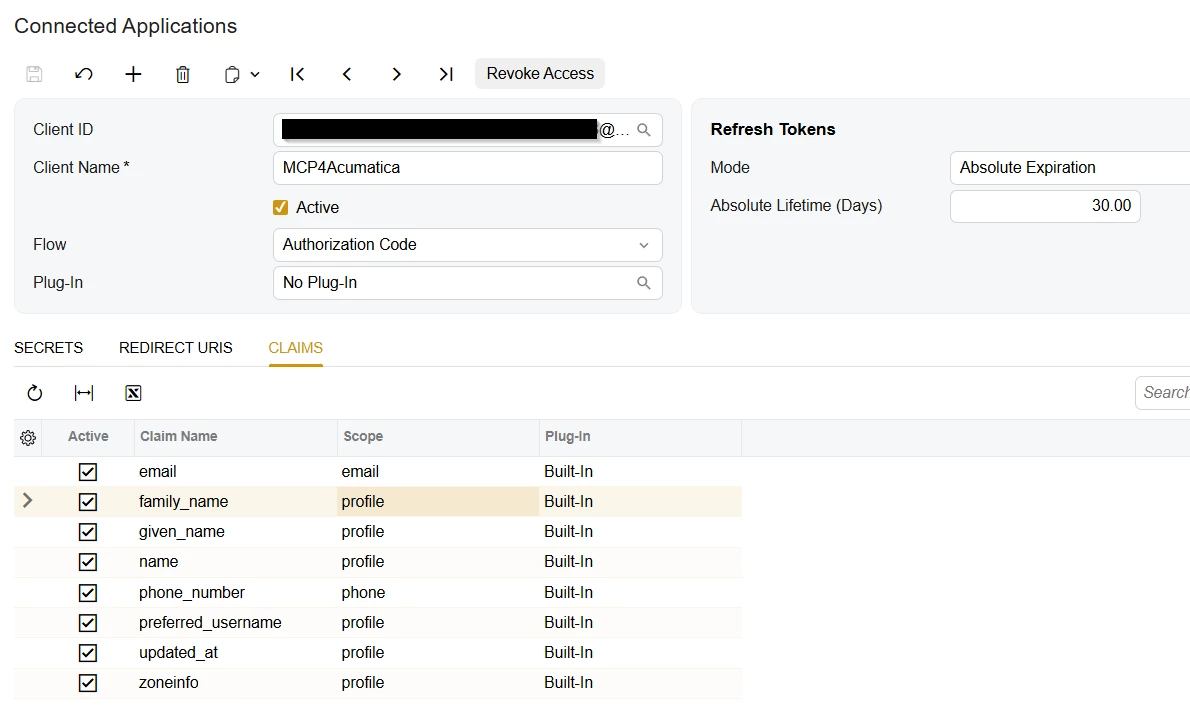
Do you have a screen shot for this, namely step 5 -- I don’t see where to set the scope:


Connected Application (SM303010)


  1. In Acumatica: System > Integration > Connected Applications (SM303010).
  2. Create a new Connected Application.
  3. Set the OAuth 2.0 Flow to Authorization Code.
  4. Add a redirect URI: https://<your-worker-url>/callback (use the *.workers.dev hostname or your custom domain).
  5. Set the scope to api openid profile email offline_access (offline_access is required so Acumatica issues refresh tokens).
  6. Note the Client ID and Client Secret — you'll provide these as secrets during deploy.

This is the screen I see in 25R2:


  • Author
  • Freshman II
  • June 18, 2026

Ahh the joys of vibe coding and let Claude do your documentation :-).  There is no explicit setting scope in Acumatica.  Claude threw that in there as a general OAuth flow mechanism.  So, you can ignore that step.  I will fix the documentation in the next push. 


JKurtz29
Varsity II
Forum|alt.badge.img+1
  • Varsity II
  • June 18, 2026

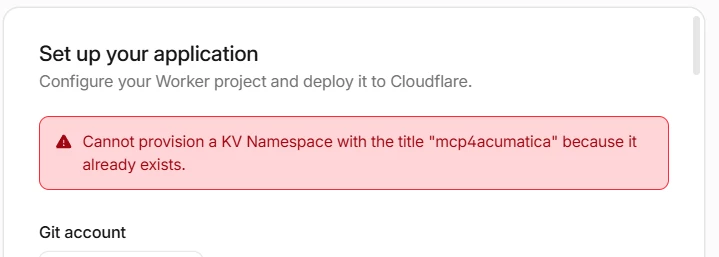
I guess since the docs were written with AI, can you figure out why the Cloudflare process doesn’t work?   I keep getting an error that the KV namespace “mcp4acumatica” exists, even if I change the names to something else.

UPDATE:  I manually created a “Workers KV” and “R2 Storage Objects” and selected those in the install wizard and got by this issue.


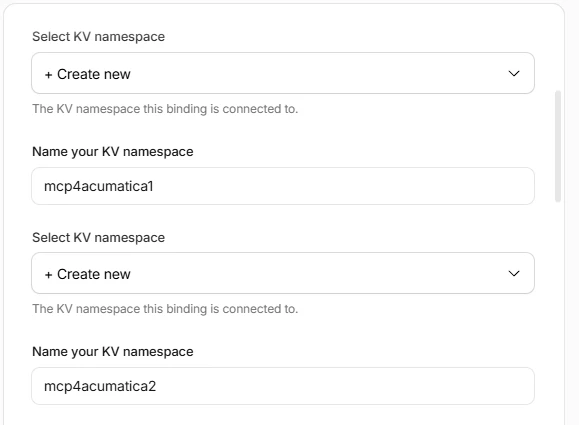
The process is asking me for the namespace twice.  Is that correct?  As you can see from the image, I even gave them different names and still got the same error.


  • Author
  • Freshman II
  • June 18, 2026

To be honest, I’ve never used the deploy to cloudflare button. A was deploying it from within claude code from a local repository.  I got Claude to update the README to clarify that two KV namespaces are required and they need to be distinct.  

This what was suggested:

The error is a structural quirk of Cloudflare's GUI auto-provisioning, not a bug in your config:

  1. Why it happens: auto-provisioning names new KV namespaces after the Worker (mcp4acumatica), so both the TOKEN_STORE and OAUTH_KV prompts default to mcp4acumatica. Two namespaces can't share a title → the second one fails, and the first attempt already created the orphan that now blocks retries.
  2. Fix now: Dashboard → Storage & Databases → KV → delete the orphaned mcp4acumatica namespace, then retry giving the two prompts distinct names (mcp4acumatica-appmcp4acumatica-oauth).
  3. If the GUI keeps failing: use the terminal installer (install.sh / setup.sh) — it creates one namespace and binds both to it, so no collision is possible.

If you already got past that, hope you will get it working.  Happy to help if needed