

Answer

Matrix Item Grid (Table View) Notes

  • July 25, 2025
  • 6 replies
  • 105 views

Forum|alt.badge.img+1

Client would like to enter notes as they are creating/adding to sales order via matrix items and have these carry over to the SOLines when they click Add & Close.  Is this even possible?

As far as I can tell, the notes/attachments on the matrix table view don’t actually do anything currently.

I’ve done many customizations, including to matrix items (with much help from ​@Zoltan Febert) but this one looks like another tricky one where I need to override the AddOrderLines method somehow.
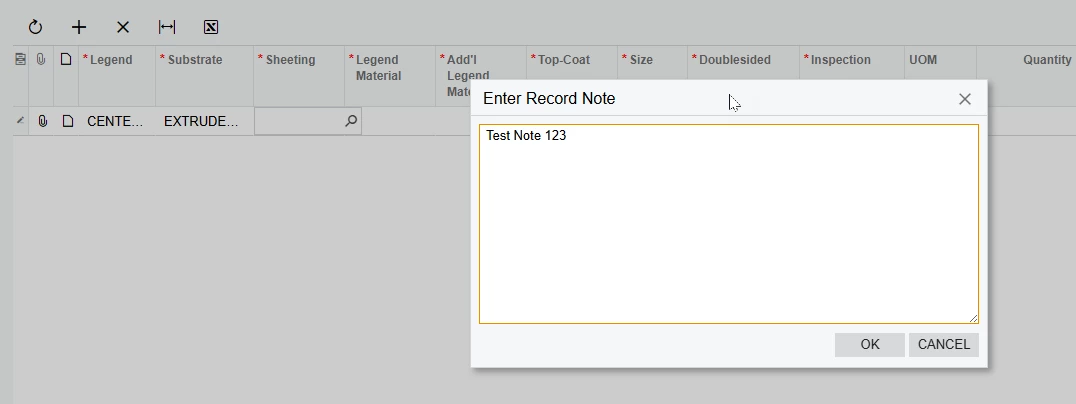
After clicking Add & Close I can’t find this in the CSAnswers table using:

SELECT * FROM Note WHERE NoteText = 'Test Note 123'

 

Best answer by Zoltan Febert

Hi ​@rjean09, notes are in the Note table, not in CSAnswers.Try to use this sample to get / set notes when you add the SOLines:

// Get note
string note = PXNoteAttribute.GetNote([Matrix cache], [Matrix record]);

// Set note
PXNoteAttribute.SetNote([SOLine cache], [SOLine record], note);


6 replies

Zoltan Febert
Jr Varsity I
Forum|alt.badge.img+3
  • Jr Varsity I
  • Answer
  • July 28, 2025

Hi ​@rjean09, notes are in the Note table, not in CSAnswers.Try to use this sample to get / set notes when you add the SOLines:

// Get note
string note = PXNoteAttribute.GetNote([Matrix cache], [Matrix record]);

// Set note
PXNoteAttribute.SetNote([SOLine cache], [SOLine record], note);


Forum|alt.badge.img+1
  • Author
  • Semi-Pro III
  • July 28, 2025

Trying a different approach.  Rather than trying to use the built in note feature on the matrix grid I’ve added a UsrNote to MatrixInventoryItemExt.  When SO lines are added during Add & Close I can use this to create a regular PXNote on SOLine.  However, I can’t figure out how to override or hook the AddItemsToOrder method.


Forum|alt.badge.img+1
  • Author
  • Semi-Pro III
  • July 28, 2025

Hi ​@rjean09, notes are in the Note table, not in CSAnswers.Try to use this sample to get / set notes when you add the SOLines:

// Get note
string note = PXNoteAttribute.GetNote([Matrix cache], [Matrix record]);

// Set note
PXNoteAttribute.SetNote([SOLine cache], [SOLine record], note);

Yes, I mis-typed CSAnswers.  But not found in Notes table either.  

My main issue is I don’t know where to add this code. I’m assuming somewhere in AddItemsToOrder but not sure how to hook that.


Forum|alt.badge.img+1
  • Author
  • Semi-Pro III
  • July 28, 2025

Hi ​@rjean09, notes are in the Note table, not in CSAnswers.Try to use this sample to get / set notes when you add the SOLines:

// Get note
string note = PXNoteAttribute.GetNote([Matrix cache], [Matrix record]);

// Set note
PXNoteAttribute.SetNote([SOLine cache], [SOLine record], note);


Hi Zoltan,

I tried this but had no luck:

 [PXProtectedAccess]
public abstract class SmartPanelExt_ProtectedExtension : MatrixEntryExt
{
[PXProtectedAccess(typeof(SmartPanelExt<SOOrderEntry, SOOrder>))]
protected override CreateMatrixItemsHelper GetCreateMatrixItemsHelper(PXGraph graph)
{
return new CreateMatrixItemsHelperExt(graph);
}

[PXProtectedAccess(typeof(SmartPanelExt<SOOrderEntry, SOOrder>))]
protected override void AddMatrixItemsToOrder(int? siteID)
{
// I had a breakpoint set here but it was never hit after Add & Close clicked
base.AddMatrixItemsToOrder(siteID);

foreach (MatrixInventoryItem item in base.MatrixItems.Cache.Cached)
{
if (item.InventoryID == null || item.InventoryID == 0) continue;

SOLine soOrderLine = base.Base.Transactions
.Select(Base, item.InventoryID, siteID);

if (soOrderLine != null)
{
MatrixMatrixInventoryItemExt ext = item.GetExtension<MatrixMatrixInventoryItemExt>();
if (ext != null && !string.IsNullOrEmpty(ext.UsrNote))
{
PXNoteAttribute.SetNote(Base.Transactions.Cache, soOrderLine, ext.UsrNote);
}
}
}
}
}


Forum|alt.badge.img+1
  • Author
  • Semi-Pro III
  • July 31, 2025

Here is my solution.  Seems to be working:


    [PXProtectedAccess]
public abstract class SmartPanelExt_ProtectedExtension : MatrixEntryExt
{
[PXProtectedAccess(typeof(SmartPanelExt<SOOrderEntry, SOOrder>))]
protected override CreateMatrixItemsHelper GetCreateMatrixItemsHelper(PXGraph graph)
{
return new CreateMatrixItemsHelperExt(graph);
}

[PXProtectedAccess(typeof(SmartPanelExt<SOOrderEntry, SOOrder>))]
protected override void CreateNewLine(int? siteID, int? inventoryID, string taxCategoryID, decimal qty, string uom)
{
// PXTrace.WriteInformation("HIT CreateNewLine");
base.CreateNewLine(siteID, inventoryID, taxCategoryID, qty, uom);

SOLine soOrderLine = (SOLine)base.Base.Transactions.Cache.Current;

if (soOrderLine != null)
{
MatrixInventoryItem item = base.MatrixItems.Cache.Cached.Cast<MatrixInventoryItem>().FirstOrDefault(x => x.InventoryID == soOrderLine.InventoryID);
if (item != null)
{
MatrixMatrixInventoryItemExt ext = item?.GetExtension<MatrixMatrixInventoryItemExt>();
if (ext != null && !string.IsNullOrEmpty(ext.UsrNote))
{
PXNoteAttribute.SetNote(Base.Transactions.Cache, soOrderLine, ext.UsrNote);
}
}
}
}

}


Forum|alt.badge.img+1
  • Author
  • Semi-Pro III
  • July 31, 2025

Update: after getting it to work with a custom note field I decided to try getting the built-in note from the matrix cache like ​@Zoltan Febert suggested and it works that way, too!

        [PXProtectedAccess(typeof(SmartPanelExt<SOOrderEntry, SOOrder>))]
protected override void CreateNewLine(int? siteID, int? inventoryID, string taxCategoryID, decimal qty, string uom)
{
// PXTrace.WriteInformation("HIT CreateNewLine");
base.CreateNewLine(siteID, inventoryID, taxCategoryID, qty, uom);

SOLine soOrderLine = (SOLine)base.Base.Transactions.Cache.Current;

if (soOrderLine != null)
{
MatrixInventoryItem item = base.MatrixItems.Cache.Cached.Cast<MatrixInventoryItem>().FirstOrDefault(x => x.InventoryID == soOrderLine.InventoryID);
if (item != null)
{
// MatrixMatrixInventoryItemExt ext = item?.GetExtension<MatrixMatrixInventoryItemExt>();
//if (ext != null && !string.IsNullOrEmpty(ext.UsrNote))
//{
// PXNoteAttribute.SetNote(Base.Transactions.Cache, soOrderLine, ext.UsrNote);
//}

// Get built-in PXNote
string note = PXNoteAttribute.GetNote(base.MatrixItems.Cache, item);
if (!string.IsNullOrEmpty(note))
{
PXNoteAttribute.SetNote(Base.Transactions.Cache, soOrderLine, note);
}
}
}
}
