



We are trying to create a Material Return transaction through the Manufacturing REST API for a non-tracked inventory item and split the returned quantity into multiple Line Details records because each split line has a different custom Reason Code.
The inventory item is NOT lot/serial tracked.
Expected Behavior
We want the Material Return transaction to create:
Main Line:
- Quantity = -3.00
Line Details / Allocations:
- Qty = 2.00 → ReasonCode = BALWOFF
- Qty = 1.00 → ReasonCode = CRWOFF
So the total allocated quantity should equal the document quantity (-3.00) without creating any additional allocation lines.
Current Problem
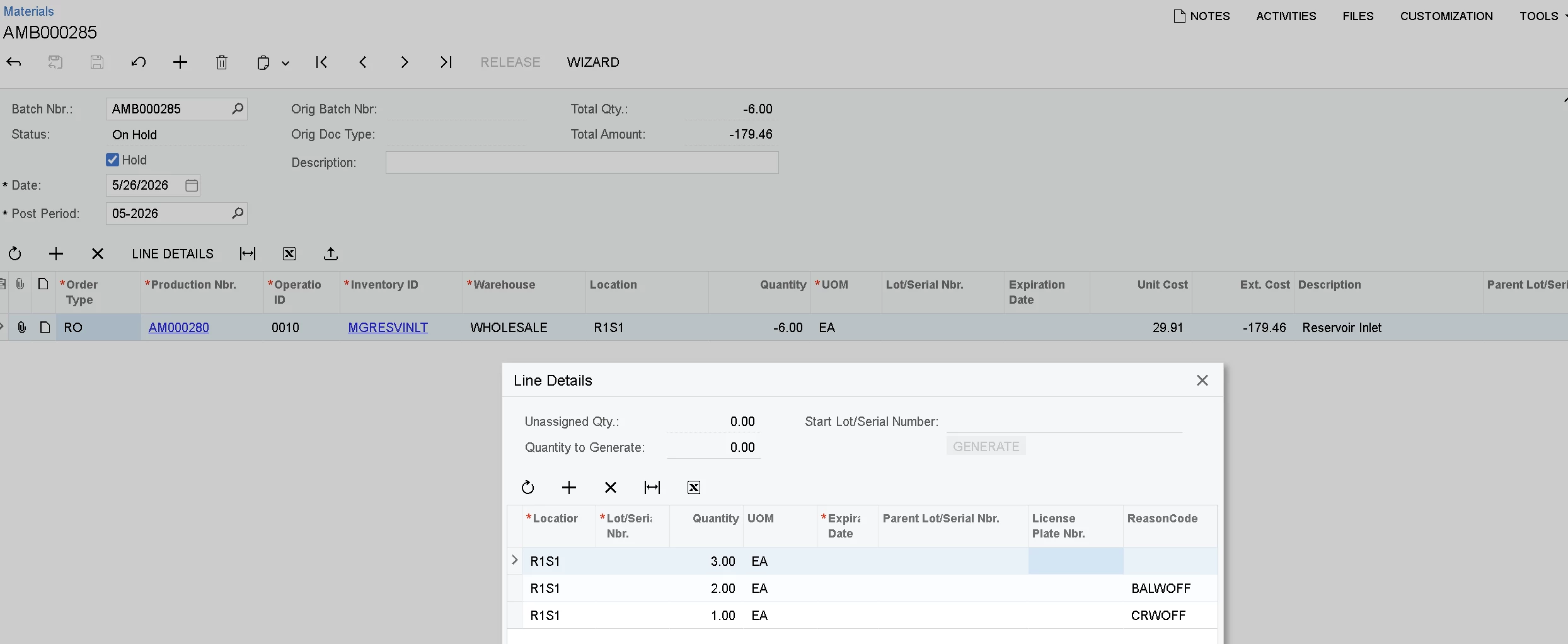
When we send the payload below, Acumatica creates:
- the two intended split lines
- PLUS an extra allocation line with quantity = 3.00
As a result:
- Total allocation quantity becomes incorrect
- An unwanted extra split line is created in Line Details
Screenshot attached for reference.
Current Payload
{
    "Hold": {
        "value": true
    },
    "Details": [
    {
        "ProductionNbr": {
            "value": "AM000280"
        },
        "OperationNbr": {
            "value": "0010"
        },
        "InventoryID": {
            "value": "MGRESVINLT"
        },
        "Warehouse": {
            "value": "WHOLESALE"
        },
        "Location": {
            "value": "R1S1"
        },
        "UOM": {
            "value": "EA"
        },
        "TranType": {
            "value": "RET"
        },
        "InvtMult": {
            "value": 1
        },
        "Quantity": {
            "value": -3.00
        },
        "Allocations": [
            {
                "Location": {
                    "value": "R1S1"
                },
                "UOM": {
                    "value": "EA"
                },
                "TranType": {
                    "value": "RET"
                },
                "InvtMult": {
                    "value": 1
                },
                "Quantity": {
                    "value": 2.00
                },
                "ReasonCode": {
                    "value": "BALWOFF"
                }
            },
            {
                "Location": {
                    "value": "R1S1"
                },
                "UOM": {
                    "value": "EA"
                },
                "TranType": {
                    "value": "RET"
                },
                "InvtMult": {
                    "value": 1
                },
                "Quantity": {
                    "value": 1.00
                },
                "ReasonCode": {
                    "value": "CRWOFF"
                }
            }
        ]
    }]
}
Observed Result
The transaction is created successfully, but Acumatica generates:
- Qty 3.00 (extra line)
- Qty 2.00 with ReasonCode BALWOFF
- Qty 1.00 with ReasonCode CRWOFF
The extra Qty 3.00 allocation line should NOT be created.
Questions
- For non-tracked items, is there a specific way allocations should be sent through REST API to prevent Acumatica from auto-generating the parent allocation line?
- Should allocation quantities for Material Return be sent as:
- positive quantities
- or negative quantities?
- Is there any additional flag or field required to tell Acumatica that allocations are fully assigned?
- Is using custom fields like ReasonCode on allocation splits causing Acumatica to generate the extra line automatically?
- Is this expected behavior in Manufacturing Material Return transactions for non-tracked items?
Any guidance would be appreciated.