

Answer

Mass Update for Customer Settings

  • January 18, 2022
  • 3 replies
  • 338 views

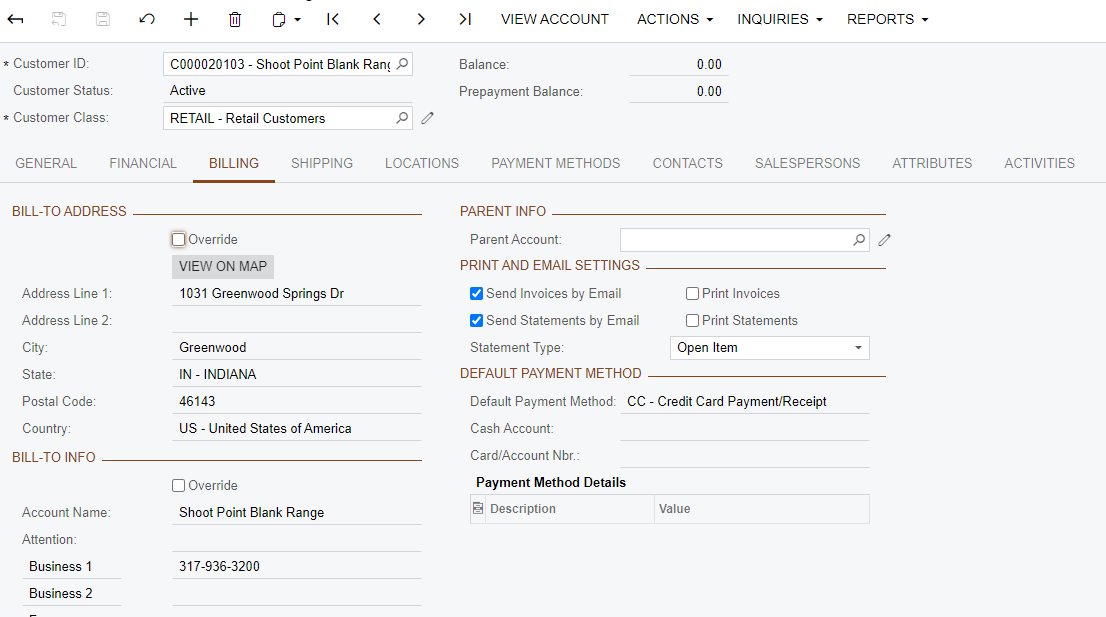
Right now all of our current customers are defaulted to ‘Send Invoices by Email’ & ‘Send Statements by Email’.  I believe it was how they imported it.  I need to deselect these options for all but a handful of customers that need to be emailed their invoices.  We have over 16,000 customers so going one by one isn’t really an option. Is there a way I can do a mass update to deselect these options for everyone then I can assign them to the few that needs to be emailed?  Thanks in advance for your help!
 

Best answer by Dmitrii Naumov

I think the best way to do that is to use "mass update" feature of generic inquiries. So then you can select the ones that you want to update and process them

3 replies

Dmitrii Naumov
Acumatica Moderator
Forum|alt.badge.img+7
  • Acumatica Moderator
  • Answer
  • January 18, 2022

I think the best way to do that is to use "mass update" feature of generic inquiries. So then you can select the ones that you want to update and process them


Forum|alt.badge.img+12
  • Acumatica Support Team
  • January 19, 2022

Hi @TracyVogt 

Adding to previous post, since an import scenario was used to import the data, one may use the import scenario to update the information. 

Keep only Customer Code and the required option columns active on mapping to update existing customers. 

Hope this helps,
Regards,


Naveen Boga
Captain II
Forum|alt.badge.img+19
  • Captain II
  • January 19, 2022

Hi @TracyVogt  Adding to the previous post, if you wanted to update the above checkboxes (Send Invoices by Email & Send Statements by Email) for all the customers in the system, simply you can go with the Database script update.

Update Customer set MailInvoices=0, SendStatementByEmail=0 where CompanyID=2

Add this script to the customization package and deploy it in the instance.

OR

If you wanted to update these checkboxes NOT for all the customers, in my opinion, the best would be the Import scenario.

In the Import Scenario, you can have only the Customer ID, and these checkboxes as FALSE and run the import scenario for the specific customers.


Hope this helps!



