




Using the project editor, I add UsrDepartment to the Bills and Adjustments screen. It is a simple selector. When the filed was added, it created it in the ARRegister table.
I want the field to be required. I did not use [PXDefault] in the DAC in case there are legacy records where that field is null, and I don’t want any other processes to fail if that field is null.
In order to make the field required, I added code to the RowPersisting event hander on the APInvoice DAC.
In order to get the value in the field, I need to get the extension on the ARRegister DAC.
If you are saving an EXISTING invoice, everything works fine, and the field is marked as an error with a message.
MY FIRST CHOICE: When you save the invoice and you do not supply the department, I want to mark the field with a propertyexception.
However, if you try to save a NEW record and the field is empty, I get an unexpected error.
I can get around this by throwing a PXException to the screen, but I want to actually flag the field that is required for a better user experience.
Here is my DAC extension
#region UsrDepartment
[PXDBString(15)]
[PXDefault(PersistingCheck = PXPersistingCheck.Nothing)]
[PXUIField(DisplayName = "Department", Required = true)]
[PXSelector(typeof(Search<EPDepartment.departmentID>),
	typeof(EPDepartment.departmentID),
	typeof(EPDepartment.description),
	DescriptionField = typeof(EPDepartment.description),
	SelectorMode = PXSelectorMode.DisplayModeText)]
public string UsrDepartment { get; set; }
public abstract class usrDepartment : PX.Data.BQL.BqlString.Field<usrDepartment> { }
#endregion
Here is the RowPersisting code:
protected void APInvoice_RowPersisting(PXCache cache, PXRowPersistingEventArgs e)
{
	var row = (APInvoice)e.Row;
	if (row != null)
	{
		if (cache.GetStatus(e.Row) != PXEntryStatus.Deleted)
		{
			if (row.Status == "H" || row.Status == "B")
			{
				JHAPRegisterExt ext = cache.GetExtension<JHAPRegisterExt>(row);
				if (ext != null)
				{
					if (ext.UsrDepartment == null)
					{
						throw new PXException(ICSMessages.DepartmentRequired);

						//cache.RaiseExceptionHandling<JHAPRegisterExt.usrDepartment>(row, null, new PXSetPropertyException<JHAPRegisterExt.usrDepartment>(ICSMessages.DepartmentRequired, PXErrorLevel.Error));
						//e.Cancel = true;
					}
				}
			}
		}
	}
}
If I use the exception handling that is remarked out AND I enter a line item, I get this error when saving the record:
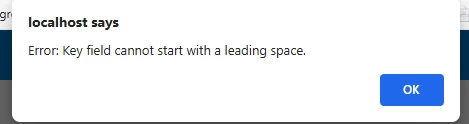
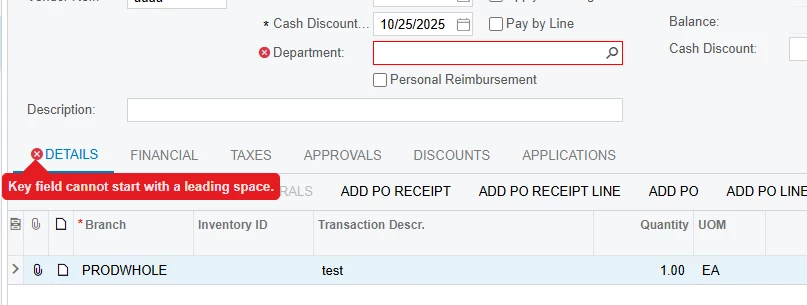
If I do not enter a line item, I don’t get the error. The Department field is flagged as in the above screenshot.
To repeat for clarity, if I enter a line item, leave the Department field blank, click save, I get the error. I click OK on the error, select a department, click save, all is well.
I don’t know why cancelling the RowPersisting on the APInvoice would cause an error in the Details tab. Looking through the grid, I don’t see any fields flagged with any errors.
I suspect it might be that the RefNbr field = “ <NEW>” for a new record and when setting a property exception, that field causes the error.
Another repeat...If I am updating an existing record (that was previously saved) and the Department field is empty, it works exactly as expected.
Help!

