

Question

Make Customer Default Contact Equal to Customer Primary Contact

  • September 15, 2025
  • 8 replies
  • 107 views

Forum|alt.badge.img

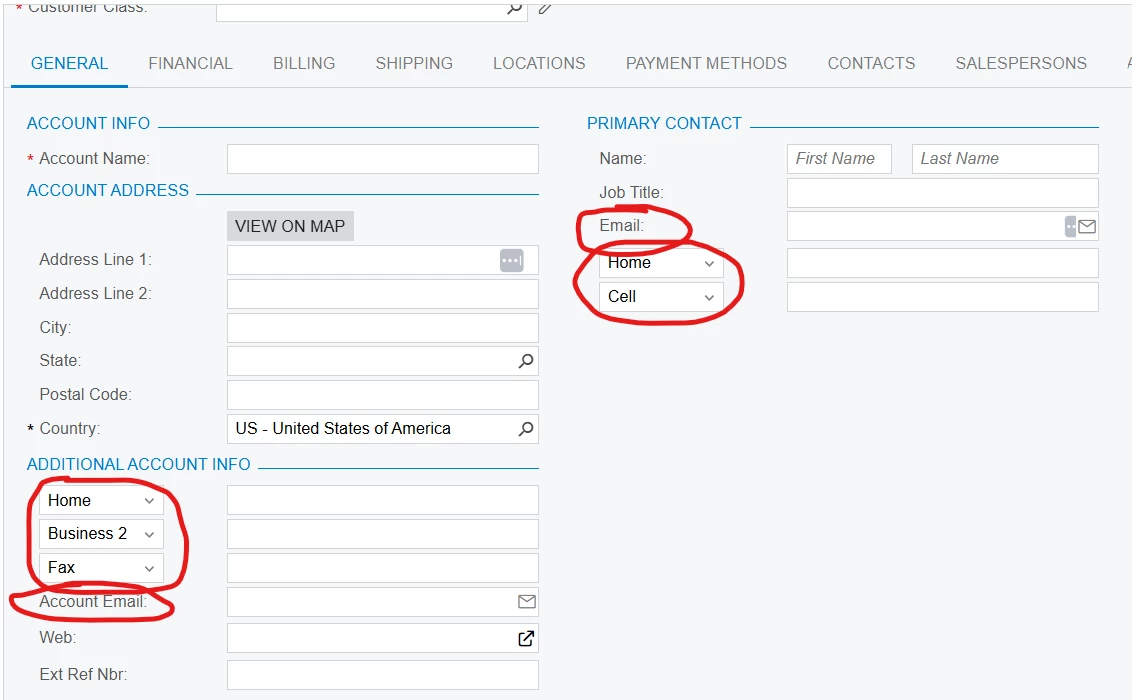
Would like some help to create a customization to make the Account Email and Phone Numbers under a Customer’s Additional Contact Info auto-populate the info for the Primary Contact and vice versa.

When a user types info into the DefContact.EMail field I’d like it to auto-populate in the field PrimaryContactCurrent.EMail field and vice versa. When a user types info into the DefContact.Phone1 and DefContact.Phone2 I’d like it to auto-populate in the fields PrimaryContactCurrent.Phone1 and PrimaryContactCurrent.Phone2 and vice versa.

 

8 replies

jhouser
Captain II
Forum|alt.badge.img+6
  • Captain II
  • September 15, 2025

Hi ​@bobbytherbs I’ve done this kind of thing with a Business Event that triggers an Import Scenario. You would probably need two in this case, since you want it to go both directions. With this method, auto-populate would happen after user saves the customer. To have it populate the fields in real time, you would need a customization. 


Forum|alt.badge.img
  • Author
  • Freshman I
  • September 16, 2025

Would rather have it populate in real time. Anyone know how to make the customization?


DipakNilkanth
Pro III
Forum|alt.badge.img+13

Hi ​@bobbytherbs,

You need to write logic in the FieldUpdated event of each field. When a change occurs, this event will update the other fields accordingly.

The code snippet below will help you implement this.

protected void _(Events.FieldUpdated<Contact, Contact.eMail> e)
{
var defContact = (Contact)e.Row;
if (defContact == null) return;

var customer = Base.BAccount.Current;
if (customer?.PrimaryContactID == defContact.ContactID) return; // avoid circular loop

var primary = Base.PrimaryContactCurrent.Current;
if (primary != null && !string.IsNullOrEmpty(defContact.EMail))
{
primary.EMail = defContact.EMail;
Base.PrimaryContactCurrent.Update(primary);
}
}


protected void _(Events.FieldUpdated<Contact, Contact.phone1> e)
{
var contact = (Contact)e.Row;
if (contact == null) return;

var primary = Base.PrimaryContactCurrent.Current;
var defContact = Base.DefContact.Current;

if (defContact?.ContactID == contact.ContactID && !string.IsNullOrEmpty(defContact.Phone1))
{
if (primary != null)
{
primary.Phone1 = defContact.Phone1;
Base.PrimaryContactCurrent.Update(primary);
}
}
else if (primary?.ContactID == contact.ContactID && !string.IsNullOrEmpty(primary.Phone1))
{
if (defContact != null)
{
defContact.Phone1 = primary.Phone1;
Base.DefContact.Update(defContact);
}
}
}


protected void _(Events.FieldUpdated<Contact, Contact.phone2> e)
{
var contact = (Contact)e.Row;
if (contact == null) return;

var primary = Base.PrimaryContactCurrent.Current;
var defContact = Base.DefContact.Current;

if (defContact?.ContactID == contact.ContactID && !string.IsNullOrEmpty(defContact.Phone2))
{
if (primary != null)
{
primary.Phone2 = defContact.Phone2;
Base.PrimaryContactCurrent.Update(primary);
}
}
else if (primary?.ContactID == contact.ContactID && !string.IsNullOrEmpty(primary.Phone2))
{
if (defContact != null)
{
defContact.Phone2 = primary.Phone2;
Base.DefContact.Update(defContact);
}
}
}

Hope, it helps!


Forum|alt.badge.img
  • Author
  • Freshman I
  • September 17, 2025

I am getting the below error when trying to add this customization:


[2025-09-17 13:46:58.193] \App_RuntimeCode\CustomerMaint.cs(52): error CS1061: 'CustomerMaint' does not contain a definition for 'PrimaryContactCurrent' and no accessible extension method 'PrimaryContactCurrent' accepting a first argument of type 'CustomerMaint' could be found (are you missing a using directive or an assembly reference?)
[2025-09-17 13:46:58.193] \App_RuntimeCode\CustomerMaint.cs(56): error CS1061: 'CustomerMaint' does not contain a definition for 'PrimaryContactCurrent' and no accessible extension method 'PrimaryContactCurrent' accepting a first argument of type 'CustomerMaint' could be found (are you missing a using directive or an assembly reference?)
[2025-09-17 13:46:58.209] \App_RuntimeCode\CustomerMaint.cs(52): error CS1061: 'CustomerMaint' does not contain a definition for 'PrimaryContactCurrent' and no accessible extension method 'PrimaryContactCurrent' accepting a first argument of type 'CustomerMaint' could be found (are you missing a using directive or an assembly reference?)
[2025-09-17 13:46:58.209] Compiler time, in seconds: 6.4726435
[2025-09-17 13:46:58.224] Validation failed.

DipakNilkanth
Pro III
Forum|alt.badge.img+13

Hi ​@bobbytherbs,

please replace your code with below code snippet.
 

  protected void _(Events.FieldUpdated<Contact, Contact.eMail> e)
{
var defContact = (Contact)e.Row;
if (defContact == null) return;

var customer = Base.BAccount.Current;
if (customer?.PrimaryContactID == defContact.ContactID) return; // avoid circular loop
var primctr = Base.GetExtension<AR.CustomerMaint.PrimaryContactGraphExt>();
var primary = primctr.PrimaryContactCurrent.Current;
if (primary != null && !string.IsNullOrEmpty(defContact.EMail))
{
primary.EMail = defContact.EMail;
primctr.PrimaryContactCurrent.Update(primary);
}
}


protected void _(Events.FieldUpdated<Contact, Contact.phone1> e)
{
var contact = (Contact)e.Row;
if (contact == null) return;
var primctr = Base.GetExtension<AR.CustomerMaint.PrimaryContactGraphExt>();
var primary = primctr.PrimaryContactCurrent.Current;
var defContactAddress = Base.GetExtension<BusinessAccountMaint.DefContactAddressExt>();
var defContact = defContactAddress.DefContact.Current;

if (defContact?.ContactID == contact.ContactID && !string.IsNullOrEmpty(defContact.Phone1))
{
if (primary != null)
{
primary.Phone1 = defContact.Phone1;

primctr.PrimaryContactCurrent.Update(primary);
}
}
else if (primary?.ContactID == contact.ContactID && !string.IsNullOrEmpty(primary.Phone1))
{
if (defContact != null)
{
defContact.Phone1 = primary.Phone1;
//var defContactAddress = Base.GetExtension<BusinessAccountMaint.DefContactAddressExt>();
defContactAddress.DefContact.Update(defContact);
}
}
}


protected void _(Events.FieldUpdated<Contact, Contact.phone2> e)
{
var contact = (Contact)e.Row;
if (contact == null) return;
var primctr = Base.GetExtension<AR.CustomerMaint.PrimaryContactGraphExt>();
var primary = primctr.PrimaryContactCurrent.Current;
var defContactAddress = Base.GetExtension<BusinessAccountMaint.DefContactAddressExt>();
var defContact = defContactAddress.DefContact.Current;

if (defContact?.ContactID == contact.ContactID && !string.IsNullOrEmpty(defContact.Phone2))
{
if (primary != null)
{
primary.Phone2 = defContact.Phone2;
primctr.PrimaryContactCurrent.Update(primary);
}
}
else if (primary?.ContactID == contact.ContactID && !string.IsNullOrEmpty(primary.Phone2))
{
if (defContact != null)
{
defContact.Phone2 = primary.Phone2;
defContactAddress.DefContact.Update(defContact);
}
}
}

Note : It’s just a code snippet, change the logic as per your requirement, not tested it.


Forum|alt.badge.img
  • Author
  • Freshman I
  • September 17, 2025

This does not seem to be working as intended. It let me publish the customization but if I edit the Additional Account Info Email and select save the Server Restarts after being locked up for a bit and does not save my changes. If I update the Primary Contact Info Email I can save it but it does not change anything in the Additional Contact Info Email. 

If I attempt to update either Phone1 or Phone2 under Additional Contact Info I receive and error “Error: Updating  'Contact' record raised at least one error. Please review the errors.” when trying to save.

I can update Phone1 under Primary Contact but it does not affect Phone1 in Additional Contact Info.

If I try to change Phone2 under Primary Contact I hit save and the phone number I just entered disappears


Chris Hackett
Community Manager
Forum|alt.badge.img
  • Acumatica Community Manager
  • November 5, 2025

Hi ​@bobbytherbs were you able to find a solution? Thank you!


Forum|alt.badge.img
  • Author
  • Freshman I
  • November 5, 2025

@Chris Hackett not yet I have not


