Question

Make attachment field mandatory

  • May 25, 2023
  • 11 replies
  • 246 views

Michael Ndungi
Varsity I
Forum|alt.badge.img

Hello everyone,
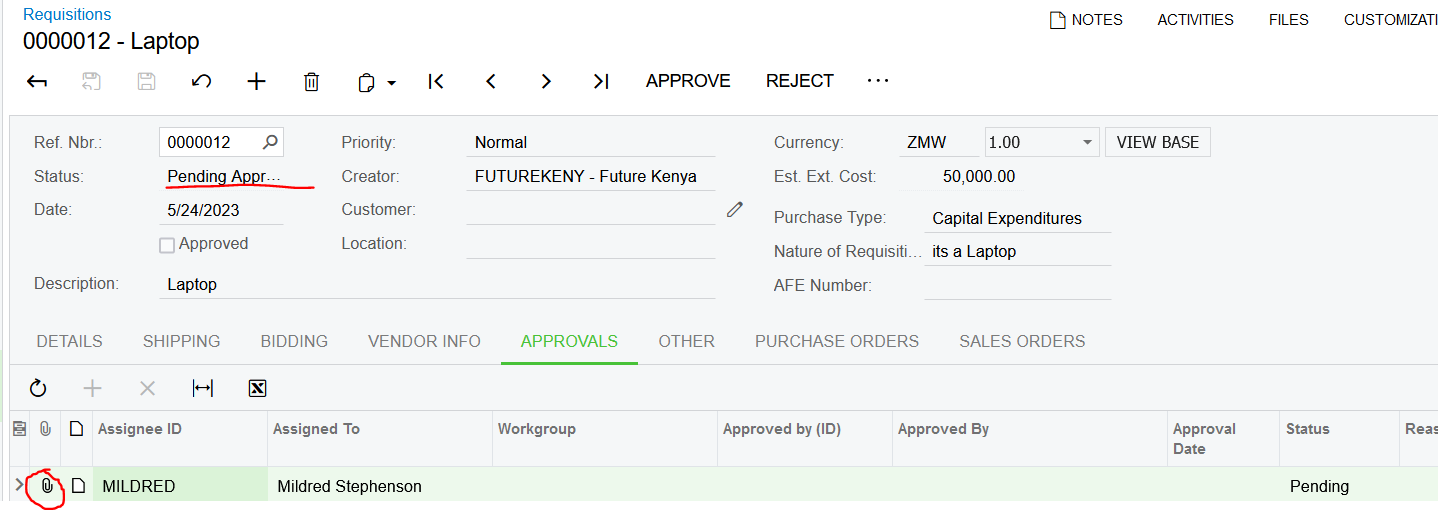
I have tried to make the attachment field mandatory but was unable to.
I need to make it mandatory once the user approve the requisition.
 

Kindly assist 
Thank you for continuous support.
Any kind of response is always highly appreciated.

11 replies

darylbowman
Captain II
Forum|alt.badge.img+15

I don't think you can make a file mandatory in the same way that you can make a field, but you should be able to check the Status value in an Event (perhaps RowPersisting) and throw a PXException if a file is not attached.


Michael Ndungi
Varsity I
Forum|alt.badge.img

I don't think you can make a file mandatory in the same way that you can make a field, but you should be able to check the Status value in an Event (perhaps RowPersisting) and throw a PXException if a file is not attached.


​​​​​​​protected void EPApproval_RowPersisted(PXCache cache, PXRowPersistedEventArgs e, PXRowPersisted InvokeBaseHandler)
    {
        if(InvokeBaseHandler != null)
        InvokeBaseHandler(cache, e);
      var row = (EPApproval)e.Row;

if(row.NoteID == null){

 throw new PXException("Kindly attach the AFE");

}


}

Tried to do this but  dint work.


darylbowman
Captain II
Forum|alt.badge.img+15

I meant RowSelected of the parent record.

You should be able to check for the EPApprovals during the save of the parent record.


aaghaei
Captain II
Forum|alt.badge.img+10
  • Captain II
  • May 25, 2023

You are checking the wrong field from the wrong table. For “Notes” you will need to look into “Note” DAC where Note.NoteID = EPApproval.NoteID and see if “NoteText” has value and for “Files” you will need to look into NoteDoc WHERE NoteDoc.NoteID = EPApproval.NoteID and see if any record exists there.

RowPersisted or any other event handler in your case will not help because the EPApproval record is Auto Generated initially when a document falls into Approval Map. If you put this validation on any event handler of EPApproval DAC your system will stop working. Even if you use RowUpdated, there are some internal records created or auto approval happens that will cause the same problem for you.

You might be able to play with it and incorporate the “Status” field as well as “IsPreApproved” which is used for internal stuff but I think you will face some exception-handlings.

You will need to develop this on your document Graph. What you are trying to make work, won't be so straightforward although seems so. I have played a lot with Approvals and it has a very complicated structure to override as well.


darylbowman
Captain II
Forum|alt.badge.img+15

I just realized I said RowSelected in my second answer. I meant RowPersisting of the parent record.


darylbowman
Captain II
Forum|alt.badge.img+15

This works on Invoices

protected virtual void _(Events.RowPersisting<ARInvoice> e)
{
ARInvoice invoice = e.Row;
if (invoice is null) return;

var invoiceGraph = (ARInvoiceEntry)e.Cache.Graph;

if (invoice.Status == ARDocStatus.PendingApproval)
{
PX.Objects.EP.EPApproval approval = invoiceGraph.Approval.Select()?.FirstTableItems?.FirstOrDefault();
if (approval is object)
{
var files = PXNoteAttribute.GetFileNotes(e.Cache, approval);
if (!(files?.Any() ?? false))
Base.Document.Ask("Attachment Required", "The required files are missing from Approvals", MessageButtons.OK, MessageIcon.Error);
}
}
}

I had to use a dialog because throwing an exception will prevent it from saving, and attaching a file requests to save, so it ends up in a loop.


aaghaei
Captain II
Forum|alt.badge.img+10
  • Captain II
  • May 25, 2023

Nice work @darylbowman it definitely gives a great head start. All it needs is a little bit of fine-tuning to check for the Pending Approval records in EPApproval and be triggered only when EPApproval Status changes from Pending to Approved/Rejected. Do not forget to exclude the IsPreApproved from verifications. Cheers pal


Michael Ndungi
Varsity I
Forum|alt.badge.img

All these responses are GREAT!!
@aaghaei @darylbowman thanks alot


Michael Ndungi
Varsity I
Forum|alt.badge.img

This works on Invoices

protected virtual void _(Events.RowPersisting<ARInvoice> e)
{
ARInvoice invoice = e.Row;
if (invoice is null) return;

var invoiceGraph = (ARInvoiceEntry)e.Cache.Graph;

if (invoice.Status == ARDocStatus.PendingApproval)
{
PX.Objects.EP.EPApproval approval = invoiceGraph.Approval.Select()?.FirstTableItems?.FirstOrDefault();
if (approval is object)
{
var files = PXNoteAttribute.GetFileNotes(e.Cache, approval);
if (!(files?.Any() ?? false))
Base.Document.Ask("Attachment Required", "The required files are missing from Approvals", MessageButtons.OK, MessageIcon.Error);
}
}
}

I had to use a dialog because throwing an exception will prevent it from saving, and attaching a file requests to save, so it ends up in a loop.

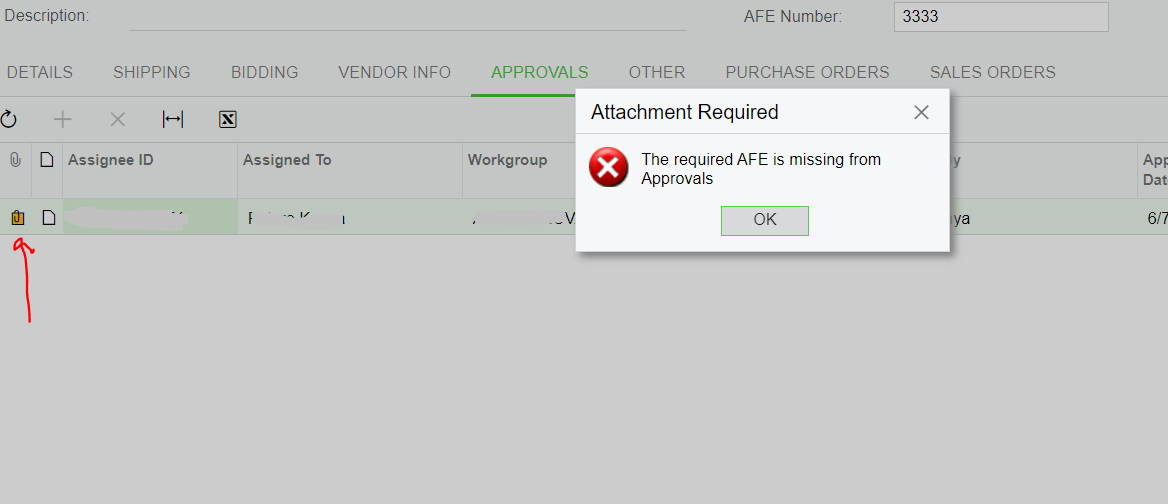
I implemented this on Requisition but the system keeps prompting the dialog box even after attaching the file.
what could be the reason why?


code:


protected virtual void _(Events.RowPersisting<RQRequisition> e)
{
RQRequisition requisition = e.Row;
RQRequisitionExt reqyyy = PXCache<RQRequisition>.GetExtension<RQRequisitionExt>(requisition);
if (requisition is null) return;

var requisitionGraph = (RQRequisitionEntry)e.Cache.Graph;

if (requisition.Status == RQRequisitionStatus.Bidding)
{
PX.Objects.EP.EPApproval approval = requisitionGraph.Approval.Select()?.FirstTableItems?.FirstOrDefault();
if (approval is object)
{
var files = PXNoteAttribute.GetFileNotes(e.Cache, approval);
if (!(files?.Any() ?? false) )

//&& approval.WorkgroupID != null && requisition.Approved == true && reqyyy.UsrAFN != null

Base.Document.Ask("Attachment Required", "The required AFE is missing from Approvals", MessageButtons.OK, MessageIcon.Error);
}
}
}


darylbowman
Captain II
Forum|alt.badge.img+15

Make a variable of 

bool hasFiles = files?.Any()

And then the if statement like

if (!(hasFiles ?? false))


I ran into an issue in another project with the coalescing making the value always false and I think this is how I fixed it.


darylbowman
Captain II
Forum|alt.badge.img+15

Looking again, I realize I made that bool non nullable. It should be:

bool? hasFiles = files?.Any()