Solved

Load records in Print/Email Orders screen based on custom SOOrder header checkbox

  • January 21, 2026
  • 13 replies
  • 111 views

Forum|alt.badge.img+2

Hello Team,

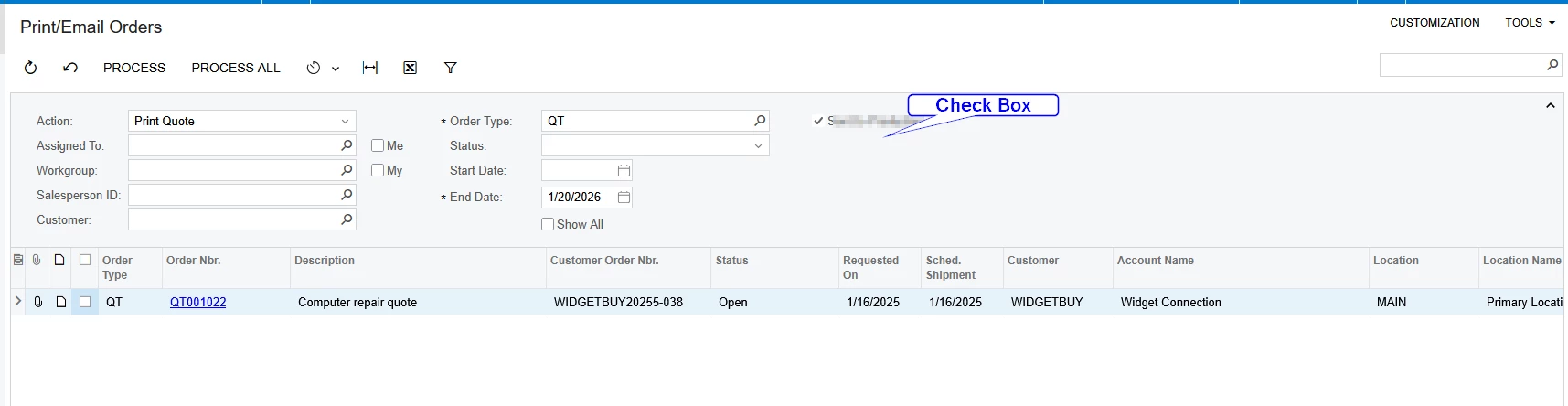
In the Print/Email Orders screen, I want to add a custom filter checkbox. I have already have a custom checkbox field in the SOOrder table. If the filter checkbox is checked, then only Sales Orders with this custom flag records should load; if unchecked, all records should load.

How can I achieve this?


Best answer by Naveen Boga

@SKV687 I checked it and below code is working fine. Please check from your end and confirm.


 public class SOEmailProcessing : PXFilteredProcessingJoin<SOOrderProcessSelected, SOProcessFilter,
LeftJoinSingleTable<Customer, On<SOOrder.customerID.IsEqual<Customer.bAccountID>>>,
Where<Brackets<SOOrderProcessSelected.behavior.IsEqual<SOBehavior.tR>.
Or<Match<Customer, AccessInfo.userName.FromCurrent>>>.
And<SOOrderProcessSelected.orderDate.IsLessEqual<SOProcessFilter.endDate.FromCurrent>>.
And<SOProcessFilter.startDate.FromCurrent.IsNull.
Or<SOOrderProcessSelected.orderDate.IsGreaterEqual<SOProcessFilter.startDate.FromCurrent>>>.
And<PX.SM.WorkflowAction.IsEnabled<SOOrderProcessSelected, SOProcessFilter.action>>.
And<SOProcessFilter.showAll.FromCurrent.IsEqual<True>.
Or<SOProcessFilter.action.FromCurrent.IsIn<
SOOrderProcess.WellKnownActions.SOOrderScreen.printSalesOrder,
SOOrderProcess.WellKnownActions.SOOrderScreen.printQuote,
SOOrderProcess.WellKnownActions.SOOrderScreen.printBlanket>.
And<SOOrderProcessSelected.printed.IsEqual<False>>>.
Or<SOProcessFilter.action.FromCurrent.IsIn<
SOOrderProcess.WellKnownActions.SOOrderScreen.emailSalesOrder,
SOOrderProcess.WellKnownActions.SOOrderScreen.emailQuote,
SOOrderProcess.WellKnownActions.SOOrderScreen.emailBlanket>.
And<SOOrderProcessSelected.emailed.IsEqual<False>>>>>>
{
public SOEmailProcessing(PXGraph graph)
: base(graph)
{
_OuterView.WhereAndCurrent<SOProcessFilter>(nameof(SOOrderProcessSelected.ownerID));
}
public SOEmailProcessing(PXGraph graph, Delegate handler)
: base(graph, handler)
{
_OuterView.WhereAndCurrent<SOProcessFilter>(nameof(SOOrderProcessSelected.ownerID));

bool? sentToProduction = graph.Caches<SOProcessFilter>().GetExtension<SOProcessFilterExt>(
graph.Caches<SOProcessFilter>().Current)?.UsrSentToProduction;
if (sentToProduction == true)
_OuterView.WhereAnd<Where<SOOrderVFSentToProdExt.usrSentToProduction.IsEqual<True>>>();
else
_OuterView.WhereAnd<Where<SOOrderVFSentToProdExt.usrSentToProduction.IsEqual<False>.
Or<SOOrderVFSentToProdExt.usrSentToProduction.IsNull>>>();
}
}

 

13 replies

Forum|alt.badge.img
  • Freshman I
  • January 21, 2026

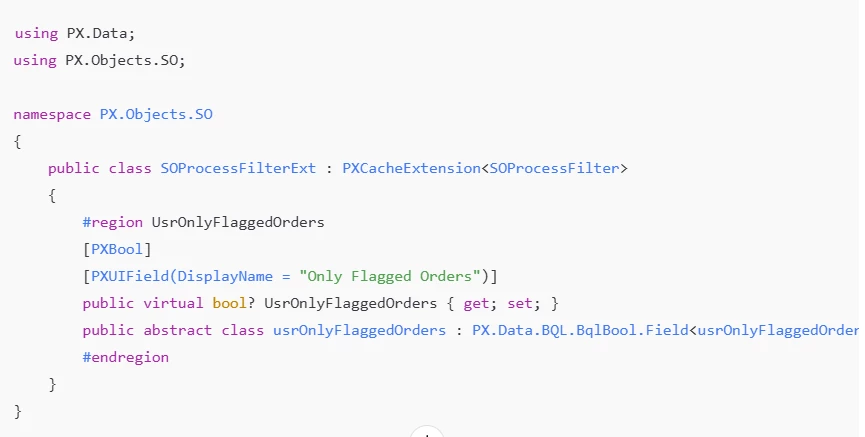
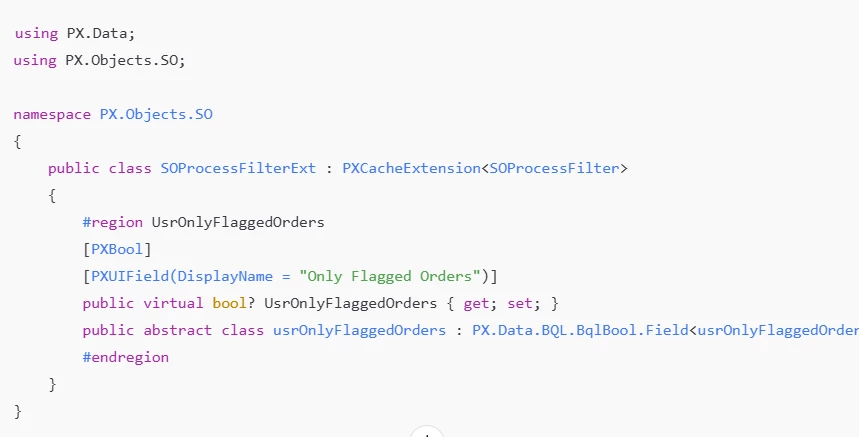
Filter DAC Extension for Processing Screen
 

This will work exactly as you want:
Checkbox unchecked → all orders load
Checkbox checked → only orders where SOOrderExt.UsrYourFlagField = true

A few minor modifications may be required. Please review and update the code accordingly based on the attached screenshot.


Forum|alt.badge.img+2
  • Author
  • Pro II
  • January 21, 2026

@FarhanaM60 

Thanks for the response, I need logic to load the records based on filter checkbox.


Forum|alt.badge.img
  • Freshman I
  • January 21, 2026

This is what written in Business logic it is validating according to Checkbox to load and unload


npetrosov31
Jr Varsity I
Forum|alt.badge.img+1
  • Jr Varsity I
  • January 21, 2026

hi ​@SKV687,


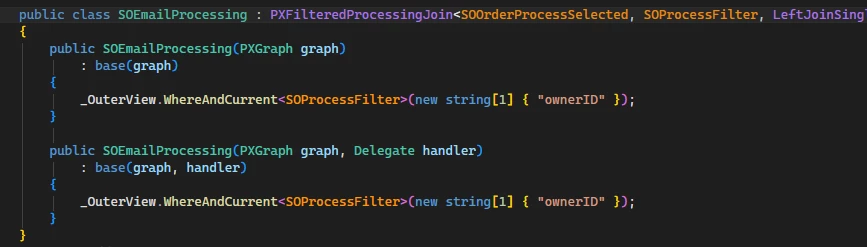
In order to get this done you need to take a look of how the grid is actually filtered. I found that the Records grid on that screen is created using this:

This SOEmailProcessing class is a PXFilteredProcessingJoin and if we dig a little it is just an inheritance:

The full select statement is a bit long to insert here. 

The only way I see here is to create an IEnumerable for the Records grid and add your filter inside of it. 


Forum|alt.badge.img+2
  • Author
  • Pro II
  • January 21, 2026

Yes ​@npetrosov31 

I applied the same logic in SOEmailProcessing using the code below. It filters records only when the checkbox is checked. When the checkbox is unchecked, no records are loaded and the result is empty, whereas all records should be displayed. Here some condition is missing I am unable to get the Filter view condition here.

 public class SOEmailProcessing : PXFilteredProcessingJoin<SOOrderProcessSelected, SOProcessFilter,
LeftJoinSingleTable<Customer, On<SOOrder.customerID.IsEqual<Customer.bAccountID>>>,
Where<Brackets<SOOrderProcessSelected.behavior.IsEqual<SOBehavior.tR>.
Or<Match<Customer, AccessInfo.userName.FromCurrent>>>.
And<SOOrderProcessSelected.orderDate.IsLessEqual<SOProcessFilter.endDate.FromCurrent>>.
And<SOProcessFilter.startDate.FromCurrent.IsNull.
Or<SOOrderProcessSelected.orderDate.IsGreaterEqual<SOProcessFilter.startDate.FromCurrent>>>.
And<PX.SM.WorkflowAction.IsEnabled<SOOrderProcessSelected, SOProcessFilter.action>>.
And<SOProcessFilter.showAll.FromCurrent.IsEqual<True>.
Or<SOProcessFilter.action.FromCurrent.IsIn<
SOOrderProcess.WellKnownActions.SOOrderScreen.printSalesOrder,
SOOrderProcess.WellKnownActions.SOOrderScreen.printQuote,
SOOrderProcess.WellKnownActions.SOOrderScreen.printBlanket>.
And<SOOrderProcessSelected.printed.IsEqual<False>>>.
Or<SOProcessFilter.action.FromCurrent.IsIn<
SOOrderProcess.WellKnownActions.SOOrderScreen.emailSalesOrder,
SOOrderProcess.WellKnownActions.SOOrderScreen.emailQuote,
SOOrderProcess.WellKnownActions.SOOrderScreen.emailBlanket>.
And<SOOrderProcessSelected.emailed.IsEqual<False>>>>>>
{
public SOEmailProcessing(PXGraph graph)
: base(graph)
{
_OuterView.WhereAndCurrent<SOProcessFilter>(nameof(SOOrderProcessSelected.ownerID));
}
public SOEmailProcessing(PXGraph graph, Delegate handler)
: base(graph, handler)
{
_OuterView.WhereAnd<Where<SOOrderVFSentToProdExt.usrSentToProduction, Equal<Current<SOProcessFilterExt.usrSentToProduction>>>>();
_OuterView.WhereAndCurrent<SOProcessFilter>(nameof(SOOrderProcessSelected.ownerID));
}
}

I will try implementing this using the Records view delegate.


npetrosov31
Jr Varsity I
Forum|alt.badge.img+1
  • Jr Varsity I
  • January 21, 2026

@SKV687,

Actually your code is working as written. You added this part: _OuterView.WhereAnd<Where<SOOrderVFSentToProdExt.usrSentToProduction, Equal<Current<SOProcessFilterExt.usrSentToProduction>>>>();

This code always filters by the checkbox and does not skip the filter if it is unchecked. Try to add Or<Current<SOProcessFilterExt.usrSentToProduction, IsNull» to skip the filter if the filter is not checked. May be false checking also needed there, but that may fix the existing part without changing to view delegate


Forum|alt.badge.img+2
  • Jr Varsity III
  • January 21, 2026

@SKV687 ,
   

The issue is that your WhereAnd condition is always applied, even when the checkbox is unchecked. You need to make the filter conditional based on the checkbox state.


Override the View Delegate

You can try something like this

Example:

public class SOEmailProcessingExt : PXGraphExtension<SOEmailProcessing>
{
public override void Initialize()
{
base.Initialize();

// Subscribe to filter field updated event to refresh the view
Base.Filter.Cache.Graph.FieldUpdated.AddHandler<SOProcessFilterExt.usrSentToProduction>(
(cache, e) => {
Base.Orders.Cache.Clear();
Base.Orders.View.RequestRefresh();
});
}


public delegate IEnumerable OrdersDelegate();

[PXOverride]
public virtual IEnumerable Orders(OrdersDelegate baseDelegate)
{
var filter = Base.Filter.Current;
var filterExt = filter?.GetExtension<SOProcessFilterExt>();

// Get base results
foreach (PXResult<SOOrderProcessSelected, Customer> result in baseDelegate())
{
SOOrderProcessSelected order = result;

// If checkbox is NOT checked, return all records
if (filterExt?.UsrSentToProduction != true)
{
yield return result;
continue;
}

// If checkbox IS checked, filter by the custom field
var orderExt = PXCache<SOOrder>.GetExtension<SOOrderVFSentToProdExt>(order);
if (orderExt?.UsrSentToProduction == true)
{
yield return result;
}
}
}
}

// Filter Extension
public sealed class SOProcessFilterExt : PXCacheExtension<SOProcessFilter>
{
#region UsrSentToProduction
[PXBool]
[PXUIField(DisplayName = "Sent to Production")]
[PXUnboundDefault(false)]
public bool? UsrSentToProduction { get; set; }
public abstract class usrSentToProduction : PX.Data.BQL.BqlBool.Field<usrSentToProduction> { }
#endregion
}

// Order Extension (assuming this exists)
public sealed class SOOrderVFSentToProdExt : PXCacheExtension<SOOrder>
{
#region UsrSentToProduction
[PXDBBool]
[PXUIField(DisplayName = "Sent to Production")]
public bool? UsrSentToProduction { get; set; }
public abstract class usrSentToProduction : PX.Data.BQL.BqlBool.Field<usrSentToProduction> { }
#endregion
}


Forum|alt.badge.img+2
  • Author
  • Pro II
  • January 22, 2026

@noorula77 

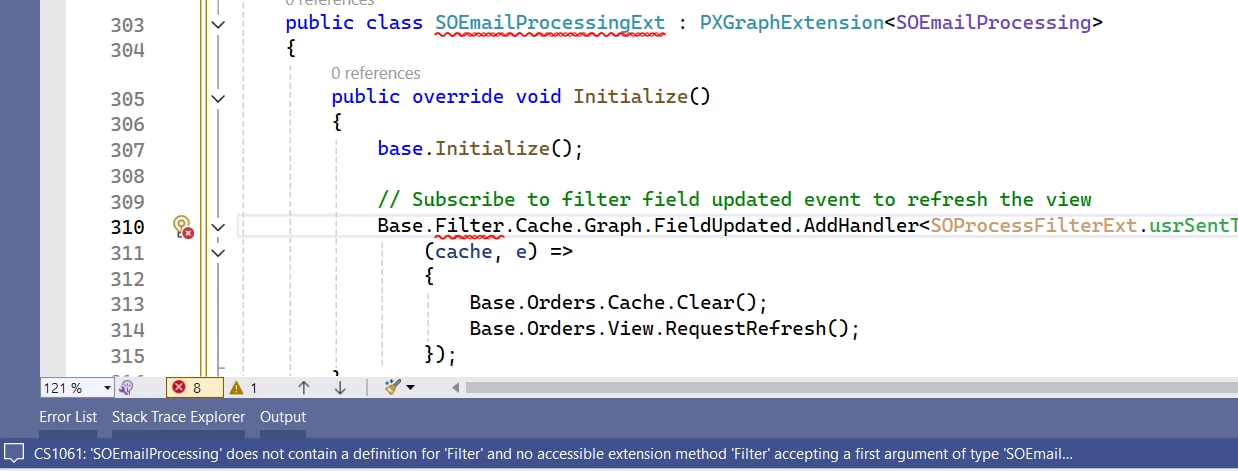
Thanks for the response. SOEmailProcessing is not a graph, have you reviewed the code shared above?

I am encountering the following error. Could you please review and advise?


Forum|alt.badge.img+8
  • Captain II
  • January 22, 2026

If you’re wanting to modify/extend the SOOrderProcess (SO502000) graph, then your class declaration should be:

public class SOEmailProcessingExt : PXGraphExtension<SOOrderProcess>

Then, 

Base

will reference SOOrderProcess which does have a PXFilter called Filter.


Forum|alt.badge.img+2
  • Jr Varsity III
  • January 22, 2026

@SKV687 


·  Extends SOOrderProcess - The correct graph class for the Print/Email Orders screen

·  Overrides the Orders view delegate - This controls what records are displayed

·  Conditional logic:

  • When checkbox is unchecked (or null): Shows ALL orders from the base query
  • When checkbox is checked: Filters to show ONLY orders where UsrSentToProduction = true

    ·  Extends SOOrderProcess - The correct graph class for the Print/Email Orders screen

    ·  Overrides the Orders view delegate - This controls what records are displayed

    ·  Conditional logic:

  • When checkbox is unchecked (or null): Shows ALL orders from the base query
  • When checkbox is checked: Filters to show ONLY orders where UsrSentToProduction = true
    Try like this:

    public class SOOrderProcessExt : PXGraphExtension<SOOrderProcess>
    {
    public override void Initialize()
    {
    base.Initialize();


    Base.Filter.Cache.Graph.FieldUpdated.AddHandler<SOProcessFilterExt.usrSentToProduction>(
    (cache, e) =>
    {
    Base.Orders.Cache.Clear();
    Base.Orders.View.RequestRefresh();
    });
    }

    public delegate IEnumerable OrdersDelegate();

    [PXOverride]
    public virtual IEnumerable Orders(OrdersDelegate baseDelegate)
    {
    var filter = Base.Filter.Current;
    var filterExt = filter?.GetExtension<SOProcessFilterExt>();


    foreach (PXResult<SOOrderProcessSelected, Customer> result in baseDelegate())
    {
    SOOrderProcessSelected order = result;

    // If checkbox is NOT checked, return all records
    if (filterExt?.UsrSentToProduction != true)
    {
    yield return result;
    continue;
    }

    // If checkbox IS checked, filter by the custom field
    var orderExt = PXCache<SOOrder>.GetExtension<SOOrderVFSentToProdExt>(order);
    if (orderExt?.UsrSentToProduction == true)
    {
    yield return result;
    }
    }
    }
    }

    // Filter Extension
    public sealed class SOProcessFilterExt : PXCacheExtension<SOProcessFilter>
    {
    #region UsrSentToProduction
    [PXBool]
    [PXUIField(DisplayName = "Sent to Production")]
    [PXUnboundDefault(false)]
    public bool? UsrSentToProduction { get; set; }
    public abstract class usrSentToProduction : PX.Data.BQL.BqlBool.Field<usrSentToProduction> { }
    #endregion
    }

    // Order Extension (assuming this already exists in your customization)
    public sealed class SOOrderVFSentToProdExt : PXCacheExtension<SOOrder>
    {
    #region UsrSentToProduction
    [PXDBBool]
    [PXUIField(DisplayName = "Sent to Production")]
    public bool? UsrSentToProduction { get; set; }
    public abstract class usrSentToProduction : PX.Data.BQL.BqlBool.Field<usrSentToProduction> { }
    #endregion
    }


Forum|alt.badge.img+2
  • Author
  • Pro II
  • January 22, 2026

Hi ​@noorula77  

Have you reviewed this code on your end? If I’m not wrong, it appears the source logic may have been generated using an AI tool. However, this approach will not work because Orders Delegate and Orders Views are not available in the SOOrderProcess graph.

@Django ​@npetrosov31 

Thank you for you Inputs, I have tried below code and it works as per my requirement.

 _OuterView.WhereAnd<Where<SOOrderVFSentToProdExt.usrSentToProduction.IsEqual<False>.
                                Or<SOOrderVFSentToProdExt.usrSentToProduction.IsNull>>>();


Naveen Boga
Captain II
Forum|alt.badge.img+20
  • Captain II
  • Answer
  • January 23, 2026

@SKV687 I checked it and below code is working fine. Please check from your end and confirm.


 public class SOEmailProcessing : PXFilteredProcessingJoin<SOOrderProcessSelected, SOProcessFilter,
LeftJoinSingleTable<Customer, On<SOOrder.customerID.IsEqual<Customer.bAccountID>>>,
Where<Brackets<SOOrderProcessSelected.behavior.IsEqual<SOBehavior.tR>.
Or<Match<Customer, AccessInfo.userName.FromCurrent>>>.
And<SOOrderProcessSelected.orderDate.IsLessEqual<SOProcessFilter.endDate.FromCurrent>>.
And<SOProcessFilter.startDate.FromCurrent.IsNull.
Or<SOOrderProcessSelected.orderDate.IsGreaterEqual<SOProcessFilter.startDate.FromCurrent>>>.
And<PX.SM.WorkflowAction.IsEnabled<SOOrderProcessSelected, SOProcessFilter.action>>.
And<SOProcessFilter.showAll.FromCurrent.IsEqual<True>.
Or<SOProcessFilter.action.FromCurrent.IsIn<
SOOrderProcess.WellKnownActions.SOOrderScreen.printSalesOrder,
SOOrderProcess.WellKnownActions.SOOrderScreen.printQuote,
SOOrderProcess.WellKnownActions.SOOrderScreen.printBlanket>.
And<SOOrderProcessSelected.printed.IsEqual<False>>>.
Or<SOProcessFilter.action.FromCurrent.IsIn<
SOOrderProcess.WellKnownActions.SOOrderScreen.emailSalesOrder,
SOOrderProcess.WellKnownActions.SOOrderScreen.emailQuote,
SOOrderProcess.WellKnownActions.SOOrderScreen.emailBlanket>.
And<SOOrderProcessSelected.emailed.IsEqual<False>>>>>>
{
public SOEmailProcessing(PXGraph graph)
: base(graph)
{
_OuterView.WhereAndCurrent<SOProcessFilter>(nameof(SOOrderProcessSelected.ownerID));
}
public SOEmailProcessing(PXGraph graph, Delegate handler)
: base(graph, handler)
{
_OuterView.WhereAndCurrent<SOProcessFilter>(nameof(SOOrderProcessSelected.ownerID));

bool? sentToProduction = graph.Caches<SOProcessFilter>().GetExtension<SOProcessFilterExt>(
graph.Caches<SOProcessFilter>().Current)?.UsrSentToProduction;
if (sentToProduction == true)
_OuterView.WhereAnd<Where<SOOrderVFSentToProdExt.usrSentToProduction.IsEqual<True>>>();
else
_OuterView.WhereAnd<Where<SOOrderVFSentToProdExt.usrSentToProduction.IsEqual<False>.
Or<SOOrderVFSentToProdExt.usrSentToProduction.IsNull>>>();
}
}



Forum|alt.badge.img+2
  • Author
  • Pro II
  • January 23, 2026

@Naveen Boga 

Thanks for sharing. I have checked this on my end, and the code is working as expected.