Answer

Layout Rules - Merge

  • November 4, 2021
  • 9 replies
  • 526 views

greglang
Varsity I
Forum|alt.badge.img+1

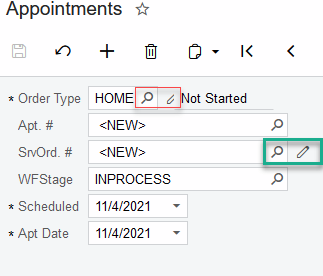
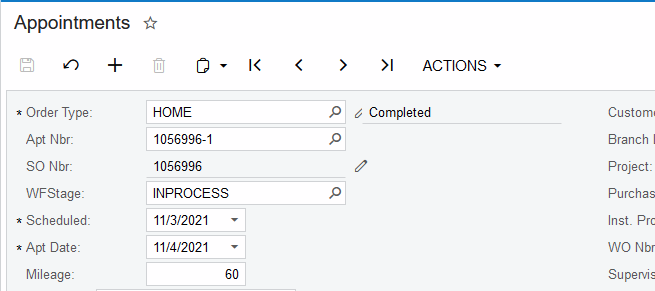
Does anyone know how to add more space between 2 fields in a merge layout rule?  See from the screenshot below the add new button is being cutoff by the status field.  I have tried to adjust many properties but can’t seem to get the order type to overlap with the status field.  Thanks in advance. 


Best answer by Naveen Boga

Hi @greglang  Here is the sample example for your reference. Add this style attribute to “Status” field


style="margin-left: 10px;"  


9 replies

Naveen Boga
Captain II
Forum|alt.badge.img+19
  • Captain II
  • November 4, 2021

Hi @greglang Below is the sample example to merge the fields (Merging Field and Button)


<px:PXLayoutRule runat="server" Merge="true" />
<px:PXNumberEdit ID="edSelectRecords" runat="server" DataField="SelectRecords" CommitChanges="true" />
<px:PXButton runat="server" ID="btnSelectRecords" CommandSourceID="ds" CommandName="SelectRecords" RenderAsButton="true" />

screenshot for reference.


greglang
Varsity I
Forum|alt.badge.img+1
  • Author
  • Varsity I
  • November 4, 2021

@Naveen B Thanks for the reply.  I think I need to clarify my issue.  In the screenshot I provided I have already taken the Appointment screen and merged the fields I wish to have on the same line.  The issue I’m running into is that I can not seem to get the Edit Pencil to be part of the spacing rules.  What I’m looking is for a way not to have it cutoff by the Status and fit on the same line. 


See the Red Lines around the Order Type in the picture below vs the Green Lines around the SrvOrd #.  I know its a little issue but I just don’t like the unfinished look of it.


Below is my code.

    <px:PXLayoutRule runat="server" StartRow="True" StartColumn="True" ControlSize="M" LabelsWidth="XS">
</px:PXLayoutRule>
<px:PXLayoutRule runat="server" ID="CstPXLayoutRule128" Merge="True" />
<px:PXSelector LabelText="Order Type:" LabelID="Labelx1" Size="XS" AutoAdjustColumns="True" DisplayMode="Value" ID="edSrvOrdType" runat="server"
DataField="SrvOrdType" DataSourceID="ds"
AllowEdit="True">
</px:PXSelector>
<px:PXDropDown AllowEdit="True" Size="S" SuppressLabel="True" BorderStyle="None" BorderWidth="10px" ID="edStatus" runat="server" DataField="Status" Enabled="True">
</px:PXDropDown>
<px:PXLayoutRule runat="server" ID="CstLayoutRule127" />


Naveen Boga
Captain II
Forum|alt.badge.img+19
  • Captain II
  • November 4, 2021

Hi @greglang  Thanks for clarifying.

This issue you can fix by changing the below properties, remaining everything is looks good to me.

LabelsWidth="XS"  →  LayoutRule   

Size="XS" → PXSelector

Size =”S” → PXDropdown


better remove above properties and check, if it is not working add one by one and verify.   


greglang
Varsity I
Forum|alt.badge.img+1
  • Author
  • Varsity I
  • November 4, 2021

Thanks for trying but it didn’t seem to help…  here is a screenshot after removing the three sizes above. 


Naveen Boga
Captain II
Forum|alt.badge.img+19
  • Captain II
  • November 5, 2021

@greglang  Oh Ok.

It might be an issue with Pencil button, can you please remove AllowEdit = True and check.

If you need Pencil button, then you might need to apply the style to move right field little bit.


greglang
Varsity I
Forum|alt.badge.img+1
  • Author
  • Varsity I
  • November 5, 2021

Yes that does fix it but I don’t understand how to keep the pencil and just apply the style to move right the next field a bit.  Could you give me an example of the code? 


Naveen Boga
Captain II
Forum|alt.badge.img+19
  • Captain II
  • Answer
  • November 5, 2021

Hi @greglang  Here is the sample example for your reference. Add this style attribute to “Status” field


style="margin-left: 10px;"  


greglang
Varsity I
Forum|alt.badge.img+1
  • Author
  • Varsity I
  • November 5, 2021

Thanks Naveen!  super simple and it fixed my issue.


Naveen Boga
Captain II
Forum|alt.badge.img+19
  • Captain II
  • November 6, 2021

Hey @greglang Great 🙂 Thanks for sharing the update.