Solved

Issue with PXSelector: Saving Substitute Key Instead of Actual Value in Custom DAC Field

  • December 10, 2024
  • 14 replies
  • 225 views

Forum|alt.badge.img

I created a DAC field in a custom DAC as follows.

#region ParameterNbr

[PXDBString(15, IsKey = true, IsUnicode = true, InputMask = "")]
[PXUIField(DisplayName = "Parameter Nbr")]

[PXSelector(typeof(customDAC.parameterNbr), SubstituteKey = typeof(customDAC.description))]

public virtual string ParameterNbr { get; set; }
public abstract class parameterNbr : PX.Data.BQL.BqlString.Field<parameterNbr> { }
#endregion


When the length of the customDAC.description, which is the substitute key, exceeds 15, the description value is saved in the database instead of the customDAC.parameterNbr. If the length is equal to or less than 15, the     customDAC.parameterNbr is saved as usual. I changed the length to 10, but the same behavior persisted. I want to show the customDAC.description value in the user interface and save the customDAC.parameterNbr value in the DAC.

How can I solve this?
Any detailed instructions, tips, or code snippets would be greatly appreciated. Thank you!
Best answer by DrewNisley

Try the following

[PXSelector(typeof(customDAC.parameterNbr), DescriptionField = typeof(customDAC.description))]

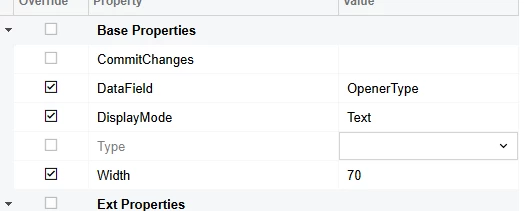
Then change the display mode to text in the Customization Project Editor and it should accomplish what you want.


14 replies

Forum|alt.badge.img+7
  • Captain II
  • December 10, 2024

I suspect you want this:

[PXSelector(typeof(customDAC.parameterNbr), DescriptionField = typeof(customDAC.description))]


Forum|alt.badge.img

Hi ​@Django ,
tried this as well, but it didn't work. The ParameterNbr field is used in a grid. When I use a substitute key, the customDAC.description field is displayed in the user interface, while the customDAC.parameterNbr field is saved in the database, which is the desired behavior. However, the issue occurs when the length of the customDAC.description field exceeds 15.


darylbowman
Captain II
Forum|alt.badge.img+15

A substitute key is a friendly UI key which masks the actual database key, like BAccountID and AcctCD in the BAccount table.


Forum|alt.badge.img

Hi ​@darylbowman ,
Yes. But the issue occurs when the length of the customDAC.description field exceeds 15.
Let's say the value of the customDAC.description field is 'ABCDEFGHIJKLMNOPQRST'. In this scenario, 'ABCDEFGHIJKLMNO' is displayed in the user interface, and 'ABCDEFGHIJKLMNO' (a string of 15 characters) is saved in the database. How to avoid this issue?


darylbowman
Captain II
Forum|alt.badge.img+15

Could you post the DAC field for Description?


Forum|alt.badge.img

Hi ​@darylbowman ,
Here it is.

    #region Description
    [PXDBString(100, IsUnicode = true, InputMask = "")]
    [PXUIField(DisplayName = "Parameter Description")]
    [PXDefault]
    public virtual string Description { get; set; }
    public abstract class description : PX.Data.BQL.BqlString.Field<description> { }


darylbowman
Captain II
Forum|alt.badge.img+15

I’m not 100% certain on the following, but this is my understanding:

Substitute key is supposed to be used to improve the UI experience while maintaining database integrity. I’ve only seen substitute key used with an auto-generated identity key. In that situation, the Selector is placed on the substitute key field in the DAC rather than the auto-generated identity field (which isn’t shown to the UI).

In your situation, the Selector would go on the Description field if that’s going to be the substitute key, but then your parameterNbr field will likely be empty unless you’re managing that some other way.


Here’s an example of a ID / CD:

#region PlantID
[PXDBIdentity]
public virtual int? PlantID { get; set; }
public abstract class plantID : PX.Data.BQL.BqlInt.Field<plantID> { }
#endregion

#region PlantCD
[PXDBString(50, IsKey = true, IsUnicode = true, InputMask = ">aaaaaaaaaaaaaaaaaaaaaaaaaaaaaaaaaaaaaaaaaaaaaaaaaa")]
[PXDefault]
[PXUIField(DisplayName = "Plant ID", Required = true)]
[PXSelector(typeof(Search<PlantsDAC.plantCD>),
typeof(PlantsDAC.plantCD))]
public virtual string PlantCD { get; set; }
public abstract class plantCD : PX.Data.BQL.BqlString.Field<plantCD> { }
#endregion

You’ll notice the SubstituteKey isn’t even specified for this DAC selector because this is the primary key.

If you used PlantID as a foreign key in another table, then you’d do this:

#region ProductID
[PXDBInt]
[PXSelector(typeof(Search<ProductsDAC.productID>),
typeof(ProductsDAC.productCD),
SubstituteKey = typeof(ProductsDAC.productCD))]
[PXUIField(DisplayName = "Product ID")]
public virtual int? ProductID { get; set; }
public abstract class productID : PX.Data.BQL.BqlInt.Field<productID> { }
#endregion

(notice the SubstituteKey, which substitutes the pretty ID in place of the actual ID when the record is displayed to the UI)


Forum|alt.badge.img+1
  • Jr Varsity III
  • December 11, 2024

Hi ​@RKarunarathne51 ,
The key issue is that when you're using SubstituteKey, Acumatica needs to be explicitly told about the field that should be stored in the database.
Please try like this:

#region ParameterNbr
[PXDBString(15, IsKey = true, IsUnicode = true, InputMask = "")]
[PXUIField(DisplayName = "Parameter Nbr")]
[PXSelector(
    typeof(customDAC.parameterNbr),
    typeof(customDAC.parameterNbr),    // Add this line - stored value
    typeof(customDAC.description)       // Display value
)]
public virtual string ParameterNbr { get; set; }
public abstract class parameterNbr : PX.Data.BQL.BqlString.Field<parameterNbr> { }
#endregion


Forum|alt.badge.img

Hi ​@noorula77,

I tried your solution, but it didn't work as intended. Now the display value is parameterNbr.


Forum|alt.badge.img+1
  • Jr Varsity III
  • December 11, 2024

Hi ​@RKarunarathne51 
Try like this hope with search it will work.

#region ParameterNbr
[PXDBString(15, IsKey = true, IsUnicode = true, InputMask = "")]
[PXUIField(DisplayName = "Parameter Nbr")]
[PXSelector(
    typeof(Search<customDAC.parameterNbr>),
    new Type[] {
        typeof(customDAC.parameterNbr),
        typeof(customDAC.description)
    },
    SubstituteKey = typeof(customDAC.description)
)]
public virtual string ParameterNbr { get; set; }
public abstract class parameterNbr : PX.Data.BQL.BqlString.Field<parameterNbr> { }
#endregion


Forum|alt.badge.img

Hi ​@noorula77 ,

Thank you for your answer. I tried your solution, but it didn't work as intended.


Forum|alt.badge.img+1
  • Jr Varsity III
  • December 11, 2024

Hi ​@RKarunarathne51 ,


Verify that customDAC.parameterNbr has a fixed length of 15 in the database. If it's shorter in the database schema, update it.
[PXDBString(15, IsKey = true, IsUnicode = true, InputMask = "")]

[PXSelector(
    typeof(customDAC.parameterNbr),
    SubstituteKey = typeof(customDAC.description),
    DescriptionField = typeof(customDAC.description)
)]

Try with below mentioned scenario hope it will work.
 

protected void CustomDAC_ParameterNbr_FieldUpdating(PXCache cache, PXFieldUpdatingEventArgs e)
{
    var row = (CustomDAC)e.Row;
    if (row != null && e.NewValue != null)
    {
        // Force the value to be the parameterNbr
        e.NewValue = row.ParameterNbr;
    }
}

protected void CustomDAC_ParameterNbr_FieldDefaulting(PXCache cache, PXFieldDefaultingEventArgs e)
{
    var row = (CustomDAC)e.Row;
    if (row != null)
    {
        // Default the parameterNbr if necessary
        e.NewValue = row.ParameterNbr;
    }
}


darylbowman
Captain II
Forum|alt.badge.img+15

I think the limitation you're experiencing is due to using the selector in a way it isn't meant to be used. In my experience, selectors are the pickiest field type in Acumatica. I'd suggest you rework your DAC to follow Acumatica best practices.


DrewNisley
Pro I
Forum|alt.badge.img+3
  • Pro I
  • Answer
  • January 23, 2025

Try the following

[PXSelector(typeof(customDAC.parameterNbr), DescriptionField = typeof(customDAC.description))]

Then change the display mode to text in the Customization Project Editor and it should accomplish what you want.

