Answer

Issue with Filtering Custom Fields on Approval Screen

  • August 6, 2025
  • 9 replies
  • 136 views

AasthaRai
Freshman I

Hi Team,


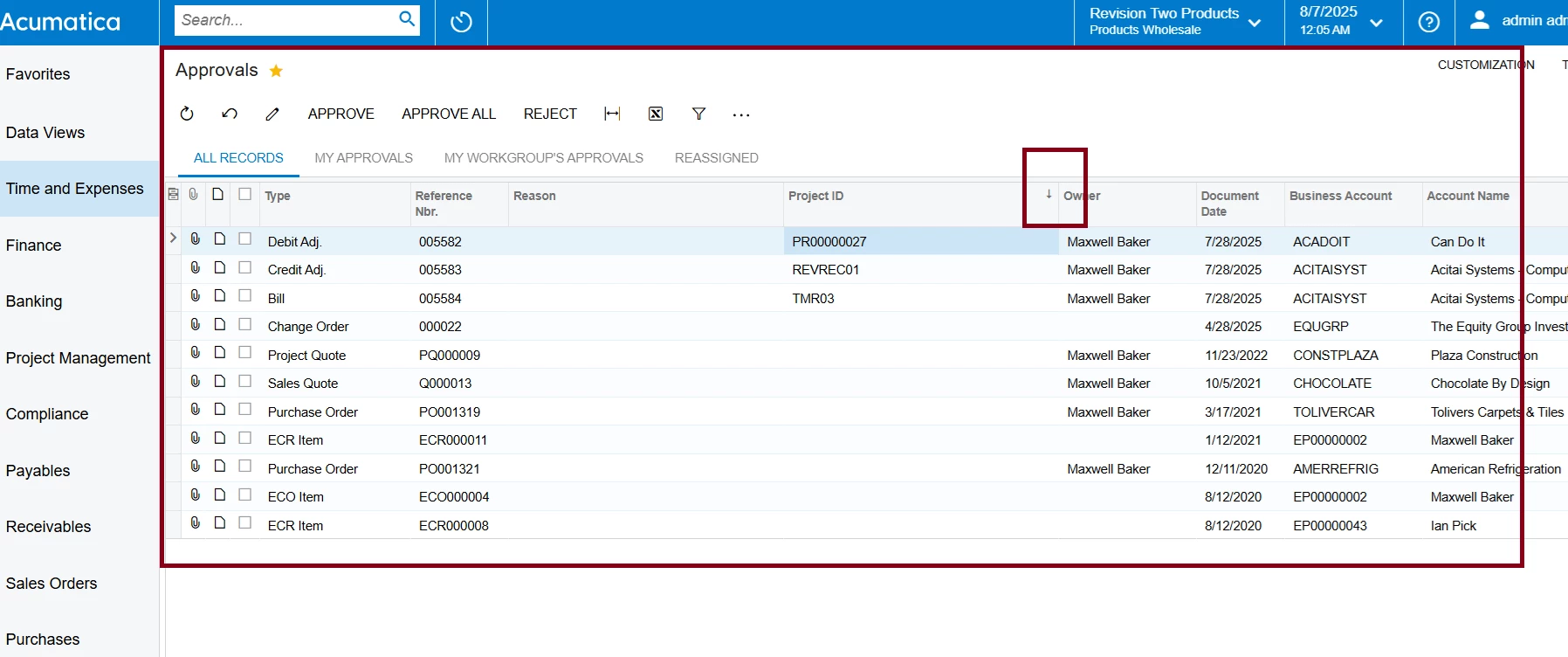
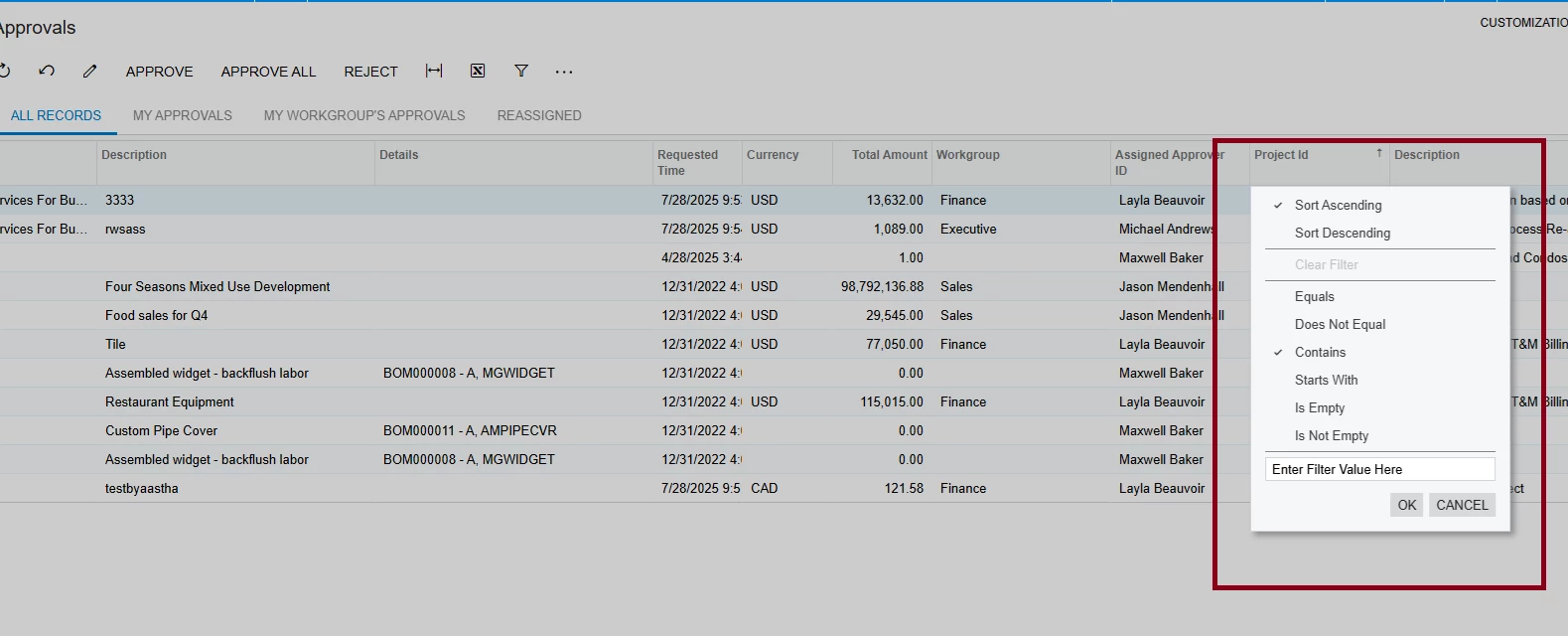
I added two custom fields on the approval screen and displayed data based on the bill using the RowSelected event. The data displays correctly. I also tried using the RowPersisted event, but the issue is that the filter is not working on the field. Could you please assist me in resolving this?

 public class EPApprovalExt : PXCacheExtension<PX.Objects.EP.EPApproval>
  {
    #region UsrProjectId
    [PXDBString(255)]
    [PXUIField(DisplayName="Project Id", Enabled = false)]
    public virtual string UsrProjectId { get; set; }
    public abstract class usrProjectId : PX.Data.BQL.BqlString.Field<usrProjectId> { }
    #endregion

}
 

Best answer by Josiah Lisle

@AasthaRai It looks like the pxdbscalar field you shared would not work for a few reasons. I made some small changes:
 

#region UsrProjectId

[PXString]
[PXUIField(DisplayName = "Project ID", Enabled = false)]
[PXDBScalar(typeof(
    Search2<PMProject.contractCD,
        InnerJoin<APTran, On<PMProject.contractID, Equal<APTran.projectID>>,
        InnerJoin<APRegister, On<APTran.refNbr, Equal<APRegister.refNbr>,
            And<APTran.tranType, Equal<APRegister.docType>>>>>,
        Where<APRegister.noteID, Equal<Current<EPApproval.refNoteID>>>>))]
public string UsrProjectId { get; set; }

public abstract class usrProjectId : BqlString.Field<usrProjectId> { }

#endregion

PXDBString to PXString, APTran.docType to APTran.tranType, and adding the Current property for the refNoteID.

I have not double checked this but this should at least publish without error and you can see if a value populates. Another thing you can try if this doesn’t work is using PXUnboundDefault Attribute instead of PXDBScalar, with the same or similar query, as in my experience that generally will allow you to filter.

9 replies

DipakNilkanth
Pro III
Forum|alt.badge.img+13

Hi ​@AasthaRai,

Try fetching the data using the FieldSelecting event of the custom fields and assign the value to e.ReturnValue.

Sometimes, filters don't work as expected when data is fetched in the RowSelected event, so using FieldSelecting can help ensure the correct values are retrieved and displayed.

Below link will helps you for the code snippet.

Hope, it helps!


darylbowman
Captain II
Forum|alt.badge.img+15

...displayed data based on the bill using the RowSelected event.

The correct event handler to use would be RowSelecting (providing the records are actually being selected out of the database (in which case RowSelecting won’t run).


darylbowman
Captain II
Forum|alt.badge.img+15

(providing the records are actually being selected out of the database (in which case RowSelecting won’t run).

This was unfortunate wording. What I meant to say was, the RowSelecting event will only fire when a row is actually selected from the database. This event handler does not work for virtual DACs created on the fly.


MichaelShirk
Captain II
Forum|alt.badge.img+5
  • Captain II
  • August 6, 2025

@AasthaRai I had a similar issue where I was able to add custom columns, but the filtering wasn’t working. 
Please see the link below. A PXDBScalar attribute may help you. 

Fields from Joined DACs are empty on Create Purchase Orders screen | Community


AasthaRai
Freshman I
  • Author
  • Freshman I
  • August 7, 2025


@darylbowman Thanks for the response. I tried using the RowSelecting event, and based on that, the field is displaying correctly as expected. However, the filter is still not able to find records using 'Contains' or 'Equals'.    


@MichaelShirk I tested with data, but there are many document types present in the Approval screen, and I only want to filter for Bill-type projects. After applying this logic, I started getting an error and the screen fails to open.


@DipakNilkanth I also tried your code, but the filter still doesn't work.


   protected void EPOwned_UsrProjectId_FieldSelecting(PXCache cache, PXFieldSelectingEventArgs e)
   {

       var row = (EPOwned)e.Row;
       if (row == null || row.RefNoteID == null) return;

       string projectCD = string.Empty;

       // === AP Bill ===
       var billResult = PXSelectJoin<PMProject,
      LeftJoin<APTran, On<APTran.projectID, Equal<PMProject.contractID>>,
      LeftJoin<APRegister, On<APTran.refNbr, Equal<APRegister.refNbr>>>>,
     Where<APRegister.noteID, Equal<@P.AsGuid>>>
     .Select(Base, row.RefNoteID).TopFirst;


       if (billResult != null)
       {
           var project = (PMProject)billResult;
           projectCD = project?.ContractCD?.Trim();
       }

       e.ReturnValue = projectCD;

   }


 #region UsrProjectId

        [PXDBString(255, IsUnicode = true)]
        [PXUIField(DisplayName = "Project ID", Enabled = false)]
        [PXDBScalar(typeof(
            Search2<PMProject.contractCD,
                InnerJoin<APTran, On<PMProject.contractID, Equal<APTran.projectID>>,
                InnerJoin<APRegister, On<APTran.refNbr, Equal<APRegister.refNbr>,
                    And<APTran.docType, Equal<APRegister.docType>>>>>,
                Where<APRegister.noteID, Equal<EPApproval.refNoteID>>>))]
        public string UsrProjectId { get; set; }

        public abstract class usrProjectId : BqlString.Field<usrProjectId> { }

        #endregion


darylbowman
Captain II
Forum|alt.badge.img+15

For the sake of thoroughness, could you post your RowSelecting code?


AasthaRai
Freshman I
  • Author
  • Freshman I
  • August 11, 2025

@darylbowman 


  protected virtual void _(Events.RowSelecting<EPApproval> e)
{
var row = e.Row;
if (row == null || row.RefNoteID == null) return;

var rowExt = PXCache<EPApproval>.GetExtension<EPApprovalExt>(row);

// ===== AP Bill =====
var billResult = PXSelectJoin<PMProject,
LeftJoin<APTran, On<APTran.projectID, Equal<PMProject.contractID>>,
LeftJoin<APRegister, On<APTran.refNbr, Equal<APRegister.refNbr>>>>,
Where<APRegister.noteID, Equal<@P.AsGuid>>>
.Select(Base, row.RefNoteID).TopFirst;

if (billResult != null)
{
var billProj = (PMProject)billResult;
if (!string.IsNullOrEmpty(billProj.ContractCD))
{
e.Cache.SetValueExt<EPApprovalExt.usrProjectId>(row, billProj.ContractCD);
e.Cache.SetValueExt<EPApprovalExt.usrDescription>(row, billProj.Description);
return;
}
}

// ===== PO Order =====
var poResult = PXSelectJoin<PMProject,
LeftJoin<POLine, On<POLine.projectID, Equal<PMProject.contractID>>,
LeftJoin<POOrder, On<POLine.orderNbr, Equal<POOrder.orderNbr>>>>,
Where<POOrder.noteID, Equal<@P.AsGuid>>>
.Select(Base, row.RefNoteID).TopFirst;

if (poResult != null)
{
var poProj = (PMProject)poResult;
if (!string.IsNullOrEmpty(poProj.ContractCD))
{
e.Cache.SetValueExt<EPApprovalExt.usrProjectId>(row, poProj.ContractCD);
e.Cache.SetValueExt<EPApprovalExt.usrDescription>(row, poProj.Description);
return;
}
}


// ===== Change Order =====
var coResult = PXSelectJoin<PMProject,
LeftJoin<PMChangeOrder, On<PMChangeOrder.projectID, Equal<PMProject.contractID>>>,
Where<PMChangeOrder.noteID, Equal<@P.AsGuid>>>
.Select(Base, row.RefNoteID).TopFirst;

if (coResult != null)
{
var coProj = (PMProject)coResult;
if (!string.IsNullOrEmpty(coProj.ContractCD))
{
e.Cache.SetValueExt<EPApprovalExt.usrProjectId>(row, coProj.ContractCD);
e.Cache.SetValueExt<EPApprovalExt.usrDescription>(row, coProj.Description);
return;
}
}

// Optional: Clear fields if no source matched
e.Cache.SetValueExt<EPApprovalExt.usrProjectId>(row, null);
e.Cache.SetValueExt<EPApprovalExt.usrDescription>(row, null);
}
}


Forum|alt.badge.img+1
  • Jr Varsity I
  • Answer
  • August 12, 2025

@AasthaRai It looks like the pxdbscalar field you shared would not work for a few reasons. I made some small changes:
 

#region UsrProjectId

[PXString]
[PXUIField(DisplayName = "Project ID", Enabled = false)]
[PXDBScalar(typeof(
    Search2<PMProject.contractCD,
        InnerJoin<APTran, On<PMProject.contractID, Equal<APTran.projectID>>,
        InnerJoin<APRegister, On<APTran.refNbr, Equal<APRegister.refNbr>,
            And<APTran.tranType, Equal<APRegister.docType>>>>>,
        Where<APRegister.noteID, Equal<Current<EPApproval.refNoteID>>>>))]
public string UsrProjectId { get; set; }

public abstract class usrProjectId : BqlString.Field<usrProjectId> { }

#endregion

PXDBString to PXString, APTran.docType to APTran.tranType, and adding the Current property for the refNoteID.

I have not double checked this but this should at least publish without error and you can see if a value populates. Another thing you can try if this doesn’t work is using PXUnboundDefault Attribute instead of PXDBScalar, with the same or similar query, as in my experience that generally will allow you to filter.


AasthaRai
Freshman I
  • Author
  • Freshman I
  • August 13, 2025

@Josiah Lisle  Thanks for the solution — it works in the filter.