Question

Issue with Field Visibility in SOOrder RowSelected Event using checkbox

  • June 9, 2025
  • 20 replies
  • 157 views

Forum|alt.badge.img

Hello, Acumatica Community!

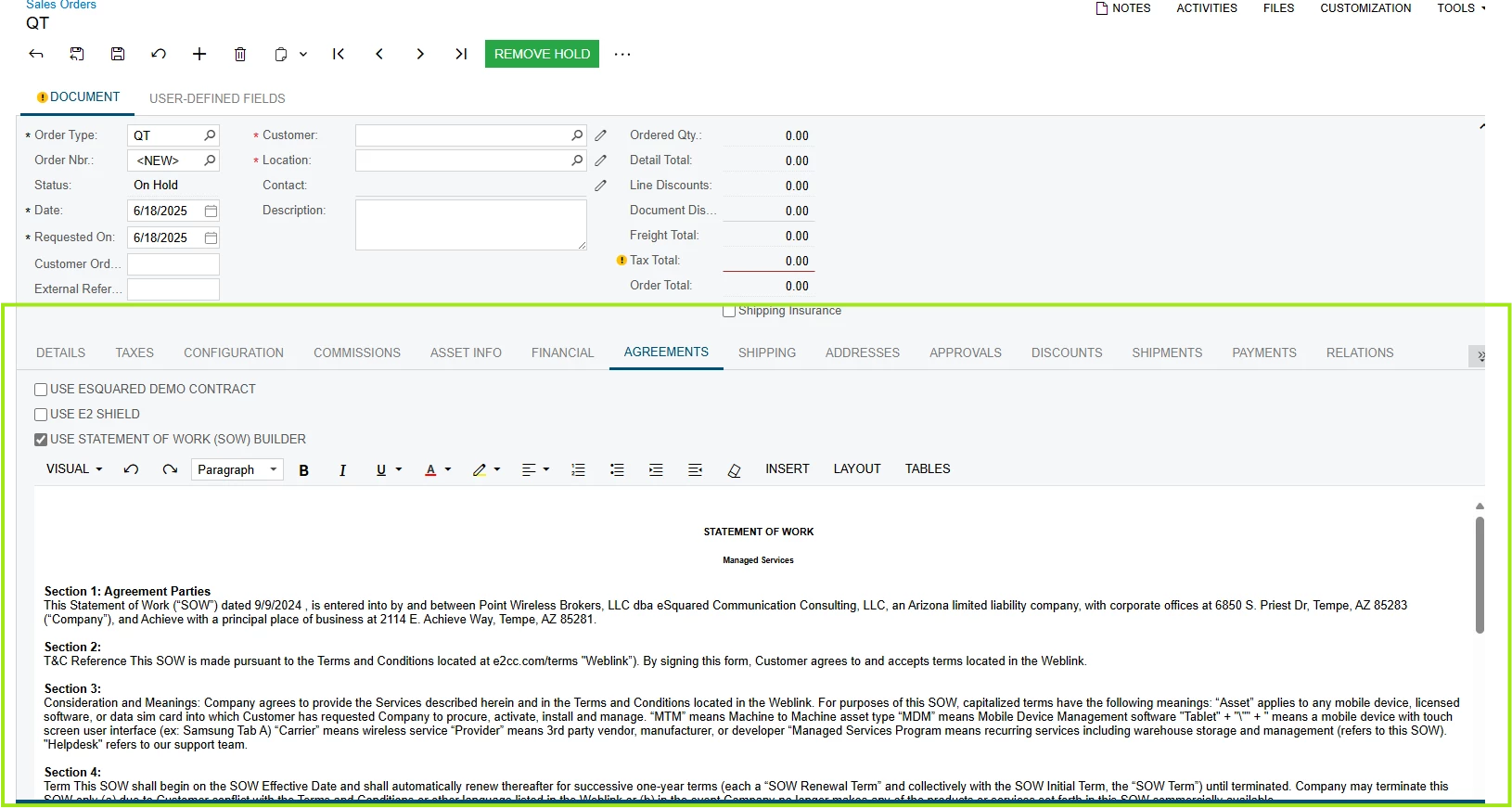
I'm experiencing an issue with setting the visibility of a custom field in the SOOrder screen within my Acumatica ERP customization. Despite my attempts to control its visibility through both DAC extensions and the graph extension logic, the field does not display as expected under certain conditions. I'm looking for guidance on how to ensure visibility in a specific context while using a RowSelected event.


Here's what I'm trying to achieve:

  1. Custom Field: I have a custom field, UsrAISIsSOWContent, added to the SOOrder DAC through the SOOrderExtension.
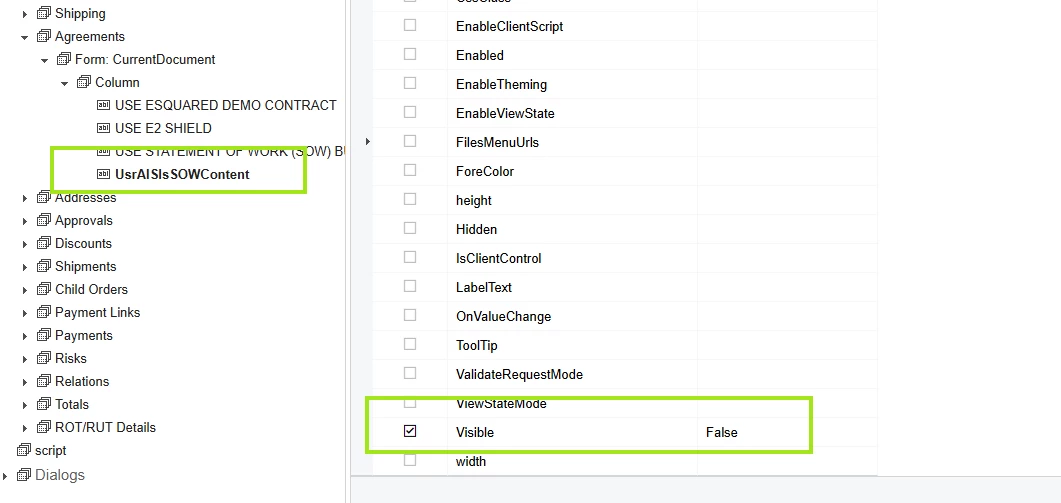
  2. On UsrAISIsSOWContentI set the Visible Properties to false on Screen settings.
     

  3. Visibility Requirement:
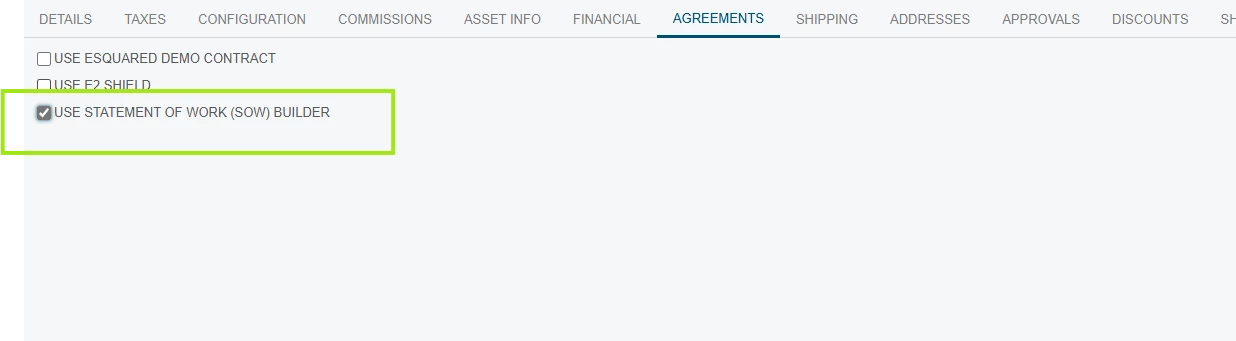
    • The field should be visible only for the order type "QT" (Quote) and when a certain boolean field, UsrAISIsSOW, is set to true.


Here's a snippet of my code for the graph extension:
 

protected virtual void SOOrder_RowSelected(PXCache sender, PXRowSelectedEventArgs e, PXRowSelected baseMethod)
{
baseMethod?.Invoke(sender, e);

SOOrder curr = Base.Document.Current;

if (curr.GetExtension<SOOrderExtension>().UsrAISIsSOWContent == null)
{
curr.GetExtension<SOOrderExtension>().UsrAISIsSOWContent = SOWAgreement;
}


if (curr == null)
{
return;
}

if (curr.OrderType == "QT")
{
SetFieldVisibility(true);
SetSectionVisibility(curr.GetExtension<SOOrderExtension>().UsrAISIsSOW == true);


}
else
{
SetFieldVisibility(false);
}


}

public virtual void SetFieldVisibility(bool val)
{
PXUIFieldAttribute.SetVisible<SOOrderExtension.usrAISIsSOW>(Base.Document.Cache, null, val);
PXUIFieldAttribute.SetVisible<SOOrderExtension.usrAISIsDemo>(Base.Document.Cache, null, val);
PXUIFieldAttribute.SetVisible<SOOrderExtension.usrAISIsE2Shield>(Base.Document.Cache, null, val);

}
public virtual void SetSectionVisibility(bool val)
{
PXUIFieldAttribute.SetVisible<SOOrderExtension.usrAISIsSOWContent>(Base.Document.Cache, null, val);

}

Things I've Checked:

  • The field is defined in the DAC with a PXUIField attribute for visibility.
  • The ASPX page includes the field within the layout.
  • Confirmed the graph extension is invoked correctly, as it is interacting with other fields as expected.

Despite these efforts, UsrAISIsSOWContent does not appear when it should. Could there be something I'm missing in the customization setup, or is there an overlooked aspect within Acumatica's handling of visibility logic?

I appreciate any insights or advice you might provide.

Thank you!

20 replies

Patrick Chen
Varsity II
Forum|alt.badge.img+2
  • Varsity II
  • June 9, 2025

Try something like this...

protected virtual void _(Events.RowSelected<SOOrder> e)
{
    SOOrder order = e.Row as SOOrder;
    var flag = (order.OrderType == "QT")
    PXUIFieldAttribute.SetVisible<SOOrderExtension.usrAISIsSOWContent>(order.Cache,null, flag);
}


Forum|alt.badge.img
  • Author
  • Jr Varsity II
  • June 9, 2025

@Patrick Chen thank you for you help, but this is not working also.


Forum|alt.badge.img+1
  • Semi-Pro III
  • June 10, 2025

@melvinc 

Make sure you don’t set Visible="False" in the customization project and use only the RowSelected event to show or hide the field with PXUIFieldAttribute.SetVisible.

Have you tried like above.


Forum|alt.badge.img+7
  • Captain II
  • June 10, 2025

One option is to define that through field attributes (PXUIVisible, specifically). ​@darylbowman has a great way to handle that here:

Using your existing code, I noticed that your second parameter is set to null instead of passing the row (which you’ll need to pass to your method as a parameter value). Most of the examples that I see, and in my own code, I’m passing a row record.

PXUIFieldAttribute.SetVisible<SOOrderExtension.usrAISIsE2Shield>(Base.Document.Cache, row, val);


Forum|alt.badge.img
  • Author
  • Jr Varsity II
  • June 10, 2025

Try something like this...

protected virtual void _(Events.RowSelected<SOOrder> e)
{
    SOOrder order = e.Row as SOOrder;
    var flag = (order.OrderType == "QT")
    PXUIFieldAttribute.SetVisible<SOOrderExtension.usrAISIsSOWContent>(order.Cache,null, flag);
}

@Patrick Chen Im having error on the parameter order.Cache


Forum|alt.badge.img
  • Author
  • Jr Varsity II
  • June 10, 2025

One option is to define that through field attributes (PXUIVisible, specifically). ​@darylbowman has a great way to handle that here:

Using your existing code, I noticed that your second parameter is set to null instead of passing the row (which you’ll need to pass to your method as a parameter value). Most of the examples that I see, and in my own code, I’m passing a row record.

PXUIFieldAttribute.SetVisible<SOOrderExtension.usrAISIsE2Shield>(Base.Document.Cache, row, val);


Hi ​@Django is this correct, I tried this and used the PXUIVisible to the DAC  still not working


#region UsrAISIsSOWContent
public abstract class usrAISIsSOWContent : PX.Data.BQL.BqlString.Field<usrAISIsSOWContent> { }
protected String _UsrAISIsSOWContent;
[PXDBText(IsUnicode = true)]
[PXUIVisible(typeof(Where<SOOrder.orderType.IsEqual<SOOrderTypeConstants.quoteOrder>>))]
[PXUIField(DisplayName = "")]
public virtual String UsrAISIsSOWContent
{
get
{
return this._UsrAISIsSOWContent;
}
set
{
this._UsrAISIsSOWContent = value;
}
}
#endregion
public virtual void SetSectionVisibility(bool val, SOOrder row)
{
PXUIFieldAttribute.SetVisible<SOOrderExtension.usrAISIsSOWContent>(Base.Document.Cache, row, val);

}


Forum|alt.badge.img+7
  • Captain II
  • June 10, 2025

Just to confirm - You’ve set CommitChanges to True on your checkbox field that you want to use to (partially) control the visibility?

And you have removed the Visible=False from the layout property of your text box control?


Forum|alt.badge.img
  • Author
  • Jr Varsity II
  • June 10, 2025

Just to confirm - You’ve set CommitChanges to True on your checkbox field that you want to use to (partially) control the visibility?

And you have removed the Visible=False from the layout property of your text box control?

@Django Yes, I already did those things.


Forum|alt.badge.img
  • Author
  • Jr Varsity II
  • June 10, 2025

@Django is there a way to hide the Tab itself if the Order Type equal to “QT” ?


Forum|alt.badge.img+7
  • Captain II
  • June 10, 2025

Again - just confirming because we have a bunch of variables here:

If you remove all of the conditional code - you can see the field on the screen?


Can you try Patrick’s suggestion and change:

PXUIFieldAttribute.SetVisible<SOOrderExtension.usrAISIsSOWContent>(order.Cache,null, flag);

to:

PXUIFieldAttribute.SetVisible<SOOrderExtension.usrAISIsSOWContent>(e.Cache,null, flag);

and my suggestion would be:

PXUIFieldAttribute.SetVisible<SOOrderExtension.usrAISIsSOWContent>(e.Cache, e.Row, flag);


Forum|alt.badge.img
  • Author
  • Jr Varsity II
  • June 10, 2025

@Django I tried this and it’s still not working. By the way, this involves a RichTextEdit element. If I remove the condition that hides it initially when the OrderType is not 'QT', the checkbox event works and I am able to show and hide it using the checkbox. However, the problem is that it will always show, regardless of what the order type is.

Again - just confirming because we have a bunch of variables here:

If you remove all of the conditional code - you can see the field on the screen?


Can you try Patrick’s suggestion and change:

PXUIFieldAttribute.SetVisible<SOOrderExtension.usrAISIsSOWContent>(order.Cache,null, flag);

to:

PXUIFieldAttribute.SetVisible<SOOrderExtension.usrAISIsSOWContent>(e.Cache,null, flag);

and my suggestion would be:

PXUIFieldAttribute.SetVisible<SOOrderExtension.usrAISIsSOWContent>(e.Cache, e.Row, flag);


Forum|alt.badge.img+7
  • Captain II
  • June 10, 2025

And Base.Document.Current should be the same thing as e.Row but I’m tempted to have you use e.Row in your RowSelected method.

And to make your debugging easier, let’s have you create a variable for your SOOrderExtension.

SOOrderExtension orderExt = order.GetExtention<SOOrderExtension>();

bool ShowTheBox = order.Ordertype == “QT” && orderExt.UsrAISIsSOW == true;


Forum|alt.badge.img
  • Author
  • Jr Varsity II
  • June 17, 2025

@Django I apologize for late response, Im on vacation last week, I tried this same thing is happening is not working still not showing the usrAISIsSOWContent field when checkbox UsrAISIsSOW is checked.

And Base.Document.Current should be the same thing as e.Row but I’m tempted to have you use e.Row in your RowSelected method.

And to make your debugging easier, let’s have you create a variable for your SOOrderExtension.

SOOrderExtension orderExt = order.GetExtention<SOOrderExtension>();

bool ShowTheBox = order.Ordertype == “QT” && orderExt.UsrAISIsSOW == true;


Forum|alt.badge.img+7
  • Captain II
  • June 18, 2025

So my next test would be to see if you can make your check box make one of the other check boxes appear/disappear. This should work, but maybe there’s something odd with that control?


Forum|alt.badge.img
  • Author
  • Jr Varsity II
  • June 18, 2025

So my next test would be to see if you can make your check box make one of the other check boxes appear/disappear. This should work, but maybe there’s something odd with that control?

Yes, I tried this and it’s working, I was able to appear/disappear the other checkboxes. It’s weird that’s other fields type is working except for this RichEdit field.


Forum|alt.badge.img+7
  • Captain II
  • June 18, 2025

Okay - at least there’s progress. My next step would be to put a Panel or Form on the screen and then place the RichEdit in that Panel or Form. Then change the visibility of the Panel or Form, not the RichEdit.


Forum|alt.badge.img
  • Author
  • Jr Varsity II
  • June 18, 2025

Okay - at least there’s progress. My next step would be to put a Panel or Form on the screen and then place the RichEdit in that Panel or Form. Then change the visibility of the Panel or Form, not the RichEdit.

@Django this is kind ticky on my current setup, every field that i set is inside a form.


Forum|alt.badge.img+7
  • Captain II
  • June 18, 2025

Is the RichEdit control alone in it’s own form?  If so, can you try to toggle it’s visibility? 


Forum|alt.badge.img
  • Author
  • Jr Varsity II
  • June 18, 2025

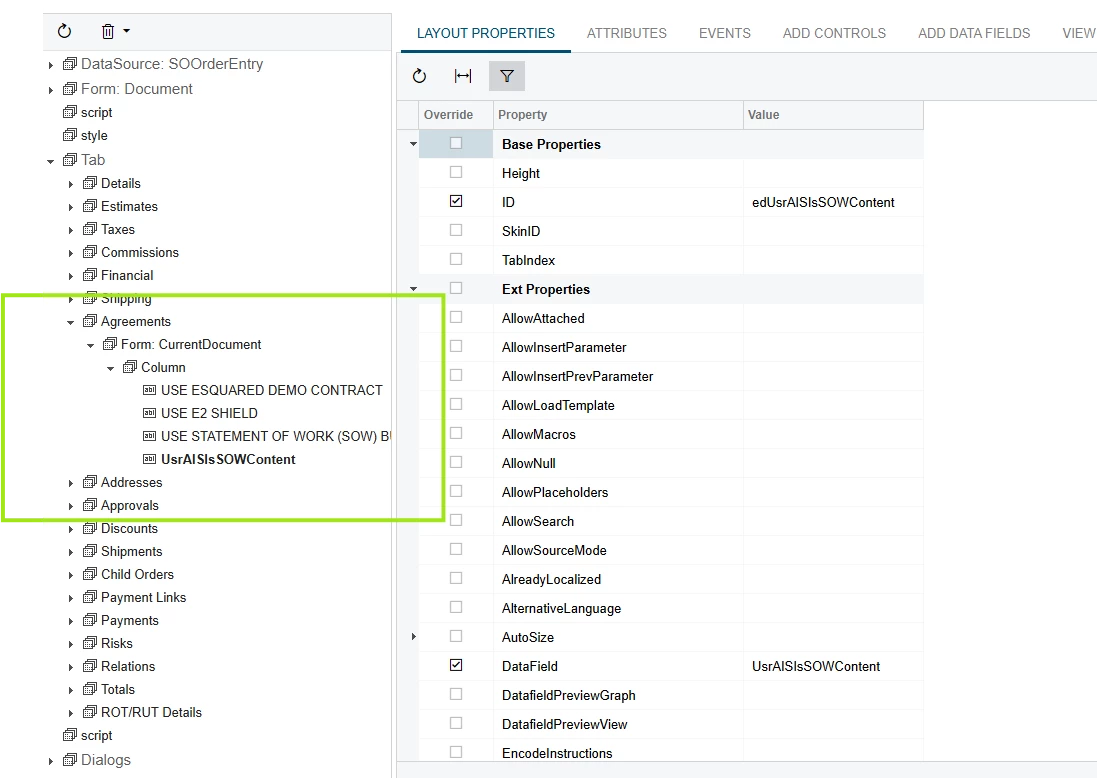
@Django this is how I set it up. The RichEdit is controlled by the checkbox “USE STATEMENT OF WORK”


Chris Hackett
Community Manager
Forum|alt.badge.img
  • Acumatica Community Manager
  • September 23, 2025

Hi ​@melvinc were you able to find a solution? Thank you!